This is week one of the SwarmCraft workflow replacement case-study series. Each week is dedicated to completing a workflow replacement project end to end, then showing the finished build, implementation evidence, and what the completed software can actually do.
The workflow is deliberately focused: a purchase request approval workflow that usually gets handled through email, chat, spreadsheets, and a broad automation platform. The target is not a full procurement suite. The target is the operating surface where a requester submits a purchase, a manager decides, finance joins when the amount is high enough, and procurement picks up the approved work.
That boundary matters. Approval workflow automation is useful when it removes manual chasing from a decision path the business already understands. It becomes risky when it pretends to replace the accounting ledger, supplier master data, ERP, or budget system of record.
Zapier's approval process automation page frames the category around collecting, routing, tracking, logging, and notifying. Those are real jobs. The SwarmCraft question is more specific: what does it look like when one approval workflow becomes owned software instead of another rented automation surface?
Project stats
| Stat | Week 01 result |
|---|---|
| Implemented tickets | 33 |
| Final board state | 33 done / 0 open |
| Agent requests | 30 |
| Build model | OpenAI Codex CLI with gpt-5.5 |
| Build-lane runtime | 3h 17m |
| Tracked files | 158 |
| Tracked text lines | 18,721 |
| Implementation and config lines | 12,401 |
| Test and spec files | 19 |
| Browser evidence screenshots | 7 |
The useful part is not just that an AI agent wrote code. The useful part is that the agent worked through a ticketed approval workflow project with explicit implementation packets, validation commands, committed screenshots, and a final board state. For commercial reuse, that distinction matters: the output is a repository with app code, tests, documentation, runbooks, migrations, and release evidence scaffolding, not a prompt transcript.
The approval workflow we built
The finished app handles a purchase request approval process with four accountable roles.
| Role | Responsibility |
|---|---|
| Employee requester | Submits the purchase request with amount, budget code, manager, supplier, and urgency details. |
| Approving manager | Approves or rejects every valid request assigned to them. |
| Finance reviewer | Reviews manager-approved requests over $5,000. |
| Procurement operations | Creates the downstream purchase task or purchase order after approval. |
The workflow approval process follows a typical purchase approval flow:
- A requester submits a purchase request.
- The API validates the budget code before the request can move forward.
- The assigned manager reviews every valid request.
- Requests at or below
$5,000move to procurement after manager approval. - Requests above
$5,000require finance approval before procurement. - Rejections close the workflow with reviewer attribution and notes.
- Urgent requests get fast-track visibility without skipping approval, ownership, or audit history.
That is the difference between a vague promise to automate approval workflow and a buildable custom approval workflow. The rule is small enough to own, but it still has real operational consequences.
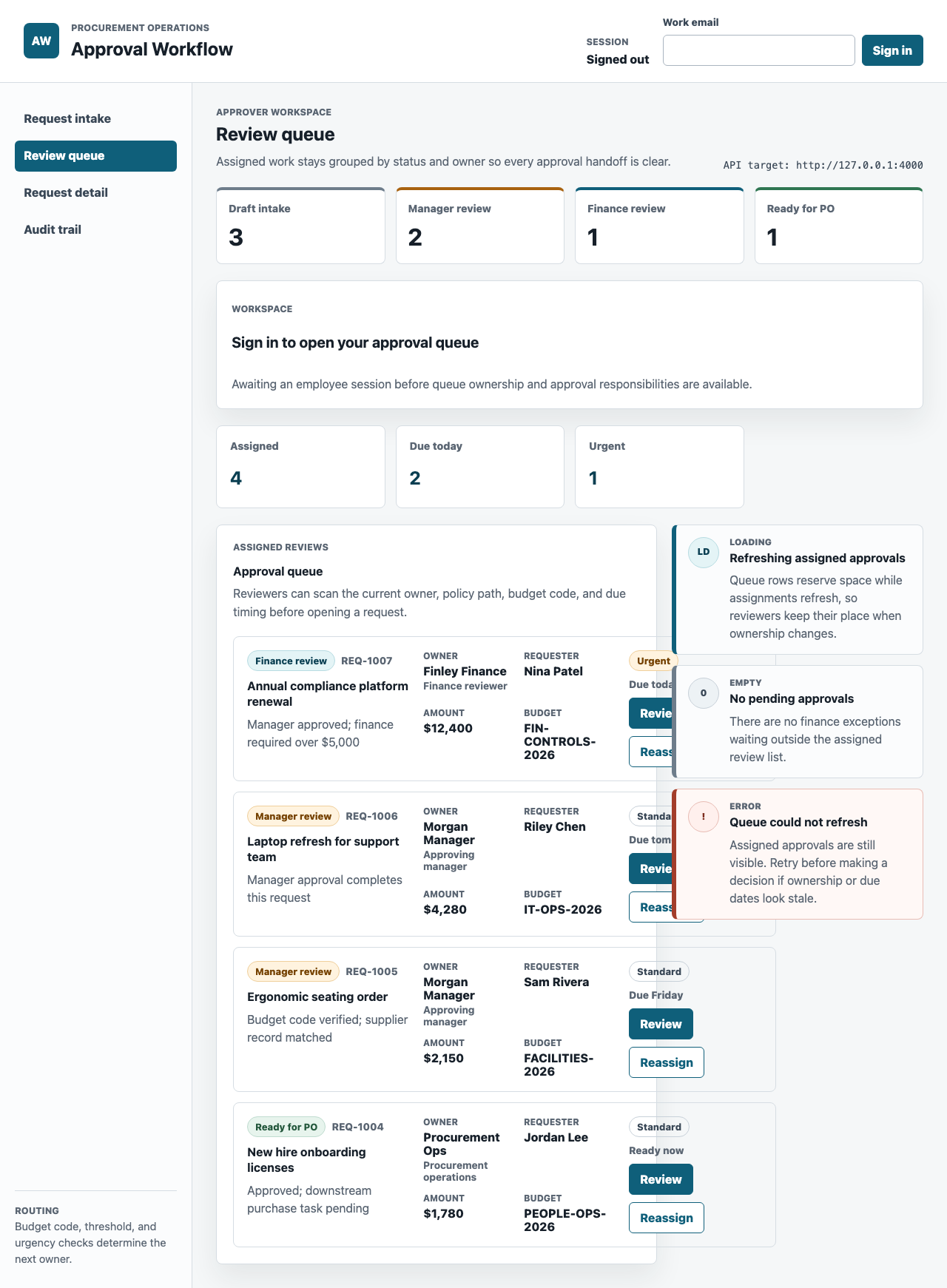
This first product screenshot is a strong result for a Week 01 generated application. There are a few obvious styling changes to smooth out, especially around spacing, visual rhythm, and some detail density, but the important workflow surfaces are already visible: queue ownership, request facts, urgency, amount, budget code, and the review action.
What the custom workflow app includes
The Week 01 build produced a working internal web portal and API boundary, not just a mockup.
| Area | Implemented capability |
|---|---|
| Intake | Purchase request form with budget-code validation and visible required-field handling. |
| Manager review | Role-based approval queue, request details, approve and reject decisions, and reviewer notes. |
| Finance review | Over-threshold routing for requests above $5,000, with a finance-owned queue. |
| Fast track | Urgent request labeling and audit evidence without bypassing required approvals. |
| Audit trail | Chronological decision, handoff, owner, reviewer, timestamp, and note history. |
| Authentication | Local login bootstrap, session handling, role mapping, and route authorization checks. |
| Integrations | Adapter boundaries for email, Slack, ERP supplier lookup, and budget-code master data. |
| Operations | Docker Compose PostgreSQL, Flyway migrations, production Dockerfiles, CI evidence jobs, and runbooks. |
This is why a manual approval workflow often deserves a focused replacement instead of another general-purpose platform layer. The hard part is not sending a notification. The hard part is preserving decision ownership, state, thresholds, exceptions, and proof.
Technology implemented
The repository is a small monorepo with clear ownership boundaries.
| Layer | Technology |
|---|---|
| Web app | React 19, Vite 7, Playwright browser tests |
| API | Node.js 20+, native ESM modules, HTTP handlers, pg PostgreSQL client |
| Database | PostgreSQL 16, Flyway 10 migrations and seed data |
| Local runtime | npm workspaces, Docker Compose, environment loaders |
| CI and release evidence | GitHub Actions, lint/test/build jobs, migration validation, production image packaging |
| Documentation | Architecture notes, feature docs, local database runbook, deployment, rollback, troubleshooting, and system-test evidence |
The implementation keeps browser UI in apps/web, workflow rules and persistence in apps/api, SQL migrations under the API boundary, and operating documentation under docs. That sounds ordinary, but it is what makes the approval process automation easier to reason about later. A future change to the finance threshold, supplier lookup, or notification adapter has a place to go.
What the browser evidence proves
The Playwright system test is not only a regression check. It creates screenshots that show a reviewer what the workflow does in a real browser.
The committed evidence covers:
- approval queue review
- missing budget-code validation
- audit trail readability
- finance reviewer queue routing
- rejected request detail state
- fast-track request detail state
- mobile fast-track audit timeline
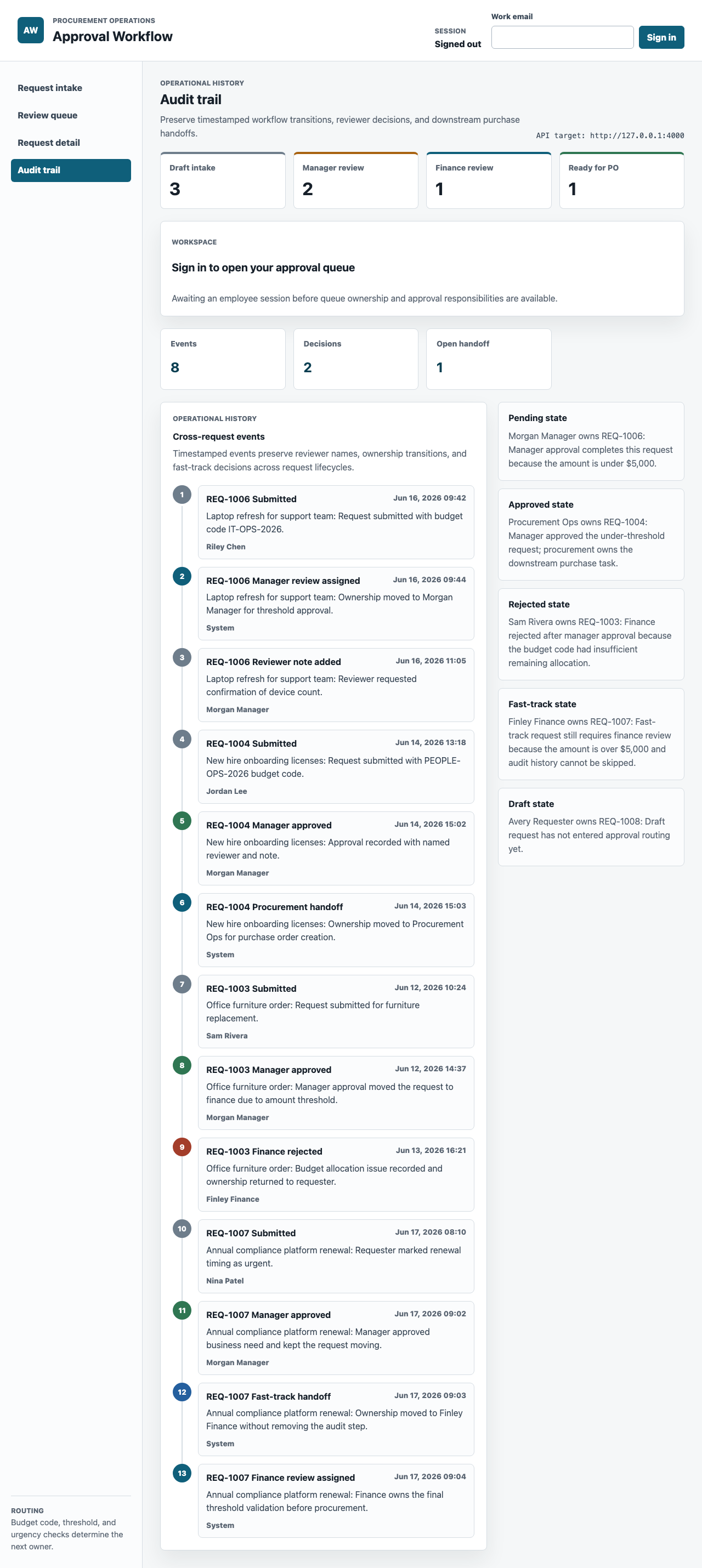
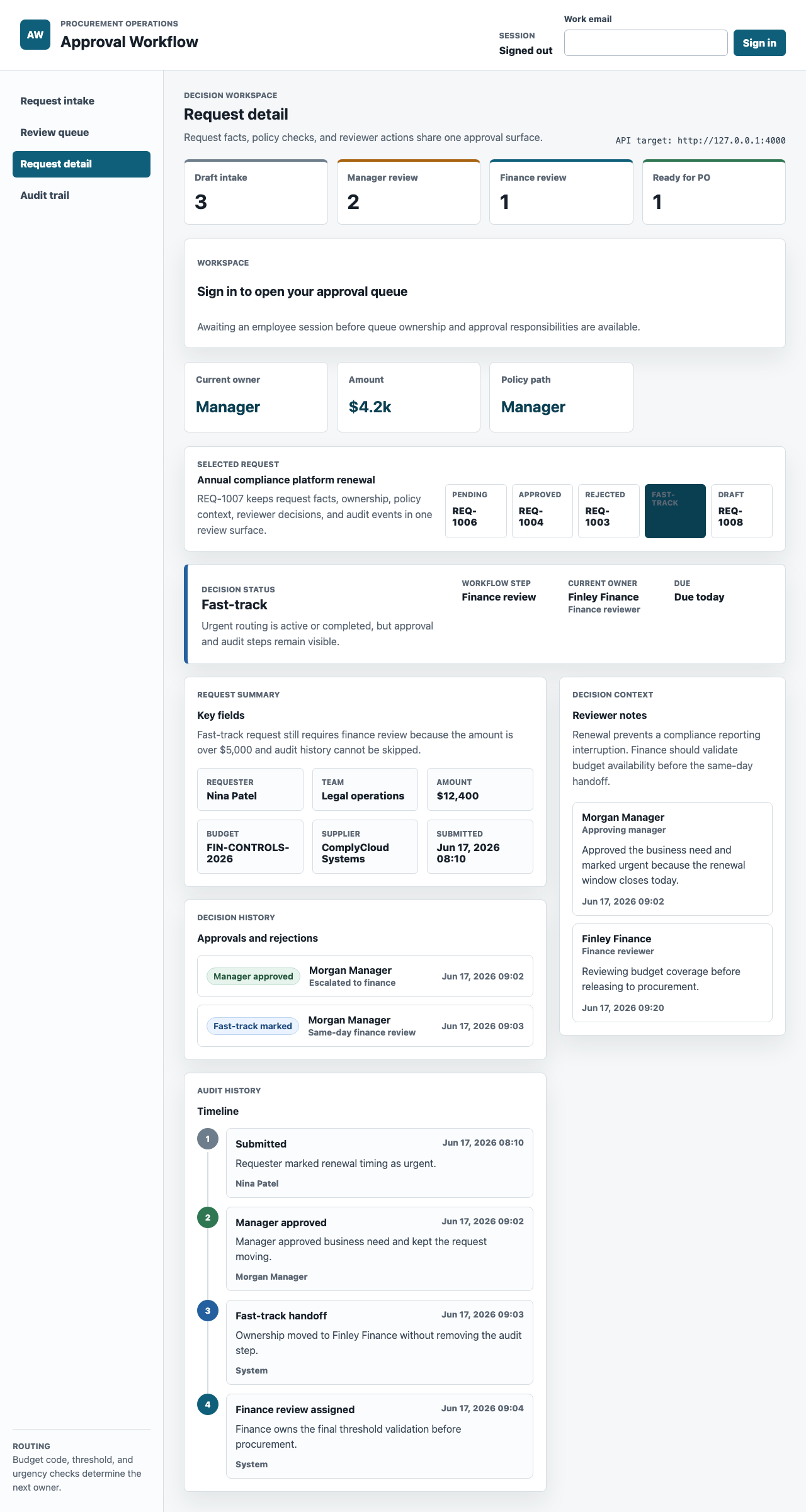
The audit view is the key surface for approval workflow automation. If the app cannot explain who acted, what they decided, when they acted, and who owns the next step, then it has only moved the manual process into a different screen.
How SwarmCraft structured the build
SwarmCraft starts by turning the workflow problem into a project board. For this approval workflow, that meant 33 tickets covering foundation work, authentication, persistence, approval rules, API contracts, integration adapters, UI screens, browser tests, CI, production packaging, and operational runbooks.
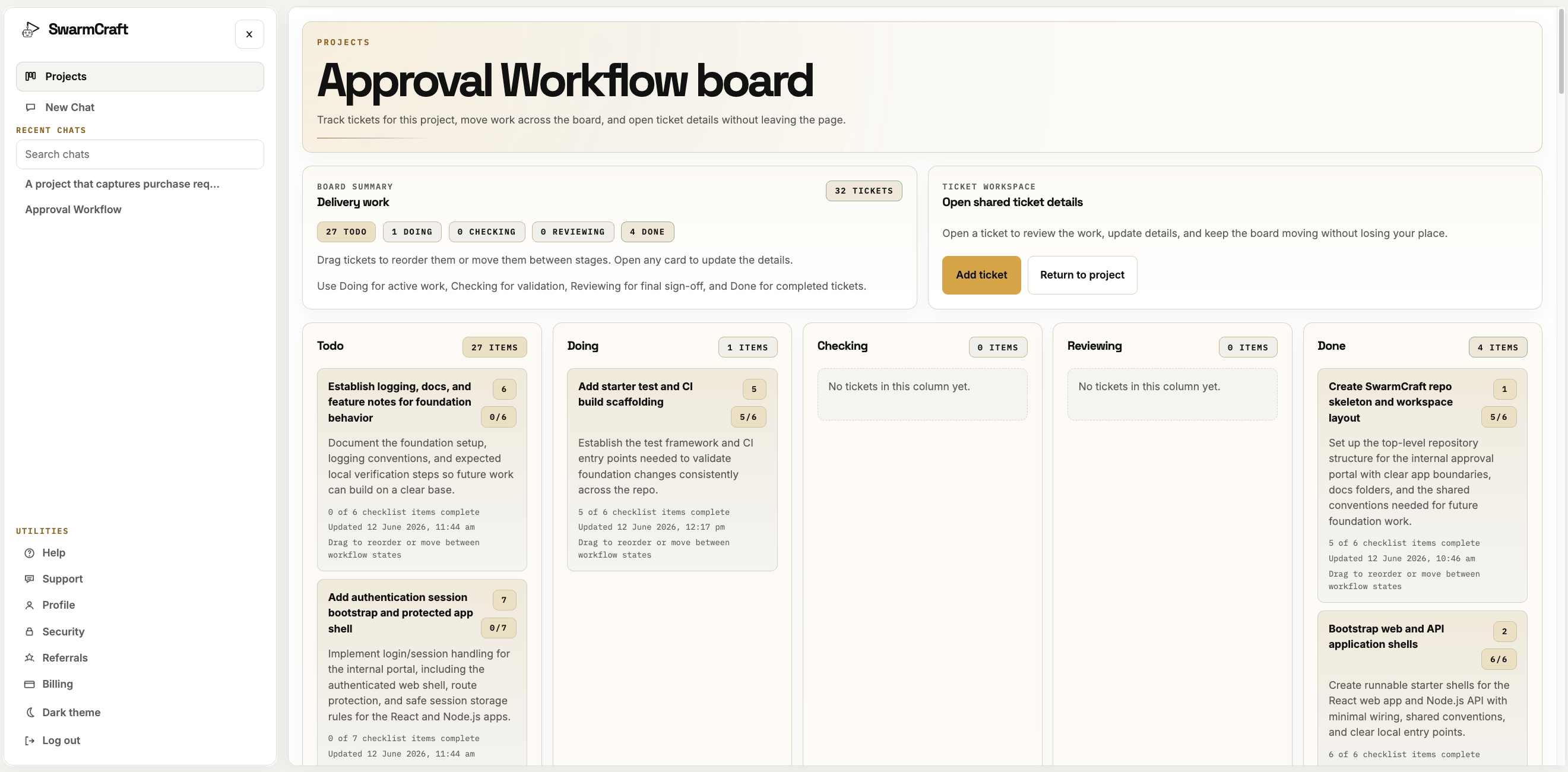
That is the sale for new readers: SwarmCraft is not a generic chat window trying to improvise a product. It is a structured, specialized build system that creates the tickets required to produce a full-stack application for a specific business problem.
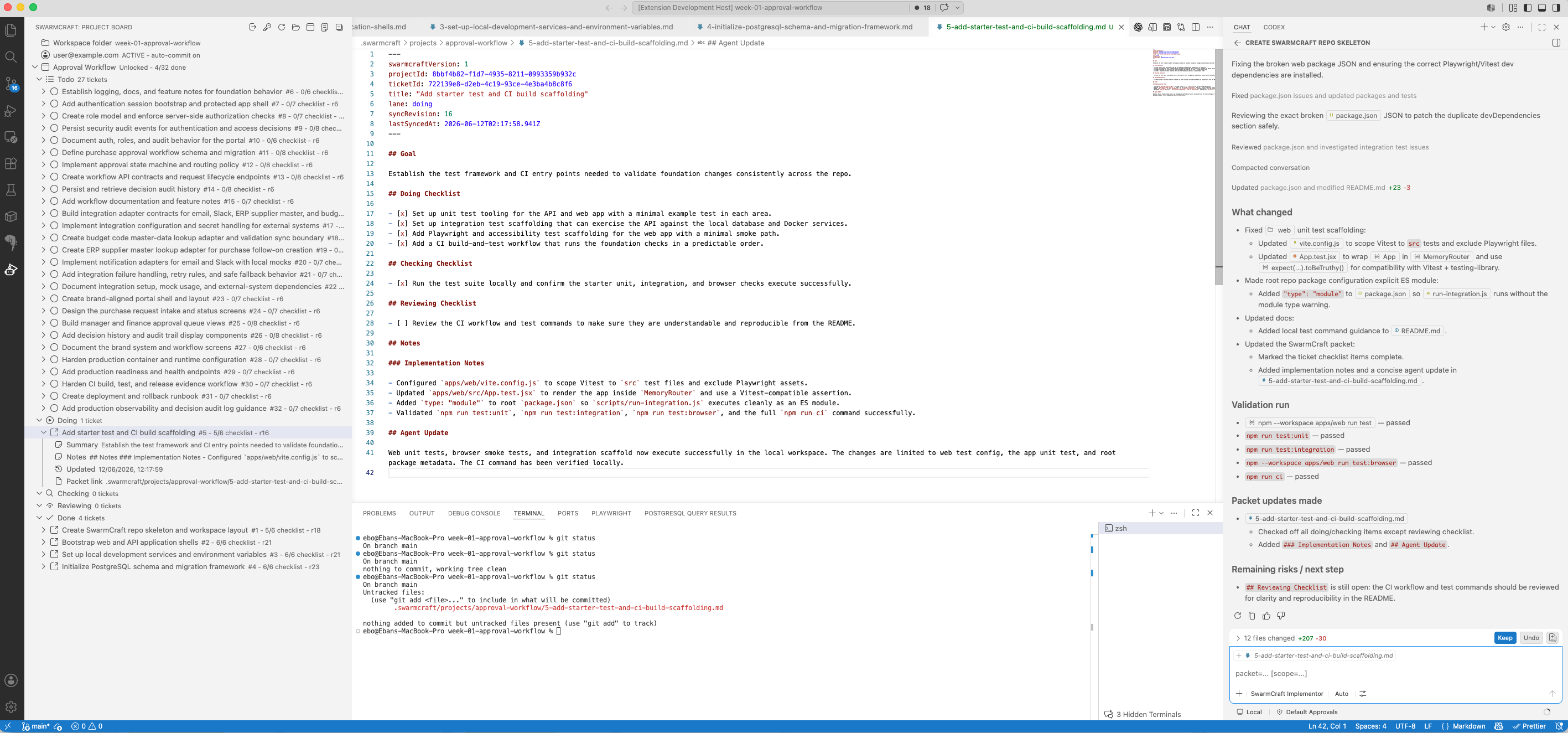
The VS Code workflow then gives the operator a local implementation surface. Tickets stay visible, packet files carry the work instructions, the agent records what changed, and validation evidence stays close to the code.
What must be true before you retire the automation tool
Do not remove an existing automation merely because the owned approval path looks straightforward. Keep it temporarily while the team confirms what actually triggers the process, which rules it enforces, which systems it changes, and what evidence must survive cutover. A light, low-risk approval may not be the first subscription worth replacing, but that is a sequencing decision rather than a reason to rent the workflow forever.
The owned path becomes ready to replace the incumbent when the approval workflow's durable business state is explicit:
- budget codes must be validated before submission
- threshold rules change who owns the next decision
- finance approval is conditional rather than universal
- urgent handling must be visible but not policy-breaking
- rejections need durable reviewer notes
- downstream procurement work needs an accountable owner
- audit history must survive beyond chat, email, or spreadsheet context
- the business wants to own the portal experience instead of shaping work around a vendor's generic model
Before cutover, run representative approvals through both paths, reconcile decisions and downstream effects, prove the audit history, and define rollback for a failed integration. Supplier, budget, identity, and accounting systems may remain authoritative without continuing to own the approval experience.
Once the owned path can accept the trigger, enforce the policy, recover from failure, and produce trusted evidence, remove the generic automation tool from that operation. If those boundaries are still unclear, Deep Discovery can map the current flow and shape the smallest safe exit before implementation begins.
What this says about AI-built workflow software
The Week 01 result is commercially interesting because the output is legible. There are tickets, code, docs, tests, migrations, screenshots, and runbooks. The final repository is small enough to inspect and structured enough to extend.
The agent did not need to invent procurement policy. It needed to turn a clear approval rule into a working internal workflow app:
- manager approval for ordinary purchases
- finance approval over
$5,000 - procurement handoff after approval
- rejection closure with reviewer context
- fast-track visibility without skipping controls
- durable audit and decision history
That is the kind of work where AI-assisted custom software becomes practical. The business rule is specific. The replacement boundary is controlled. The implementation can be validated through tests and screenshots. The finished app can be reviewed like any other software project.
What operator-builders should take from week one
Approval workflow automation works best when the trigger, owner, data, handoff, exception path, and final update are already clear.
If those things are unclear, automating the workflow usually makes the mess faster. If they are clear, a custom workflow app can remove a surprising amount of manual chasing without replacing the whole system of record.
For readers comparing the broader platform decision, Best workflow automation software, Zapier alternatives, Airtable vs custom workflow, and Notion vs custom workflow cover the switching question from different angles. This article is the implementation-led view: what one approval workflow looks like when it becomes owned software.
The mobile proof is intentionally placed last because it is long, but it is still useful evidence. Approval work often happens between other work. A manager or finance reviewer needs to inspect the request, understand the decision context, and see the audit trail without a desktop-only workflow becoming the hidden bottleneck.

Choose a discovery route
If one bounded workflow and its existing record boundary are already clear, Start Fast. Fast Start uses a focused guided intake, then shows the project credit quote before generation begins.