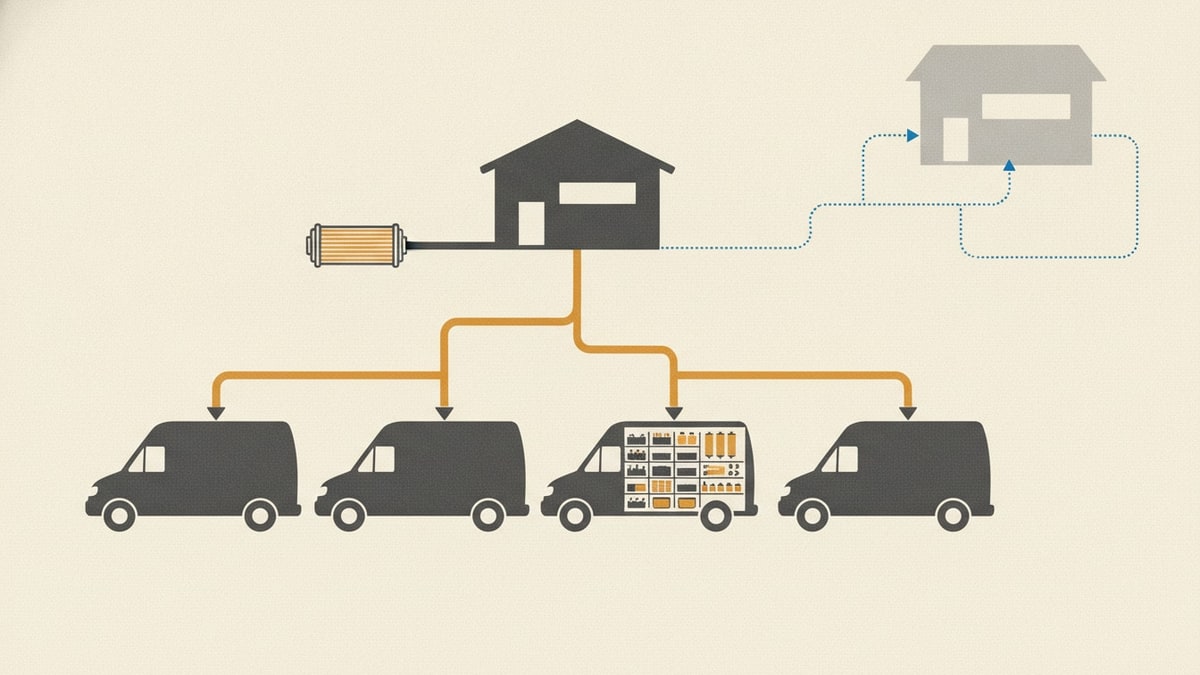
A technician needs three filters for tomorrow’s job. The office spreadsheet says there are five on another van, but one is damaged and another is already promised. Meanwhile, someone has ordered a new box because nobody trusts the figures.
The best inventory management software makes those distinctions visible and keeps them accurate as people work. It should tell you what exists, where it is, what is available, what is committed and what still needs to arrive.
Moving beyond spreadsheets does not automatically require a large platform. A simple stock application may be enough. A distributor or manufacturer may need much deeper software. A business with a well-defined operation may also consider owning its stock system while retaining accounting software such as Xero.
Start with the work, then choose the system that can support it reliably.
Best inventory management software by operating need
Use this shortlist to choose which demonstrations are worth your time. These are starting points based on advertised capabilities, not a ranking of products we have tested against one another.
| What your business needs | Start by comparing | What should decide it |
|---|---|---|
| Find and count supplies, tools or parts across small locations | Sortly, inFlow Inventory, Zoho Inventory | Fast entry, location visibility, permissions and the right purchasing depth |
| Run wholesale stock, purchasing and order fulfilment | Cin7 Core, Unleashed, Fishbowl | Reliable stock records, receiving, traceability and accounting handoffs |
| Plan materials and production alongside sales | Katana, Fishbowl, Odoo Inventory | Component availability, production scope and configuration effort |
| Coordinate ecommerce stock and warehouse fulfilment | Ordoro, SkuVault Core, Finale Inventory, Cin7 | Channel connections, picking, stock synchronisation and returns |
| Operate physical shops and checkout | Lightspeed Retail | Point-of-sale transactions connected to purchasing and store stock |
| Connect inventory to a wider enterprise operation | NetSuite Inventory Management, Odoo | Finance, organisational structure, implementation capacity and administration |
For a contractor with a storeroom and service vans, begin with the first lane and test whether its purchasing and reservation requirements justify moving into the second. A van can be a stock location, but the technician’s daily work is different from picking ecommerce orders in a warehouse.
How this inventory software comparison works
We reviewed official product, pricing and support material on 3 November 2026. We compared operating scope, stock visibility, purchasing and receiving, mobile work, integration boundaries and commercial packaging. We have not conducted a controlled hands-on trial of every product. Fit assessments and demonstration questions are our editorial judgement; advertised features are not evidence of how well your implementation will work.
Inventory management tools: the full comparison
The buying questions below identify what to verify. They are not unsupported claims that a product lacks a feature.
| Product | Useful strength and likely fit | Tradeoff or question to resolve |
|---|---|---|
| Cin7 | Core combines inventory and order operations; Omni is the more customisable offering. A useful shortlist for product businesses connecting stock with sales channels. | Identify the product and tier first. Quote the actual users, integration connections and order volume rather than assuming the entry package covers everything. |
| Unleashed | Purchasing, inventory and production capabilities suit stockholding businesses. Its packaging includes demand-planning and mobile warehouse options. | Compare Core plus required modules with Pro. Ask operators to demonstrate receiving and transfers, and price onboarding as well as the subscription. |
| Zoho Inventory | A staged buying path for order and stock management, with published Australian plans and connections to the wider Zoho suite. | Users, locations and feature tiers matter. Serial/batch tracking and stock counting appear at different levels; map your requirements before comparing price. |
| Fishbowl | Inventory, purchasing, warehousing and manufacturing options, with a strong accounting-integration proposition. | Specify the exact product and accounting connector. Cloud inventory and the Advanced product do not have identical integration coverage. Integration scope. |
| Sortly | Visual inventory, mobile access, photos, barcodes and alerts make it a sensible candidate for supplies and parts visibility. | Demonstrate your purchasing, job and accounting requirements. An easy stock register and a complete replenishment operation are different scopes. |
| inFlow Inventory | Inventory, purchasing and location-based work offer a practical middle ground for smaller operations. | Distinguish Inventory from Stockroom: the latter explicitly excludes reordering, costing and sales. Include extra users, locations and any integration access in the quote. |
| Katana | Product and material availability, purchasing and manufacturing make it relevant when stock is consumed in production. | The current page presents a custom-priced Advantage plan and a limited free plan. Confirm production, warehouse and implementation scope rather than relying on older tier comparisons. |
| Ordoro | Separate shipping, inventory and dropshipping products let ecommerce businesses choose around fulfilment responsibilities. | Free shipping software is not the inventory package. Price the combination of applications your operation needs. |
| SkuVault Core | Linnworks’ warehouse-focused product connects stock, barcode picking, quality checks and marketplace fulfilment. | A strong candidate when warehouse execution is the problem. Demonstrate field consumption and job reservations separately if your stock travels in service vans. |
| Finale Inventory | Now presented as Descartes Finale, with multi-warehouse inventory, procurement, replenishment and sales-channel connections. | Its Growth package includes the mobile barcode warehouse module. Check the package for your scanning workflow and application programming interface (API) requirements. |
| NetSuite Inventory Management | Multi-location visibility, demand-based replenishment, cycle counting and traceability within a wider enterprise resource planning (ERP) environment. | Justify the wider implementation through real finance and operating requirements. A small stockroom problem alone is a weak reason to undertake an ERP project. |
| Lightspeed Retail | Retail purchasing connected to the point of sale. Its X-Series documentation covers full and partial purchase-order receipt. | Confirm region, product series and checkout requirements. A shop-led platform deserves a different evaluation from a technician’s parts application. Receiving documentation. |
| Odoo Inventory | Configurable replenishment rules and forecast-based planning within a modular business system. | Price configuration, deployment, upgrades and the connected applications you need. Flexibility still needs someone to own the resulting operating rules. |
If your decision is already vendor-specific, continue with Cin7 alternatives, Unleashed competitors or inFlow Inventory alternatives.
Inventory management software pricing: compare the usable package
These public examples illustrate different buying levels. Prices were checked on 3 November 2026; they are not equivalent configurations or quotes for the fictional contractor below. Australian goods and services tax (GST) treatment is stated where the source specifies it.
| Product/package | Published basis | What the entry figure leaves you to check |
|---|---|---|
| Zoho Inventory Standard, Australia | A$43 per organisation/month, billed annually, including GST; two users and two locations | A storeroom and three vans exceed the included location count if each is configured separately. Include additional people and required feature tiers. |
| inFlow Inventory Lite / Core | US$99 / US$299 per month, billed annually | Extra people, locations, lot/serial features and API access can change the comparison. Specify Inventory, not the lighter Stockroom product. |
| Cin7 Standard | US$349/month, excluding tax, for new customers; five users, two ecommerce/app integrations and 6,000 sales orders/year | Confirm required integrations and modules. Unlimited inventory locations do not mean unlimited users or connections. |
| Ordoro Inventory | Starts at $349/month on the reviewed page | Confirm dollar currency and the cost of any Shipping or Dropshipping combination in the written offer. |
| Finale Essentials / Growth | Starts at $499 / $799 per month on the reviewed page | Confirm currency and terms. Growth includes the mobile barcode warehouse module; do not assume it is included at the lower price. |
For free inventory management software, examine the limits before planning a rollout. Sortly’s free plan lists 100 unique items and one user; Zoho’s lists 50 orders, one user and two locations. Katana’s free plan lists up to 30 stock-keeping units (SKUs). Those can be useful evaluation or small-operation options, but they are not interchangeable. Sortly, Zoho, Katana.
For the other products, obtain a scoped proposal rather than filling gaps with old prices. Ask for the first-year and renewal basis, onboarding, migration, hardware, accounting connections, support and export access. Include goods and services tax (GST) and currency conversion where applicable.
An owned system also has recurring costs: hosting, maintenance, security updates, backups, integration changes and operational support. Compare the cost of running the same required operation over several years. A prototype’s generation cost is not its lifetime operating cost.
Inventory management software for small business: test a working day
The best inventory management system for a small business is one its people can keep accurate without an office coordinator re-entering everything later.
Give each shortlisted supplier the same demonstration. Use a representative part, two locations, a job reservation and a partially delivered order. Ask the technician and office coordinator to perform the work themselves.
- Find usable stock. Show physical quantity, reserved quantity, damaged stock and availability separately. An item on a van is not necessarily free for another job.
- Record consumption. Use a part on a job from a phone. Correct an accidental entry without erasing the original history.
- Transfer and acknowledge. Dispatch parts from another location, show them in transit, then confirm receipt. Check when each balance changes.
- Replenish once. Include existing purchase orders when deciding what to buy. Repeat a submission and inspect whether it creates duplicate demand.
- Receive less than ordered. Accept one pack from a two-pack order. Leave the outstanding pack visible and distinguish pack quantities from individual units.
- Work through poor reception. Establish exactly what works offline, what is cached and how conflicting entries are resolved after reconnecting. A mobile application alone is not proof of offline support.
- Recover and leave. Export stock, movements, open orders and relevant history. Ask who can restore service and reconcile work completed during an interruption.
This exposes a more useful distinction than feature counts: whether the inventory management platform supports the business’s actual sequence of work, including exceptions.
Moving from spreadsheets without buying too much software
The spreadsheet starting point is real. In a public discussion, a service manager described approximately 20 technicians carrying fire-alarm parts in vans, with monthly stock spreadsheets reviewed manually by the office. The request included mobile access, van locations, barcode scanning and a possible QuickBooks connection. It is one person’s account, not a market survey or evidence that a named vendor failed. Service-van inventory discussion.
Before buying or building stock management software, reconcile the source data. Agree on part codes, units and pack sizes. Count what is physically present, separate damaged stock and identify material already committed to jobs. Preserve the original sheets and record who accepted the opening balances.
Then establish a cutover. The new application cannot become trustworthy while people continue changing unconnected copies of the old workbook. Keep the archive, but give each new stock movement one authoritative home.
A simple off-the-shelf product may solve this well. If its daily screens, permissions and purchasing functions fit, buying it can be the responsible choice. Building becomes worth investigating when the required operation is clear and recurring workarounds would otherwise remain central to daily use.
What an owned stock operation would need
Consider a fictional maintenance contractor with one storeroom and three service vans. It uses parts on jobs and already uses Xero for accounting. It has no inventory software subscription to cancel.
A meaningful owned application would include a shared parts catalogue, location balances, job reservations, technician consumption and returns, transfers, replenishment requests, approved purchases, partial receipts, counts and movement history. Drivers need a quick mobile interface; the office needs queues for shortages and discrepancies. Restricted offline work needs visible pending entries and conflict resolution.
That is a complete bounded operation, rather than a purchase-approval form with a dashboard attached. Its stock records can belong to the business, while Xero remains responsible for the financial books.
For example, the application could match a supplier invoice against the order and receipts, then send a reviewed draft purchase bill through Xero’s API. Xero supports draft bill creation and status retrieval. A payment-status update must not receive the same stock again. Stock valuation and cost-of-goods treatment still require an agreed accounting design; a successful bill handoff alone does not establish it. Xero invoices API.
This is a proposed scope, not a claim that the application or integration has already been built. The related stock replenishment workflow explores the operating sequence. The inventory stack analysis considers the duplication that can remain when records and everyday work diverge.
Does AI change the buy-or-build decision?
Artificial intelligence (AI) is relevant on both sides. Cin7 advertises AI forecasting; Unleashed packages its Advanced Inventory Manager; Katana describes AI purchase-order recommendations. Existing vendors already invest in replenishment and automation, so “the incumbent has no AI” is not a sound reason to build. Cin7, Unleashed, Katana.
There are also concrete accounts of AI-assisted custom software. The builder of AeroOps describes using Lovable and Supabase for a parts-and-project inventory application, with explicit stock states and receiving checks. It is a practitioner-reported implementation; its performance claims have not been independently verified here. AeroOps case study.
In an adjacent industry, Productiv’s named finance and warehouse leaders describe building custom logistics applications in Lovable. That vendor-published account supports the possibility of operators creating useful software. It does not establish that a complete inventory system is easy to replace or that our contractor would achieve similar savings. Productiv case study.
AI-assisted development may make a tailored application more attainable. It does not remove the need for permissions, accurate stock arithmetic, duplicate prevention, migration reconciliation and recovery. Those are the proof points to require from a custom build. Live AI inside the resulting stock application is optional.
Choosing inventory software in Australia
For Australian buyers, ask for the quoted currency, GST treatment, local support hours, hosting/data-access arrangements and the exact accounting integration. Test the phones, scanners and connectivity conditions your people actually use. Confirm whether the connector handles contacts, orders, bills, adjustments or valuation—and which system owns each record.
Choose Sortly, inFlow or Zoho as initial demonstrations for a smaller stock operation. Compare Cin7 Core, Unleashed and Fishbowl when purchasing and distribution require more depth. Bring Katana into production-led decisions, Ordoro, SkuVault Core and Finale into ecommerce fulfilment decisions, and Lightspeed into retail checkout decisions. Consider NetSuite or Odoo when a wider connected operation justifies the implementation.
Keep an existing product when it fits and its cost is justified. Move from spreadsheets to a suitable packaged system when that resolves the daily work. Investigate an owned operation when you can define its records and responsibilities and are prepared to maintain it.
If that decision needs interviews, source spreadsheets, migration planning and an accounting boundary, explore Deep Discovery. It can establish the smallest coherent operation and compare buying, configuring and building. Deep Discovery is currently available through a limited account-enabled rollout.