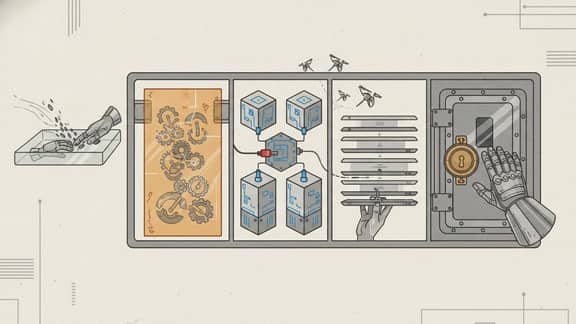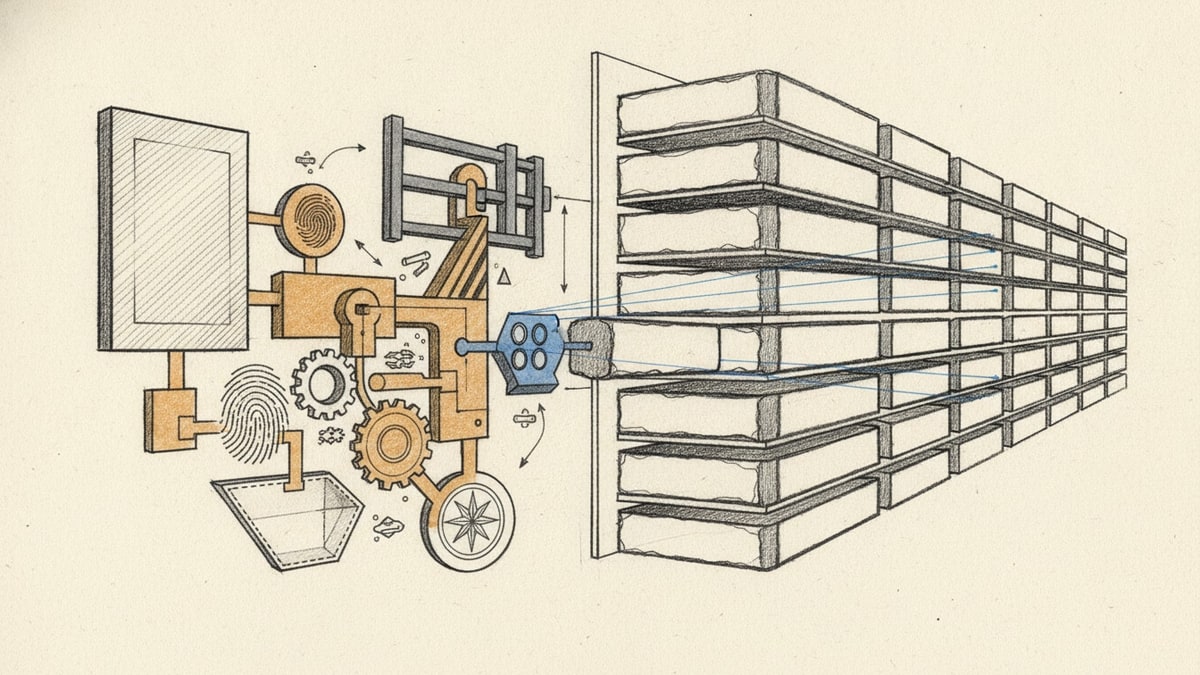
A KPI reporting workflow is not a dashboard refresh.
It is the complete operation that turns governed source data into an approved reporting record: metric definitions, reporting periods, collection, calculation, validation, frozen evidence, commentary, exceptions, decisions, publication and history.
In week 11 of our category series, we used SwarmCraft to build that operation as a customer-owned application. The result is not another general-purpose data warehouse and it is not a feature-parity Power BI replacement. Existing operational systems, warehouses and justified analytical platforms can keep governing the data they already hold. The new product owns the KPI control plane above them.
That boundary creates a more useful product story:
- Governed analytical sources supply approved data through constrained connector contracts.
- An owned KPI control plane defines what the organisation measures and preserves the reporting record.
- AI interpretation can prepare cited analysis and exception work without becoming the calculator, approver or publisher.
- Deterministic execution calculates, validates, gates, publishes and remembers.
If you are still choosing the analytical platform beneath this operation, start with Best business intelligence software. If the process is fragmented across dashboards, spreadsheets, slides and messages, read Why reporting stacks sprawl when KPI workflows span too many tools.
The report leadership actually receives
The weekly leadership report brings six approved measures into one calm view, including targets, prior-period movement, compact trends, regional contribution and the issues that still deserve attention.
The operation can bring governed measures from PostgreSQL-compatible databases, Snowflake, BigQuery, Databricks, Microsoft Fabric or SQL Server, and governed CSV or Parquet files into one owned KPI record. AI can then interpret the approved snapshots together, cite the evidence behind its commentary and prepare one coherent briefing—even when the underlying measures originate in different analytical systems.
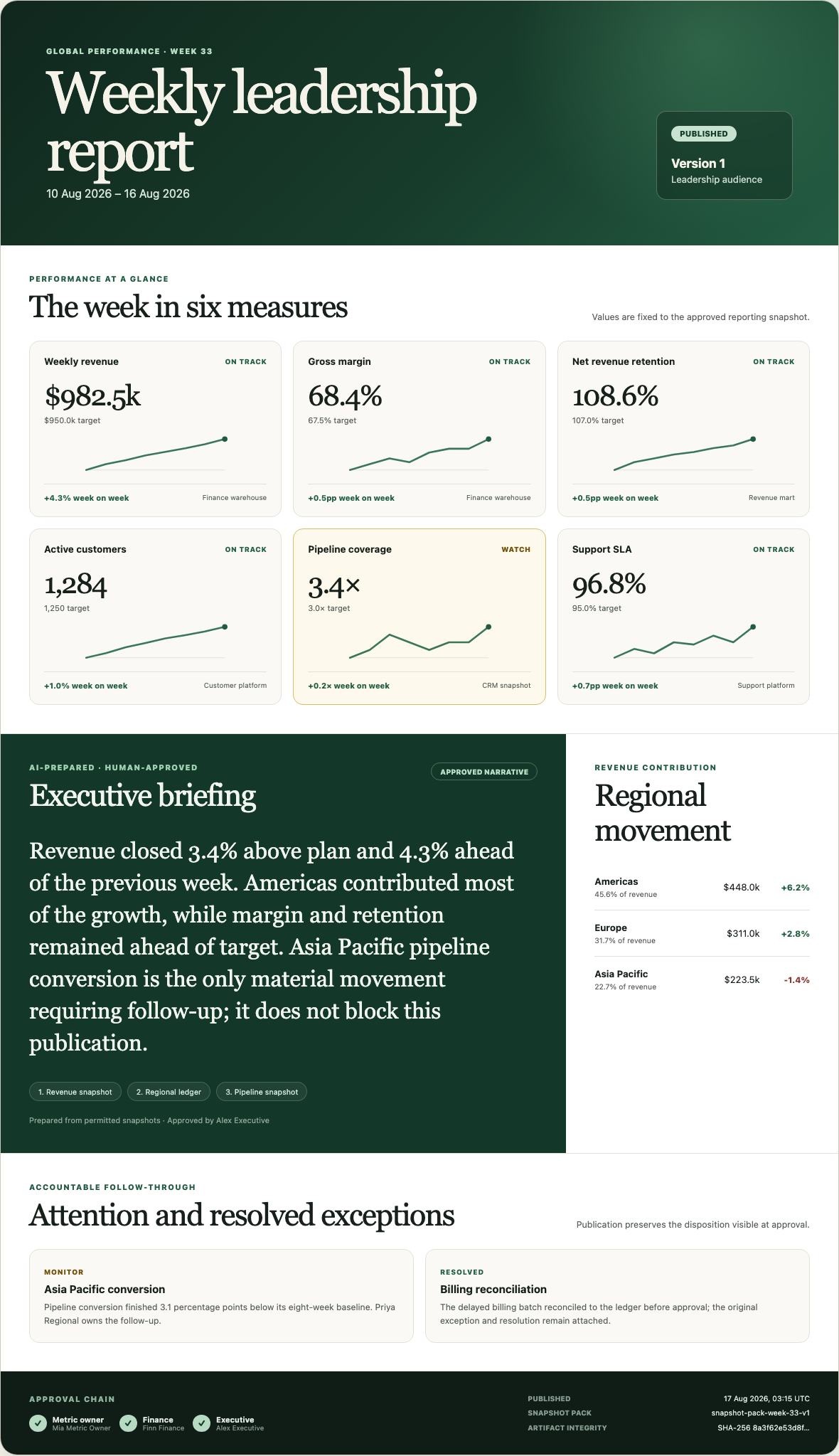
The executive briefing is prepared from permitted snapshots, cites the evidence behind its material claims and is labelled with its human approver. A resolved billing exception remains visible without dominating the report. The metric, finance and executive approval chain sits beside the publication time, snapshot-pack identity and artifact checksum.
That is the product outcome. The workflow screens later in this article explain how the organisation made it trustworthy.
The example uses representative global data. Its AI-prepared narrative demonstrates the evidence, citation and approval contract rather than the output of a live AI provider.
Project stats
| Measure | Week 11 evidence |
|---|---|
| SwarmCraft project | KPI Reporting |
| Build scope | 59 tickets selected, 59 Done, zero blocked |
| Build-agent requests | 59 Codex requests |
| Build elapsed time | 30,175,347 ms — about 8 hours 23 minutes |
| Target repository | 319 tracked files and 41,341 non-blank lines |
| Database | PostgreSQL with 15 versioned migrations |
| Test surface | 81 test, integration, accessibility, smoke and system files |
| Product screenshots | Ten deterministic workflow and published-report evidence images |
| Delivery target | Customer-managed cloud environment |
The 59-ticket board moved to Done in the build manifest. That is evidence of completed agent work, not a claim that every production gate is green. Implementation scope and current verification are reported separately below.
The KPI reporting operation we built
The application centres the reporting cycle, not the chart.
Its PostgreSQL domain owns reporting cycles, immutable KPI definition references, snapshots, validation results, exceptions, commentary, approval decisions, publications, command receipts and append-only workflow history. The browser projects those records into four operating lanes: cycle status, validation, review and publication.
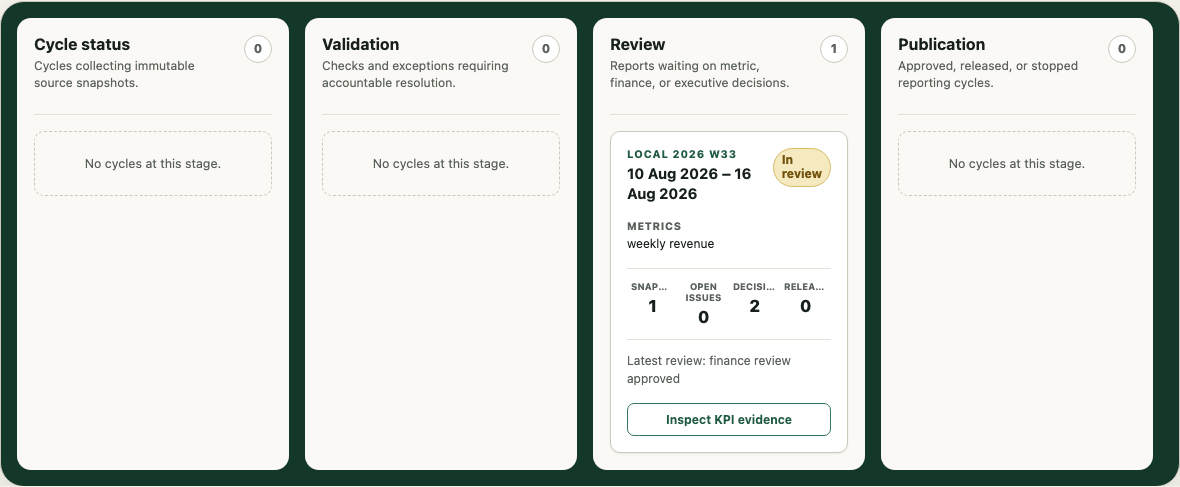
The underlying warehouse does not disappear. Nor does the need for semantic models, exploration or specialist BI. What changes is that the organisation now owns the operation that decides which definition and source belong to a reporting period, which evidence reviewers saw, which exception was resolved, who approved the outcome and exactly what was published.
That is the difference between dashboard reporting and a reporting system of record.
Who does what
| Role | Responsibility in the owned operation |
|---|---|
| Reporting operations owner | Starts cycles, coordinates collection, owns exceptions and prepares publication |
| Data platform administrator | Registers and maintains governed source connections without receiving business approval powers |
| Metric owner | Owns the business meaning, definition version and metric-stage decision |
| Regional contributor | Supplies permitted context or bounded source evidence for an assigned scope |
| Finance reviewer | Confirms reconciliation and finance-stage readiness |
| Executive approver | Accepts or rejects the exact evidence selected for release |
| Report consumer | Reads the audience-safe published outcome without entering the operational workspace |
The API enforces those responsibilities. Browser controls explain what a user may do, but the server reconstructs authority from the authenticated actor, role, capability, state and persisted evidence before accepting a command.
KPI reporting workflow steps
The implemented KPI reporting process follows a governed sequence:
- Register a source through a server-owned connector registry. Persist a secret reference, not the credential.
- Choose query-in-place, bounded extraction or deliberate materialisation according to freshness, volume, repeatability and source constraints.
- Start a reporting cycle bound to a reporting period and exact KPI definition references.
- Generate immutable KPI snapshots and record source and validation evidence.
- Apply deterministic validation before any narrative or approval work begins.
- Route failed checks into an accountable exception queue rather than hiding them in a refresh log.
- Return resolved blocking work to validation instead of allowing an old approval to bypass changed evidence.
- Present committed values, snapshot identities and validation outcomes at the review point.
- Require current metric, finance and executive approvals.
- Publish only the approved snapshot to a named audience and destination.
- Preserve the complete decision and publication trail as append-only history.
Every mutable workflow command carries an idempotency key. An exact retry returns its stored result instead of creating a duplicate snapshot, decision or publication. Reusing the key for different work is rejected.
Layer one: governed sources stay authoritative
The approved plan supports six connector families: PostgreSQL-compatible SQL, Snowflake, BigQuery, Databricks SQL, Microsoft Fabric or SQL Server, and governed CSV or Parquet imports.
The repository implements the shared connector contract, registry, secret-reference boundary, capability discovery, constrained query execution, governed file import, durable sync jobs, retry state and integration audit history. It includes two deterministic development adapters: one for PostgreSQL-shaped analytical queries and one for governed files.
It does not ship live Snowflake, BigQuery, Databricks or Microsoft adapters. Those remain provider implementations behind the tested contract. The repository documentation is explicit that a green mock test proves the owned policy and result shape—not connectivity to a customer system.
That is the correct Fast Start boundary. A KPI reporting workflow should not quietly become a new enterprise data platform. It should connect to the analytical foundation already earning its place, materialise only bounded reporting evidence when required, and retain enough provenance to reproduce or explain a past reporting decision.
Layer two: the owned KPI control plane
The owned product controls the meaning and lifecycle above those sources.
Its durable records include:
- reporting cycles and their current state;
- KPI definition-version references;
- immutable values and source snapshot identities;
- validation outcomes and safe reason codes;
- current exception ownership plus append-only exception decisions;
- separately labelled commentary;
- metric, finance and executive approval decisions;
- immutable audience, destination, artifact and published snapshot records;
- command receipts and chronological audit events.
The review workspace makes that hierarchy visible. The committed KPI value and source evidence are authoritative. Commentary sits in a separate advisory panel and is explicitly labelled not authoritative.
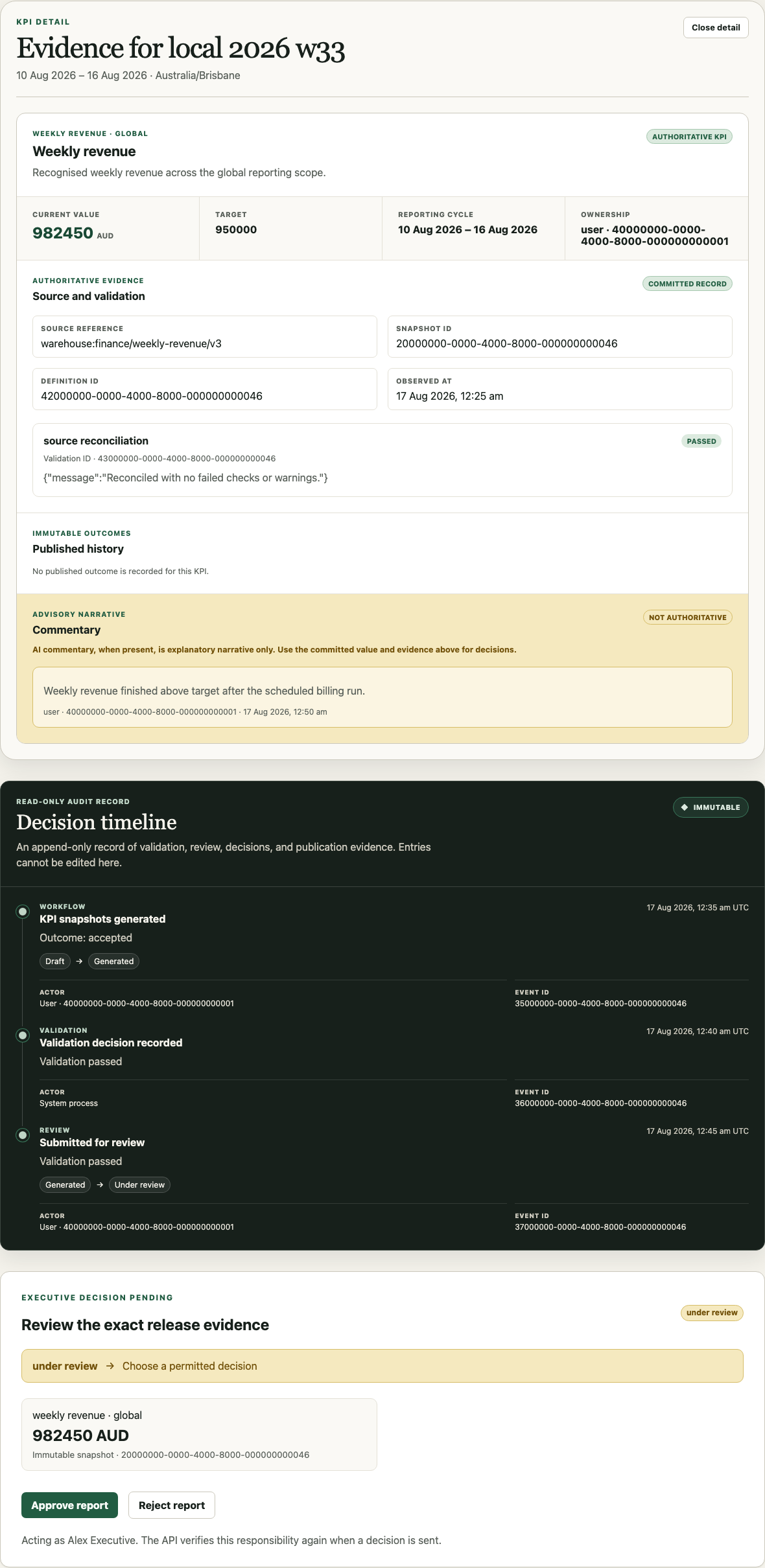
This is a small interface decision with architectural weight. A narrative cannot silently replace a value. A polished explanation cannot make failed validation pass. Reviewers can see which record supports the decision and which text is merely there to help them interpret it.
Layer three: AI prepares, people decide
AI has a valuable role in the new system, but it sits between deterministic evidence and accountable review.
The intended AI operations copilot can:
- retrieve evidence the current user is allowed to see;
- compare current and prior approved snapshots;
- identify notable movements and conflicting explanations;
- draft variance commentary with source citations;
- propose an anomaly classification;
- prepare questions or exception records for review;
- summarise an approved report for a specific audience.
It cannot define or alter an authoritative formula, write the released KPI value, clear failed validation, accept an exception, change access, approve a period or publish a report.
The week 11 build proves the product boundary and presentation contract: authoritative evidence is visually separate from proposed commentary, and the exception workspace treats a proposal as not final. It does not yet implement a live model adapter, structured citation validator, prompt/model-version record or evaluation suite. Those are required next steps before describing the product as AI-assisted in production.
That treatment is consistent with the NIST AI Risk Management Framework, which places governance across the AI lifecycle and calls for clear roles and responsibilities in human–AI configurations. “Human in the loop” is not enough by itself. The system needs an explicit boundary around evidence, authority, review and execution.
Exceptions are part of KPI reporting automation
The exception path is not a side panel for technical errors. It is the place where the real reporting operation becomes accountable.
The deterministic browser fixture starts with a failed ledger control-total check. The reporting cycle moves into an exception state and publication is blocked. An operations owner can filter the queue, inspect committed evidence, assign ownership and record a resolution. Proposed commentary remains visibly separate from the issue context.
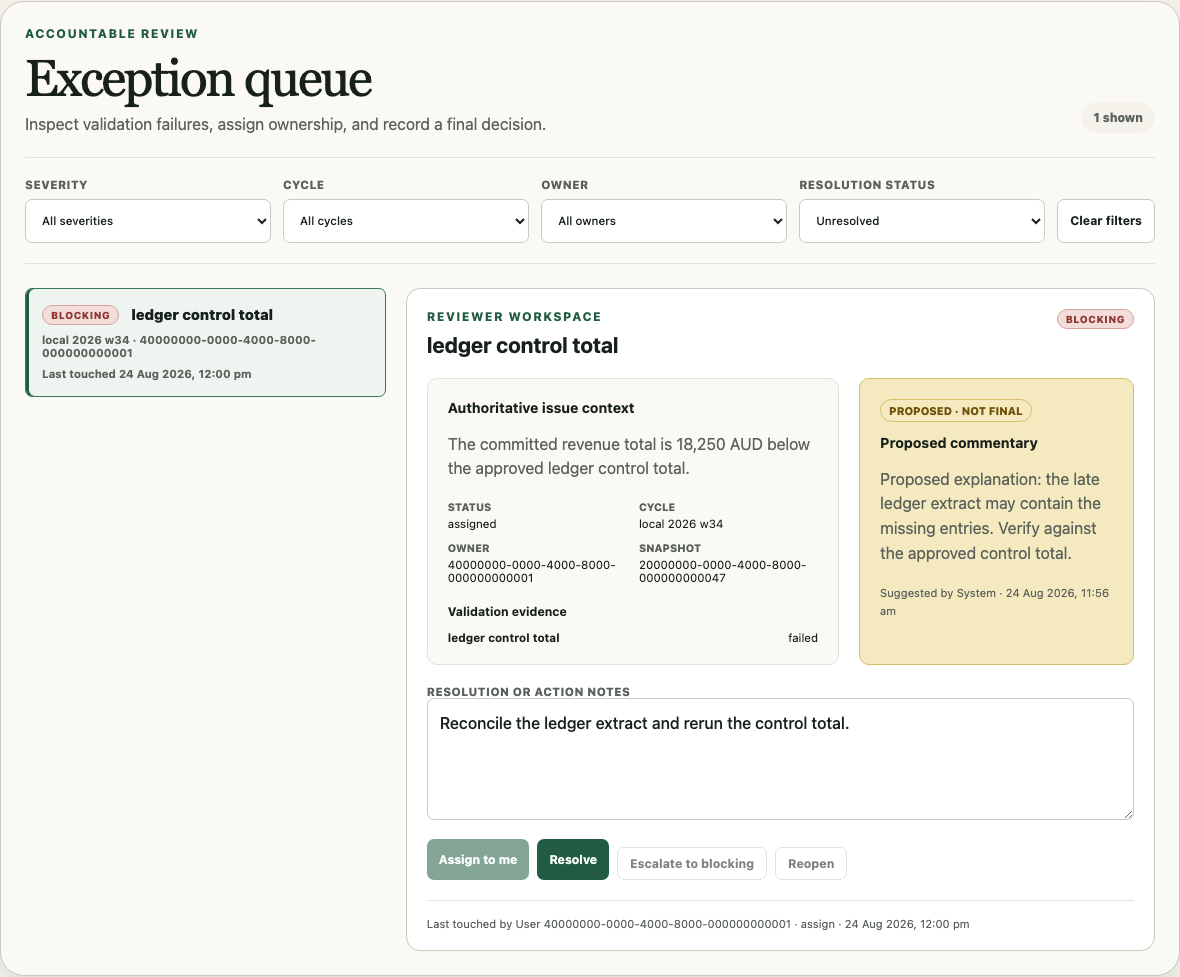
Resolving the item preserves the original failure and the final notes. It does not edit history or promote the AI proposal into a decision.
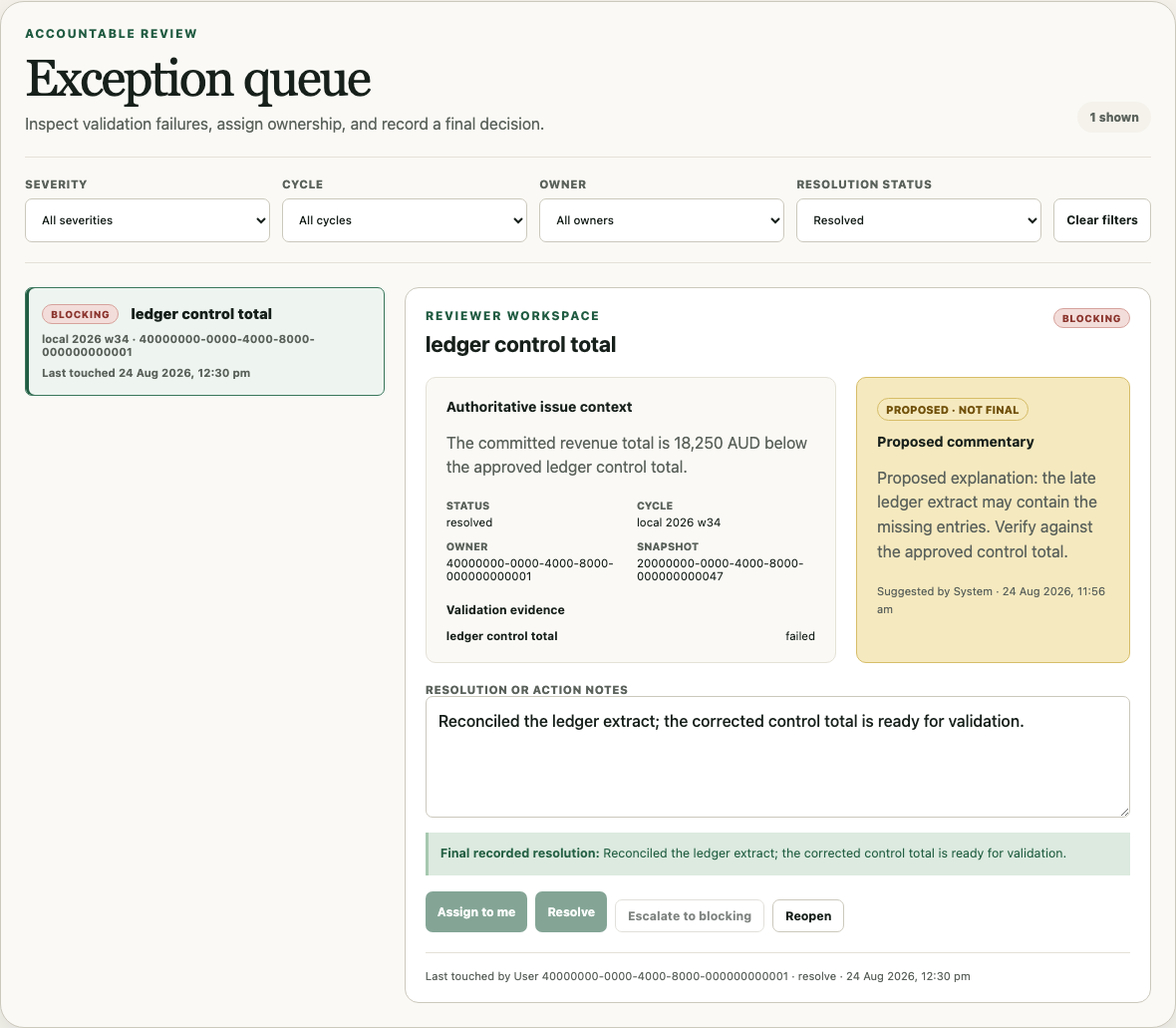
If that blocking item is reopened later, an earlier approval is not treated as a permanent bypass. The publication policy checks current validation and exception state again.
Governed approval and publication
Approval is bound to the evidence, not merely to the reporting period's name.
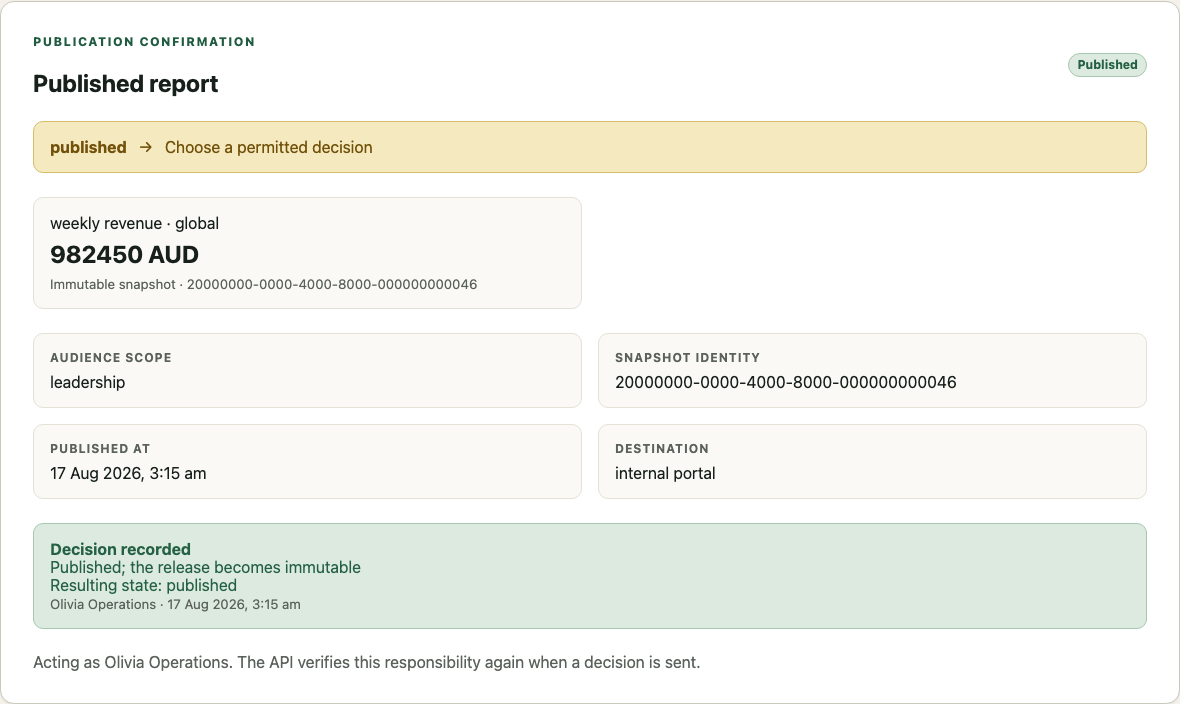
The product repeats the committed KPI value and immutable snapshot identifier at the decision point. Metric, finance and executive decisions are append-only. Publication then requires the latest complete approval chain, a snapshot captured no later than executive approval, an audience, destination, artifact reference and lowercase SHA-256 checksum.
The published screen identifies what became immutable rather than showing a generic success toast.
The decision timeline keeps validation, review, approval and publication in chronological order after the release.
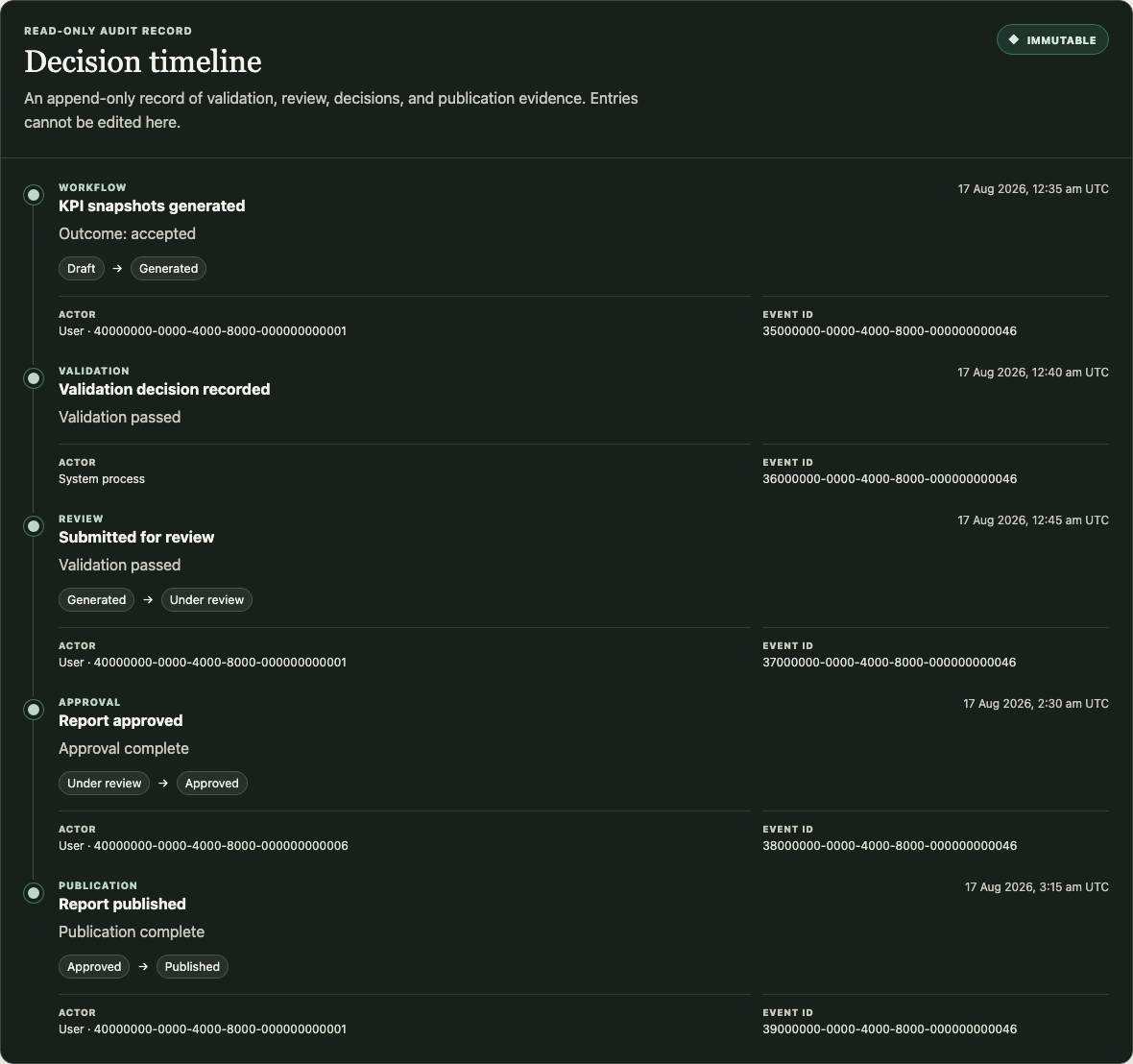
That record is the part most dashboard reporting workflows lack. A chart can show today's value. The owned operation can explain which version, source, checks, exception disposition, decisions and artifact supported a past release.
What the custom KPI reporting workflow includes
| Capability | Week 11 implementation | Production work still required |
|---|---|---|
| KPI record | Reporting cycles, immutable snapshots, validation, commentary, approvals, publications and audit | Complete the effective-dated definition catalogue, reporting-calendar configuration and retention policy |
| Source integration | Connector registry, server adapter contract, secret references, governed queries/imports, sync jobs and audit | Implement and certify live provider adapters; resolve the three current integration defects |
| Calculation and validation | Server policy, stable state transitions, validation outcomes and publication gates | Add organisation-specific formulas, reconciliations, currencies, fiscal calendars and performance tests |
| AI interpretation | Authoritative-versus-advisory UI boundary, deterministic proposed-commentary fixtures and a cited, human-approved report narrative contract | Add a live provider-neutral AI adapter, field-level context controls, structured citation validation, model/prompt versions, evaluations and failure handling |
| Exceptions | Durable queue, ownership, severity, resolution, reopening and append-only decisions | Add service levels, notifications, escalation policy and production operating ownership |
| Approval and publication | Metric, finance and executive gates; immutable release record; report-pack projection and leadership consumer view | Connect object storage, export formats, signing, notification and explicit user-to-audience grants |
| Security | OIDC boundary, server roles and capabilities, safe audit history and restricted views | Complete production identity configuration, threat modelling, penetration testing and access-review operations |
| Delivery | Non-root/read-only containers, health/readiness, CI structure, observability and recovery runbooks | Achieve a clean full-suite run, build production images, deploy, load test and rehearse restore and rollback |
Technology implemented
| Layer | Week 11 implementation |
|---|---|
| Browser application | React 18, TypeScript and Vite with responsive workflow, evidence, exception, approval, publication, leadership-report and audit surfaces |
| API | Node.js and TypeScript with server-side sessions, roles, connector policy and workflow commands |
| Persistence | PostgreSQL with 15 versioned migrations and append-only evidence constraints |
| Source boundary | Provider-neutral adapter registry, approved query templates, bounded extraction, governed CSV/Parquet imports and secret references |
| Background execution | Durable sync jobs, leases, retries, checkpoints and transactional outbox |
| Workflow | Server-authoritative state machine, idempotent commands, validation, exception and publication policies |
| Security | OpenID Connect boundary, capability-aware routes, safe logging and security/integration audit histories |
| Delivery | pnpm monorepo, Docker Compose, hardened web/API images, CI gates and deployment/recovery runbooks |
| Verification | Unit, PostgreSQL integration, accessibility, Playwright security, system and persistence test layers |
The deterministic browser journeys cover the leadership report, KPI evidence, exceptions, approval, publication and audit history; live provider connectivity and production reliability require separate operational evidence.
How SwarmCraft structured the build
SwarmCraft generated a 59-ticket KPI Reporting project. The sequence moved through repository and database foundations, identity and permissions, the KPI workflow domain, connector contracts, operating screens, browser evidence, containers, observability and recovery.
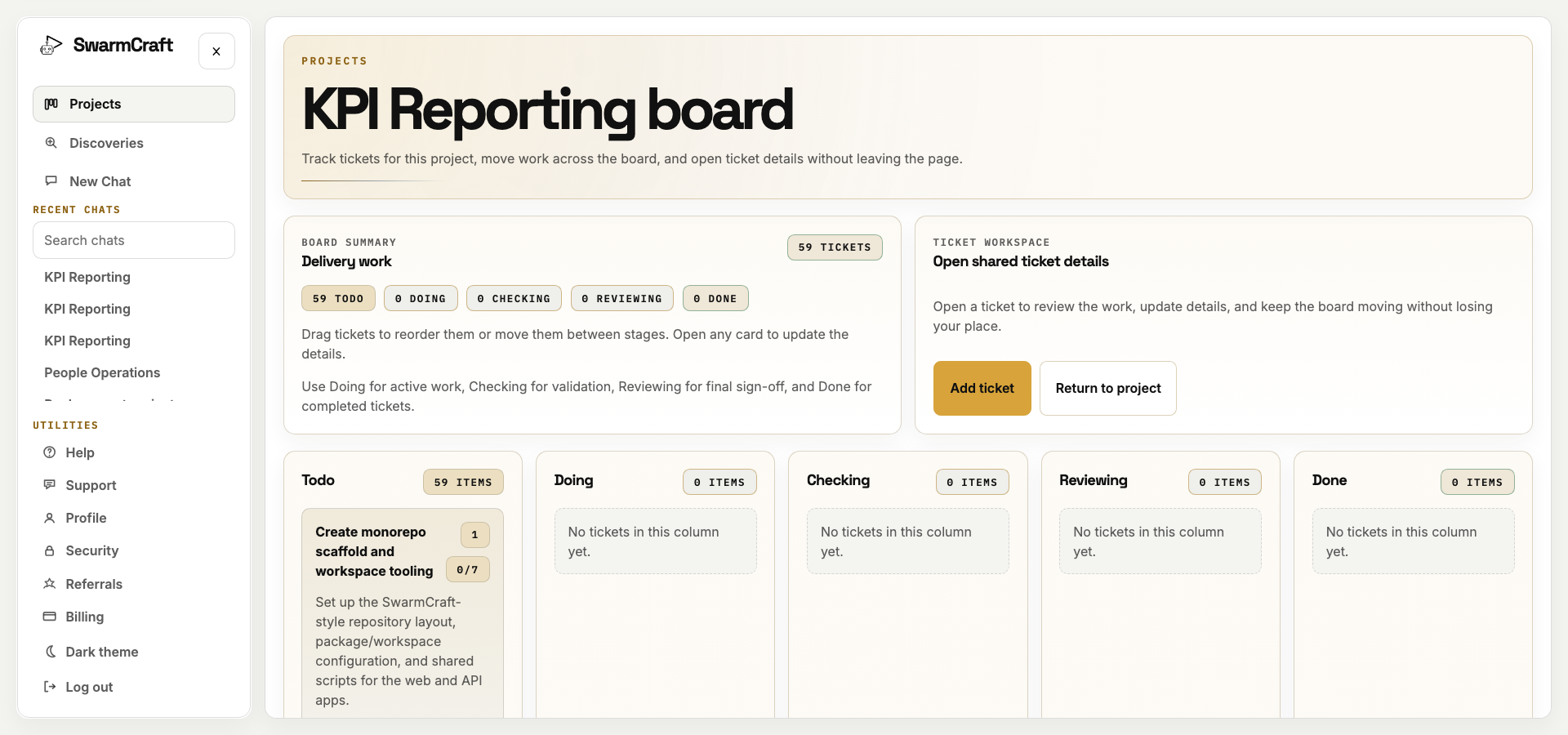
The project screenshot is the initial plan, with all 59 tickets in Todo. The build manifest is the completion record: all 59 selected tickets reached Done with zero blocked outcomes.
The sequence is important. The build did not start with a dashboard gallery and retrofit accountability later. It established the record model, authority, connector and lifecycle boundaries before finishing the operating screens.
AI also appears at two different layers:
- a Codex build agent translated the approved operating brief into the 59-ticket implementation;
- the product reserves a narrower evidence-bound role for AI inside the reporting operation.
The first role accelerated construction. The second must be governed by the application it helps operate.
When to keep the BI platform during discovery
Keep the existing BI platform and warehouse while the organisation is still discovering what must move, what should remain analytical infrastructure and what the owned operation must carry.
That is not an argument for permanent platform dependency. It is a controlled transition boundary.
Before retiring a BI product, establish that:
- every report, semantic definition, embed, alert, export and audience in real use has been inventoried;
- each capability has an explicit destination in the owned KPI operation, retained analytical foundation, another specialist tool or a deliberate retirement decision;
- the organisation can reproduce historical reporting periods and explain definition changes;
- source permissions, row and region controls, lineage, refresh and cost limits survive the transition;
- analysts still have an appropriate exploration surface where ad hoc analysis is genuinely required;
- a parallel reporting cycle reconciles values, exceptions, commentary, approvals and published outputs;
- rollback, correction, supersession and operational ownership have been rehearsed.
If those conditions are unresolved, keep the incumbent while completing deep discovery and parallel evidence. Keep it because the exit risk is not yet controlled—not because renting the reporting operation is automatically the final answer.
In many organisations, the right destination is not “replace the warehouse.” It is “own the KPI control plane, then remove dashboard and workflow surfaces that no longer earn their place.”
What this says about AI-built reporting software
The three product layers clarify who should own what.
Governed analytical foundation
Source systems, warehouses, lakehouses and justified semantic platforms continue to supply governed data. They retain the complete analytical history and specialised query capabilities the focused application should not copy by default.
Owned KPI control plane and AI interpretation
The organisation owns metric meaning, reporting cycles, bounded snapshots, exceptions, commentary, decisions and publications. AI operates inside that boundary to interpret permitted evidence, prepare cited work and expose uncertainty.
Governed execution
Deterministic software applies formulas, validation, permissions, state transitions, approvals and publication gates. It creates the durable record of what happened.
None of those layers is enough alone.
A warehouse without an owned reporting operation leaves people coordinating definitions and approvals by hand. An AI narrative floating above dashboards can make the reporting process faster without making it trustworthy. A custom workflow with no governed analytical foundation simply creates another disputed data copy.
Together, the layers produce a focused reporting system:
Sources supply. AI prepares. People decide. Deterministic software publishes and remembers.
What operator-builders should take from week 11
KPI reporting automation is not about scheduling screenshots from a dashboard. It is about owning the decisions and evidence that turn data into an organisational record.
The practical sequence is:
- Name the reporting cycle and the audiences it serves.
- Inventory authoritative sources and the existing analytical foundation.
- Define metric meaning, ownership, source mapping, validation and effective versions together.
- Choose query-in-place, bounded extraction or materialisation deliberately.
- Freeze reproducible evidence before review.
- Put every failed check into an accountable exception path.
- Let AI prepare cited interpretation only after deterministic results exist.
- Bind human approvals and publication to the exact snapshot.
- Preserve immutable history and make correction explicit.
- Remove incumbent surfaces only after parallel evidence proves the exit.
Week 11 does not prove that a generated application is ready to replace every BI estate. It proves that the reporting operation can be separated from the rented dashboard surface and made concrete, ownable and testable.
Start with Fast Start
When your warehouse or approved sources are already clear and one reporting cycle is the pain, Fast Start can shape the KPI reporting workflow without forcing a data-platform migration.
The goal is not another dashboard. It is an owned reporting operation with governed inputs, deterministic results, evidence-bound AI, accountable decisions and a published record your organisation controls.