This is week two of the SwarmCraft workflow replacement case-study series. Each week is dedicated to completing a workflow replacement project end to end, then showing the finished build, implementation evidence, and what the completed software can actually do.
The workflow is a project Kanban board: a simple internal board where delivery teams move work through agreed lanes, assign owners, flag blocked tasks, and keep important status changes visible. The target is not a full project management suite. The target is the operating surface many teams actually use every day inside Jira, Trello, Asana, Monday, ClickUp, or another broad work-management product.
That boundary matters. Project management software is valuable when a team needs portfolio reporting, cross-program dependency planning, roadmap governance, and deep engineering-tool integration. It becomes expensive clutter when the daily workflow is mostly task cards, movement rules, role permissions, and Slack updates.
If you want the broader category context first, start with Best project management software. This article is the implementation-led view: what a project Kanban board workflow looks like when it becomes owned software instead of another rented board surface.
Project stats
| Stat | Week 02 result |
|---|---|
| Implemented tickets | 36 |
| Final board state | 36 done / 0 open |
| Agent requests | 36 |
| Build runner | OpenAI Codex CLI |
| Build-lane runtime | 4h 03m |
| Tracked files | 285 |
| Tracked text lines | 20,712 |
| Implementation and config lines | 16,823 |
| Test and spec files | 22 |
| Browser evidence screenshots | 9 |
The useful part is not that the agent created another toy Kanban mockup. The useful part is that the agent worked through a 36-ticket board replacement project with backend workflow rules, persistence, migration history, browser evidence, role checks, integration adapter boundaries, operational runbooks, and a final board state.
The Kanban workflow we built
The finished app handles a practical project board workflow with four accountable roles.
| Role | Responsibility |
|---|---|
| Program admin | Maintains the board, imports task references, and reviews operational status. |
| Project manager | Creates, assigns, moves, blocks, and unblocks project work. |
| Delivery lead | Moves work through delivery lanes and helps resolve blocked tasks. |
| Team member | Views assigned work and board status without receiving management controls. |
The workflow follows a focused board model:
- A task starts in Backlog.
- A project manager or delivery lead moves it into Active when the work starts.
- Active work can move to Ready for review when delivery is ready to be checked.
- Reviewed work moves to Done.
- Blocked work stays visible on the board, but it cannot move forward until the block is resolved.
- Movement, blocked-state changes, owner updates, and integration activity are recorded as audit evidence.
- Slack notification attempts and Jira task-reference sync activity stay behind adapter boundaries, so the app can own the workflow without hard-coding the vendor.
That is the difference between a vague promise to automate a project board and a buildable replacement workflow. The rule is small enough to own, but it still has real operational consequences.
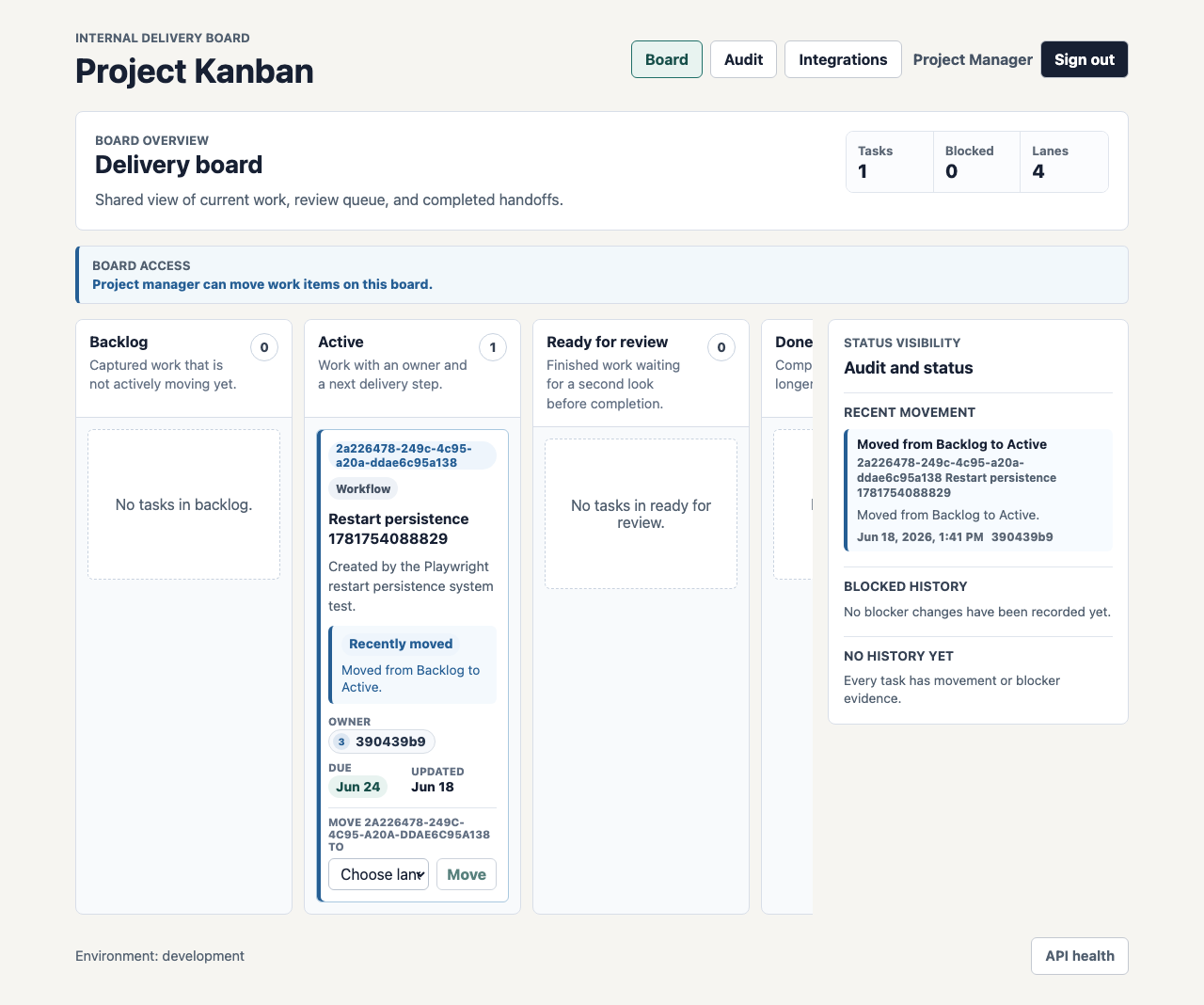
The first browser screenshot is the cleanest proof of the core workflow. It shows a real board screen after a restart, with the task still in the correct lane and the status panel still carrying the movement evidence. For a board replacement, persistence is not a nice-to-have. If the board cannot survive a restart, it is not a workflow system.
What the custom board app includes
The Week 02 build produced a working internal board application and API boundary, not just a visual prototype.
| Area | Implemented capability |
|---|---|
| Board workflow | Backlog, Active, Ready for review, and Done lanes with server-side movement validation. |
| Blocked work | Block and unblock actions, required reason capture, visible exception history, and movement prevention while blocked. |
| Ownership | Task owner, assignee, priority, due date, and status context on board cards and detail panels. |
| Role access | Server-side authorization, role-specific board controls, and browser evidence for restricted users. |
| Audit trail | Chronological movement, blocked-state, owner, security, and integration history. |
| Jira boundary | Task-reference import and sync persistence through adapter interfaces. |
| Slack boundary | Notification delivery attempts for movement and attention-needed events, with audit records. |
| Operations | Docker Compose PostgreSQL, Flyway migrations, production containers, Kubernetes manifests, health checks, structured logging, CI gates, and runbooks. |
This is why a focused Kanban replacement can be commercially meaningful. The team is not rebuilding every project management feature. It is replacing the board surface where coordination, ownership, blocked work, and notifications already happen.
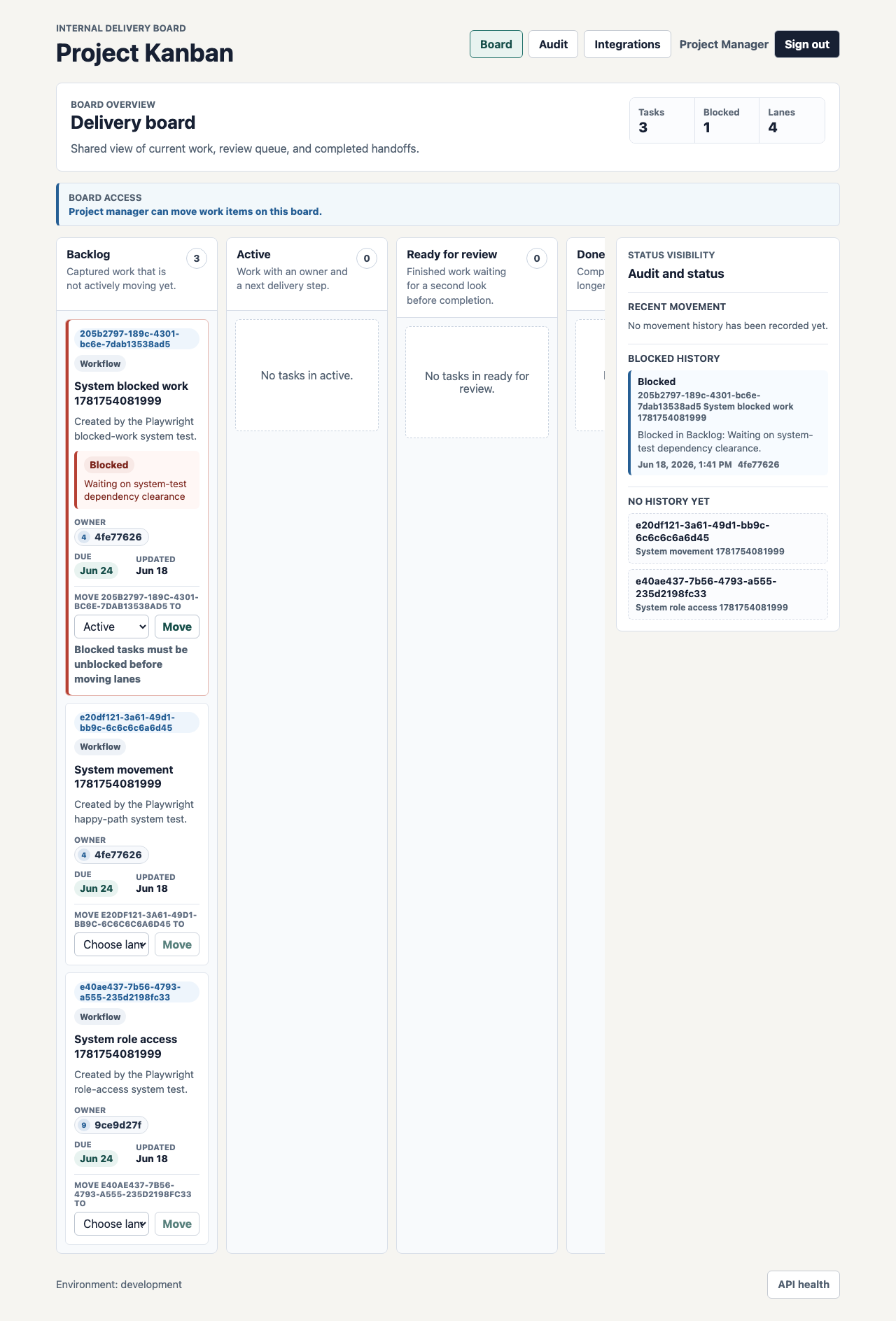
Blocked-work handling is the important exception path. A simple board that only supports happy-path movement is easy to build. A useful board has to make stuck work visible, preserve the reason, prevent accidental movement, and show the next valid action.
Technology implemented
The repository is a small monorepo with the usual production boundaries instead of a single-page demo.
| Layer | Technology |
|---|---|
| Web app | React 19, Vite 7, Playwright browser tests |
| API | Java 21, Spring Boot 3.4, Spring Web, Spring JDBC |
| Database | PostgreSQL with 10 Flyway migrations and local seed data |
| Local runtime | npm workspaces, Maven, Docker Compose, environment examples |
| CI and release evidence | GitHub Actions, production CI script, cloud manifests, image packaging, and release checklist |
| Documentation | Architecture notes, feature docs, workflow rules, system-test evidence, deployment, rollback, troubleshooting, health, and logging runbooks |
The implementation keeps browser UI in apps/web, workflow rules and persistence in apps/api, database migrations under the API boundary, and deployment ownership in infra. That separation matters later. A future change to lane rules, Slack delivery, Jira mapping, or access policy has a clear place to go.
What the browser evidence proves
The Playwright system tests are not only regression checks. They create screenshots that let a reviewer inspect the workflow in a real browser.
The committed evidence covers:
- happy-path board movement with Slack-visible status
- blocked-work handling and unblock resolution
- role-based access for delivery leads and team members
- audit trail and board persistence after restart
- integration audit history for Slack notification delivery
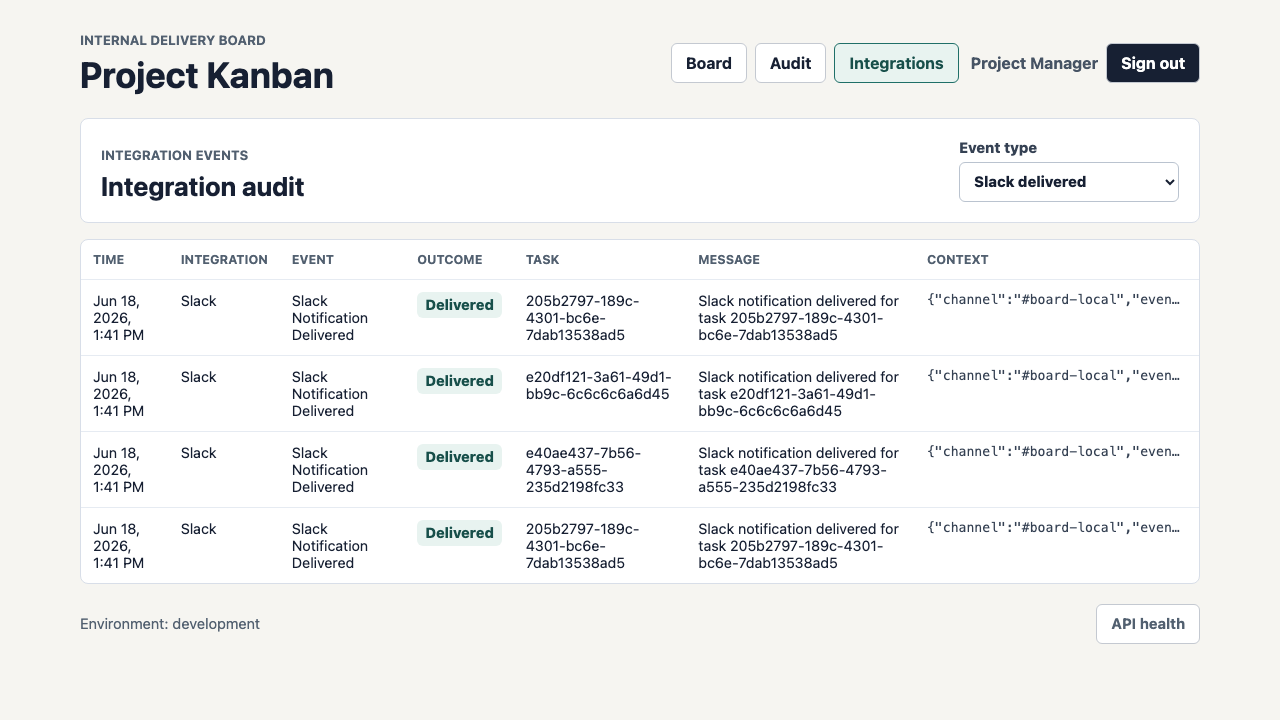
This screenshot is the reason the Slack boundary belongs in the case study. The point is not that every team wants exactly this notification payload. The point is that the app records delivery attempts as workflow evidence instead of treating Slack as an invisible side effect.
The access-control screenshot is just as important. A project board replacement has to respect the difference between people who can see work and people who can move work.
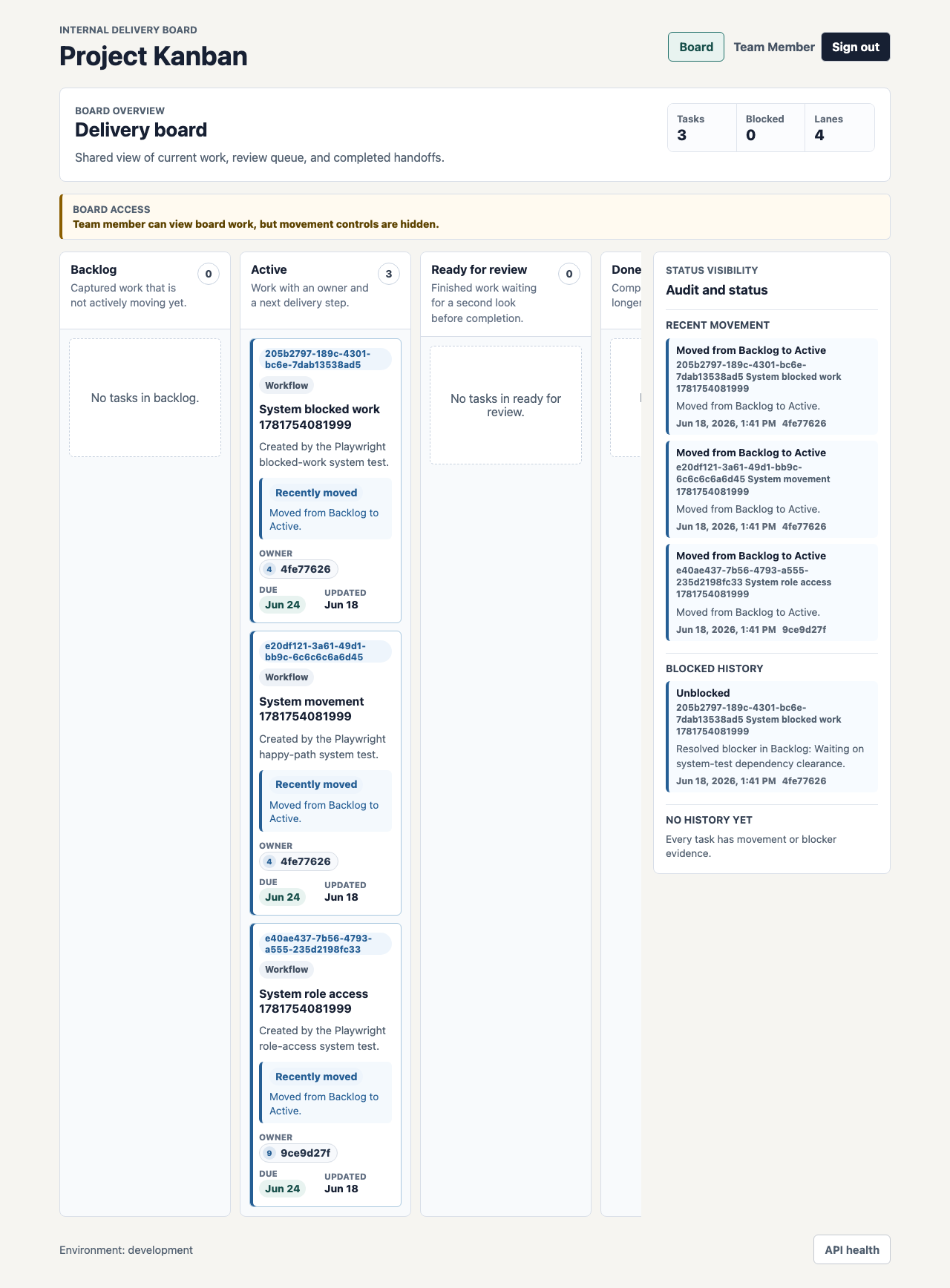
That is the part many lightweight board setups miss. Visibility is useful, but control should still belong to accountable roles. The browser evidence shows that a team member can inspect the board while management actions remain unavailable.
How SwarmCraft structured the build
SwarmCraft started by turning the workflow problem into a project board. For this Kanban replacement, that meant 36 tickets covering foundation work, authentication, role permissions, PostgreSQL persistence, board workflow rules, Jira and Slack adapter boundaries, UI states, browser system tests, production hardening, deployment manifests, logging, CI, and operational runbooks.
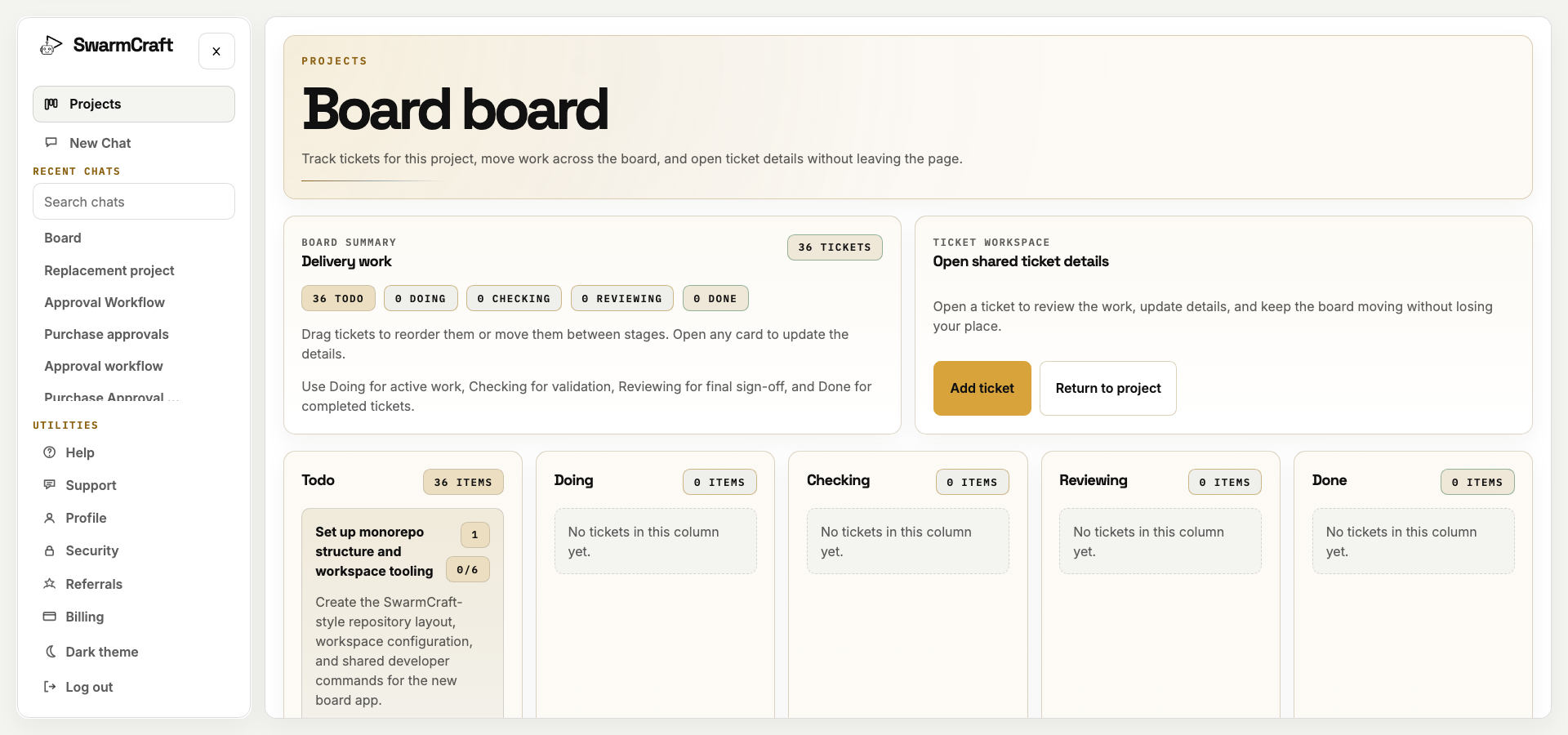
The final run closed all 36 tickets with no open work left on the SwarmCraft board. The build used 36 agent requests against a 60-request cap, and every selected ticket reached Done.
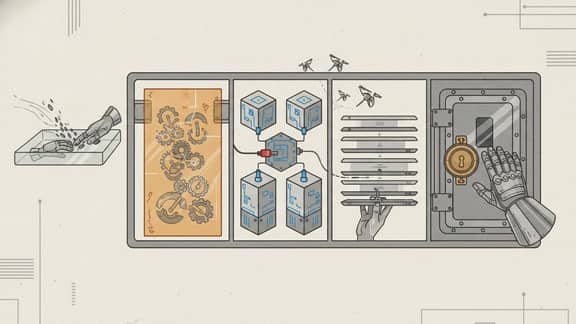
That is the sale for new readers: SwarmCraft is not a generic chat window trying to improvise a product. It is a structured, specialized build system that turns a workflow replacement idea into tickets, implementation packets, validation commands, screenshots, and a repository that can be inspected like ordinary software.
The target repo also matters. It contains app code, tests, migrations, deployment files, documentation, runbooks, and browser evidence. That is the difference between "AI generated a screen" and "AI helped produce an owned workflow app."
What must be true before you retire the project board
If the current board is entangled with sprint planning, dependency graphs, portfolio reporting, marketplace apps, or cross-team governance, do not cancel it before understanding those dependencies. Keep it during discovery and parallel operation while the team separates the daily work board from the capabilities that genuinely need another home.
The owned board becomes a credible first exit when its operating rules are focused and stable:
- the team uses predefined lanes
- only a few roles can move work
- blocked tasks need visible exception handling
- Slack updates matter more than vendor-native notification rules
- Jira references are useful, but Jira itself is not the daily operating surface
- audit history matters more than broad reporting
- the business wants fewer paid seats and less SaaS configuration
- the team wants to own the board experience instead of adapting to a vendor's generic model
Treat every incumbent capability separately: own it in the focused operation, connect a specialist provider, schedule it for a later migration, or drop it because nobody uses it. Jira references can remain useful during transition without making Jira the permanent daily operating surface.
Run live work through the owned board, reconcile state and notifications, prove blocked-work recovery and audit history, then remove the incumbent board once the team no longer depends on it for the bounded operation. When its real usage is difficult to untangle, Deep Discovery can turn the current project estate into a staged exit plan rather than a feature-parity backlog.
What this says about AI-built workflow software
The Week 02 result is commercially interesting because the output is legible. There are tickets, code, tests, migrations, screenshots, adapter boundaries, docs, and runbooks. The final repository is large enough to be useful and small enough to inspect.
The agent did not need to invent a new project management methodology. It needed to turn a clear board rule into a working internal workflow app:
- predefined board lanes
- role-specific movement controls
- blocked-work validation
- durable task history
- Slack notification evidence
- Jira reference-sync boundaries
- restart persistence
- operational deployment scaffolding
That is the kind of work where AI-assisted custom software becomes practical. The business rule is specific. The replacement boundary is controlled. The implementation can be validated through tests and screenshots. The finished app can be reviewed like any other software project.
What operator-builders should take from week two
Kanban board automation works best when the lanes, owners, movement rules, blocked-state policy, notification moments, and audit needs are already clear.
That does not mean the first version has to be the final version. A static board with agreed lanes can be the right starting point because it gives the team an owned workflow foundation. From there, the natural follow-on work is exactly the kind of improvement a product team can keep building for itself: configurable lanes, drag-and-drop movement, richer board policies, custom Slack rules, and reporting that matches how the team actually works.
That is the larger promise for operator-builders. A smaller owned board can remove a surprising amount of SaaS cost and configuration overhead without asking the team to rebuild an entire project management platform on day one. Once the workflow belongs to the business, future development becomes an extension path instead of another vendor negotiation.
For readers comparing the broader platform decision, Best project management software, Jira alternatives, and Project management tool sprawl cover the switching question from different angles. This article is the implementation-led view: what one project board workflow looks like when it becomes owned software.
Choose a discovery route
If one bounded workflow and its existing record boundary are already clear, Start Fast. Fast Start uses a focused guided intake, then shows the project credit quote before generation begins.