
A resource allocation workflow is not a calendar with names placed into empty squares.
It is the complete operation that turns demand and capacity evidence into a safe commitment: request intake, source snapshots, constraint checks, candidate evidence, scenario comparison, temporary holds, accountable approval, commitment, downstream projection and replanning when reality changes.
In week 12 of our category series, we used SwarmCraft to build that operation as a customer-owned application. The result is not a feature-parity Resource Guru, Float or enterprise PSA replacement. Existing HR, identity, leave, project, finance and time systems remain authoritative. The new product owns the allocation control plane above them.
That boundary creates a more useful operating model:
- Governed sources supply bounded people, project, leave and time evidence.
- An owned allocation control plane makes demand, capacity, proposals, holds, decisions and changes reproducible.
- AI assistance prepares cited options and trade-offs without gaining authority over people or capacity.
- Deterministic execution calculates constraints, enforces permissions, gates commitments and preserves history.
If you are choosing the wider category first, start with Best resource management software. If spreadsheets, chats and planning tools already disagree, read Why resource planning sprawl follows unclear allocation decisions.
The capacity problem the calendar concealed
The case study follows one request: a payments-service uplift needs 32 hours a week across an eight-week window. The visible plan appears workable. The admitted capacity evidence says otherwise.
Only 24 hours a week are safely available for the preferred specialist. An existing Atlas commitment creates an eight-hour overlap during 14–18 September. Leave freshness, working patterns, protected non-project work and other commitments also belong in the answer; an apparently free slot is not proof that someone can or should be allocated.
The portfolio summary makes that difference explicit. It reports demand, collision-free capacity, active holds, committed work and stale evidence together instead of collapsing the operation into one utilisation percentage.
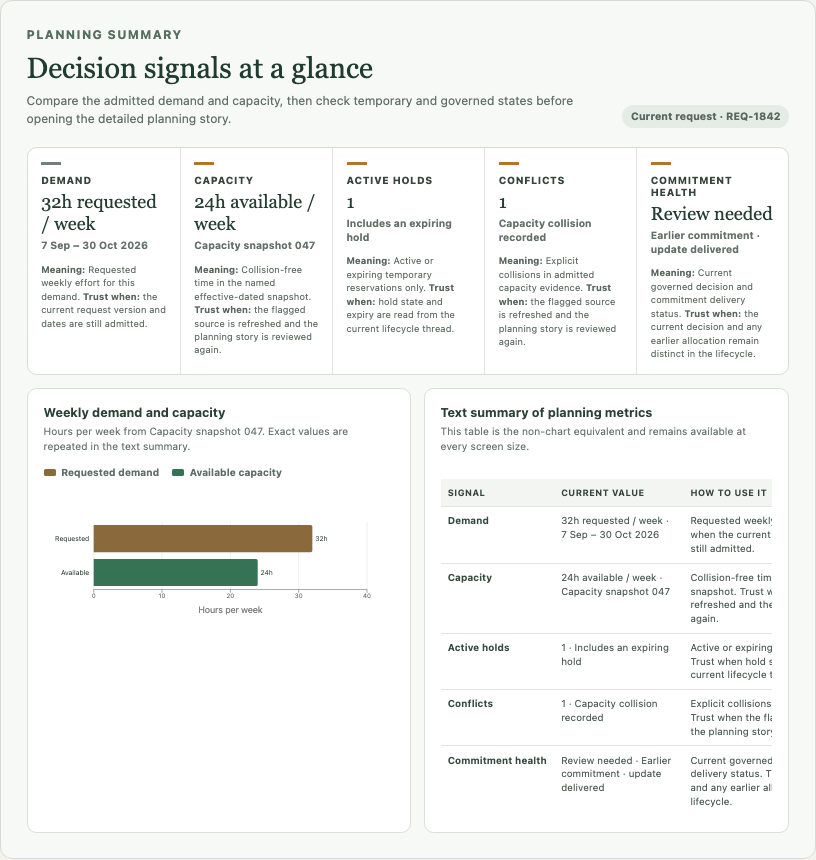
This is the story spine for the entire product: the calendar looked healthy, the governed evidence exposed a collision, a person changed the proposed answer, and the system refused to reuse that answer after its evidence became stale.
Project stats
| Measure | Week 12 evidence |
|---|---|
| SwarmCraft project | Resource Allocation |
| Build scope | 75 tickets selected, 75 Done, zero blocked or manual review |
| Build-agent requests | 75 Codex requests |
| Build elapsed time | 28,644,560 ms — about 7 hours 57 minutes |
| Target repository | 418 tracked files and 73,136 non-blank lines |
| Database | PostgreSQL with nine versioned migrations |
| Test surface | 83 unit, integration, accessibility and system test/spec files |
| Browser evidence | Twenty deterministic product screenshots |
| Verification | Fresh migrations passed, eight system journeys passed, and the full repository check passed |
| Delivery target | Customer-managed cloud environment |
The 75-ticket board records completed build-agent work. We then verified the implementation against a fresh database and the full automated test and build suite. That separates scope completion from proof that the result runs as intended.
The resource allocation operation we built
The application centres the allocation decision, not the scheduling grid.
Its durable domain covers demand requests and versions, capacity snapshots, candidate evidence, proposal versions, human dispositions, soft holds, approvals, committed allocation versions, replanning passes, downstream delivery and append-only decision history.
The retained systems still govern employment, leave, project, commercial and actual-time records. The allocation application stores bounded source references, versions and freshness evidence so a reviewer can understand the basis of a past decision without copying unrestricted personnel records into a new platform.
That distinction matters. A resource planning workflow needs enough evidence to make an allocation accountable, but it does not need to become another HRIS, payroll product, CRM or project suite.
Who does what
| Role | Responsibility in the owned operation |
|---|---|
| Resource planning owner | Configures planning policy, coordinates the horizon and owns the end-to-end allocation decision |
| Project or delivery manager | Submits demand, dates, effort, capabilities, priority and the consequence of leaving work unfilled |
| People manager | Reviews sustainable workload, working-pattern and people-context concerns within an authorised scope |
| Staffing manager | Compares evidence, edits proposals and manages temporary holds and conflicts |
| Finance or commercial reviewer | Reviews commercial priority or exception conditions without receiving unrestricted people evidence |
| Individual contributor | Sees their bounded proposed or committed work and can raise a correction or objection |
| Operations administrator | Maintains source and delivery boundaries without inheriting business decision authority |
The browser explains these responsibilities, but the API enforces them. Organisation, portfolio, project, person, field, commercial and evidence permissions are reconstructed server-side before a read, review, approval, export or AI-context request is accepted.
Resource allocation workflow steps
The implemented resource allocation process follows a governed sequence:
- Configure the planning horizon, calendars, granularity, approval policy, hold expiry, priority rules and source boundaries.
- Sync bounded people, project, leave and time summaries; record source identities, versions and freshness.
- Create an immutable capacity snapshot after working patterns, leave, protected work, holds and commitments have been applied.
- Submit a resource request with dates, effort, capabilities, constraints, priority, commercial context and accountable owner.
- Route incomplete, contradictory or unauthorised demand to an exception path before matching begins.
- Calculate eligibility, overlap and collision-free capacity deterministically.
- Build an authorised candidate pool before sending any bounded context to an AI provider.
- Prepare at least two explainable options with citations, uncertainty, assumptions and trade-offs.
- Let an accountable person accept, reject or edit the proposal and record why.
- Create an expiring soft hold when negotiation needs temporary protection without implying approval.
- Route the selected version through the required approvals.
- Re-run deterministic checks transactionally and commit only the approved, current version.
- Queue minimum downstream projections through an idempotent outbox and retain delivery evidence.
- When demand or source evidence changes, create a new snapshot and fresh review path without rewriting the original decision.
These resource allocation workflow steps are also a practical resource allocation workflow template: separate facts from suggestions, suggestions from decisions, and reversible reservations from binding commitments.
AI prepares options; people control allocation
The evidence workspace first shows what the system knows. Jordan has 24 collision-free hours, the request needs 32, Morgan passes the hard capability filters, and other candidates are excluded or uncertain for explicit reasons. Facts, AI suggestions and human decisions have distinct visual treatment.
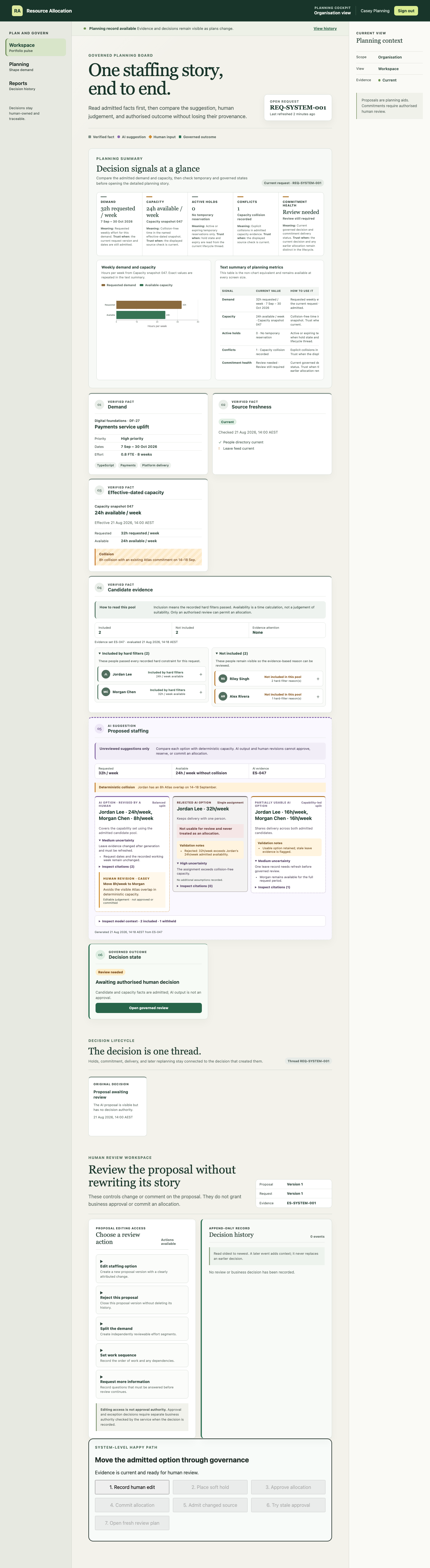
The AI-assisted comparison offers materially different choices. A single-person assignment keeps continuity but exceeds admitted capacity. A balanced split uses Jordan for 24 hours and Morgan for eight. A capability-led split changes the balance again.
Casey does not approve the first attractive answer. Casey records an eight-hour move to Morgan to avoid the deterministic Atlas overlap. The AI proposal remains in history beside the human revision.
That is the right boundary for resource allocation automation. AI can rank permitted candidates, explain trade-offs, surface missing evidence and prepare options. It cannot invent skills, infer protected traits, approve an allocation, commit capacity or change an authoritative source record.
The approach aligns with the NIST AI Risk Management Framework: governance, documented responsibilities and human–AI oversight need to operate throughout the lifecycle, not appear as a final confirmation button.
A soft hold is not a commitment
Negotiation sometimes needs temporary capacity protection. The product therefore creates an owner-bound, expiring soft hold for the revised option.
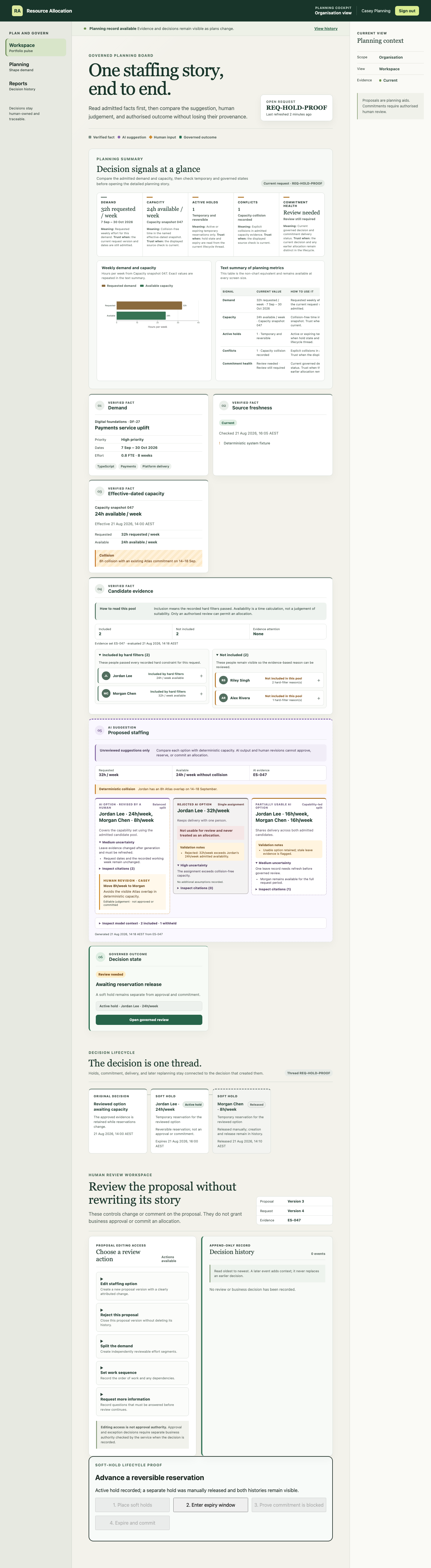
The hold is visibly reversible. It has an expiry, a lifecycle record and conflict treatment, but it does not mean the work is approved or committed. That prevents tentative planning from quietly consuming capacity forever.
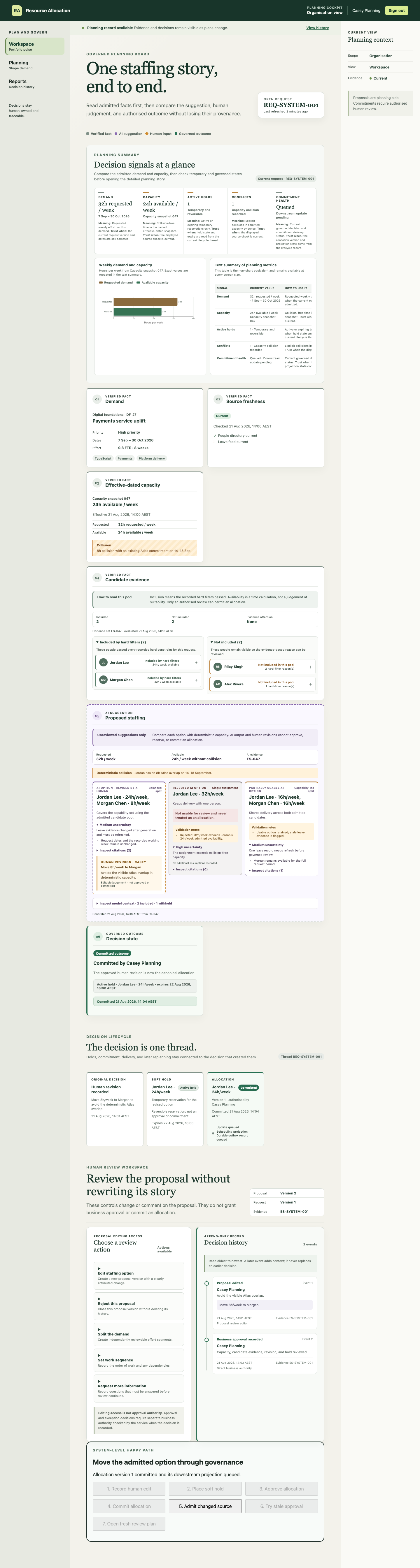
Only after current evidence, the human revision and required approval have been checked can the server create allocation version 1. The committed screen records Casey's authority and queues a downstream scheduling projection through the durable outbox.
Replanning is part of the workflow, not a correction to hide
The most important moment comes after approval.
A new people-source version changes the admitted context. The application marks the request, hold, staffing proposal and allocation chain stale. It disables the old commit path and rejects an attempt to reuse the earlier approval.
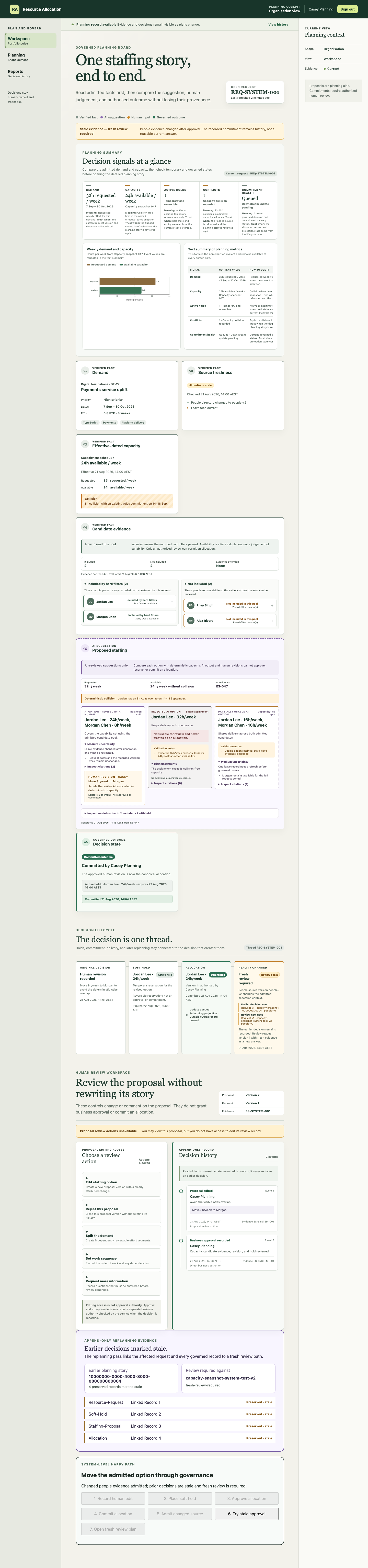
The operator can then open a fresh review plan from the new capacity snapshot. The earlier request, proposal, hold, approval and commitment remain readable; nothing is silently edited out of history.
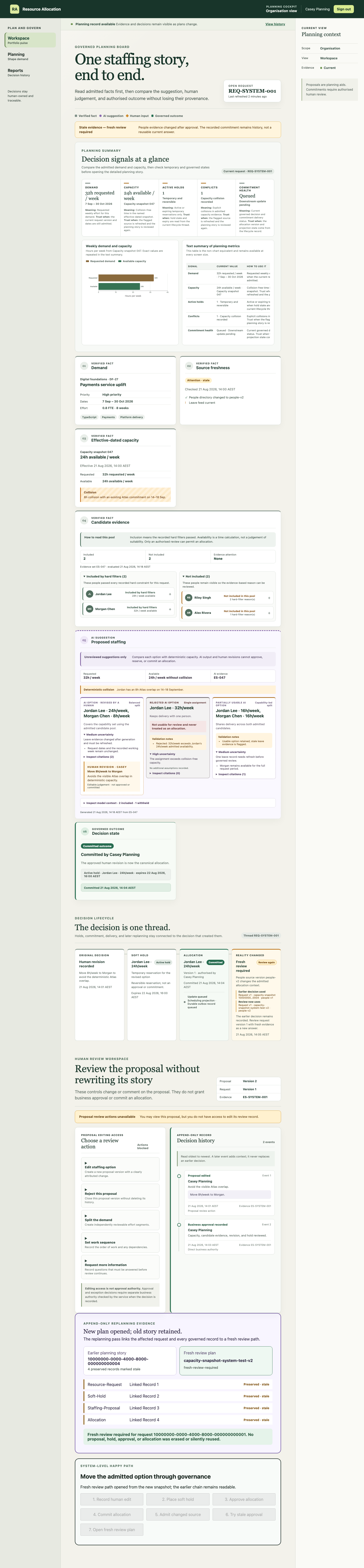
That is what makes the operation reversible without making it unaccountable. The current answer can change because reality changed. The historical answer remains because it was once the approved basis for action.
Exceptions and objections remain attributable
Not every conflict disappears through a neat capacity split. The decision-history proof records approval, objection, a named exception and its condition as distinct append-only events.
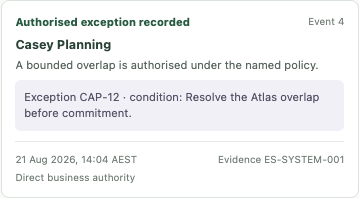
An exception is not an undocumented override. The record shows who acted, what authority they used, which evidence they reviewed and what condition must still be satisfied. A contributor correction or objection likewise remains distinct from approval and does not expose unrelated people's data.
What the custom resource allocation workflow includes
| Capability | Week 12 implementation | Production work still required |
|---|---|---|
| Demand and capacity | Versioned requests, immutable snapshots, effective-dated capacity facts and collision rules | Configure customer calendars, labour constraints, capability taxonomy and planning policy |
| Candidate evidence | Authorised pool construction, inclusion/exclusion reasons, source references and freshness | Connect and certify real HR, project, leave and time adapters with customer-specific data minimisation |
| AI-assisted scenarios | Structured proposal boundary, cited options, uncertainty, alternatives and human dispositions | Connect an approved provider; add model/prompt versioning, evaluations, monitoring and incident handling |
| Holds and commitment | Expiring soft holds, approval records, transactionally checked allocation versions and supersession | Rehearse concurrency, service levels, escalation and operating ownership at production scale |
| Replanning | Stale markers, new snapshots, blocked stale approval and history-preserving recovery | Define customer change triggers, notification rules and reconciliation service levels |
| Delivery | Transactional outbox, idempotent projections, retry and reconciliation evidence | Implement and certify live scheduling, project and notification destinations |
| Security | OIDC boundary, server-side scoped authorisation, generic denials and safe audit outcomes | Complete production identity configuration, access reviews, threat modelling and penetration testing |
| Operations | Health checks, container paths, observability, backup, restore, cutover and rollback runbooks | Deploy, load test, rehearse recovery and gather live operating evidence |
Technology implemented
| Layer | Week 12 implementation |
|---|---|
| Browser application | React, TypeScript and Vite with responsive planning, review, history, reporting and contributor surfaces |
| API | Node.js and TypeScript with server-side authority, workflow services and integration boundaries |
| Persistence | PostgreSQL with nine versioned migrations and append-only allocation evidence |
| Source boundary | Provider-neutral people, project, leave and time contracts with deterministic local fixtures |
| AI boundary | Structured proposal provider contract, evidence citations, uncertainty and field-level context controls |
| Background execution | Durable jobs, transactional outbox, delivery attempts, retries and reconciliation |
| Security | OpenID Connect boundary, scoped roles and permissions, safe logging and access audit |
| Delivery | pnpm monorepo, Docker Compose, container and customer-managed cloud runbooks |
| Verification | Unit, PostgreSQL integration, accessibility, security, migration and Playwright system layers |
The deterministic fixtures prove the owned workflow contract. They do not prove live connectivity to a customer's HRIS, PSA, leave system, time platform or AI provider. Those integrations remain production work behind the implemented boundaries.
What the browser evidence proves
The eight passing system journeys exercise more than a happy-path feature tour. Together they prove:
- the request-to-edit-to-hold-to-approve-to-commit sequence;
- durable request, decision, allocation and outbox records in PostgreSQL;
- stale-context invalidation and a fresh replanning path;
- soft-hold activation, warning and expiry;
- append-only decision, objection and exception history;
- server-enforced access denial and safe degraded-provider behaviour;
- wide and narrow accessible reporting views; and
- integration recovery, coexistence and migration-cutover evidence.
The screenshots are generated from fictional, deterministic fixtures. They are checked into the target repository so a future change can be compared against the same operating story rather than a hand-arranged demo.
How SwarmCraft structured the build
SwarmCraft generated a 75-ticket Resource Allocation project. The sequence moved through repository and domain foundations, source contracts, snapshots and capacity rules, candidate evidence, proposals, holds, decisions, commitment, replanning, security, browser proof, deployment and operational runbooks.
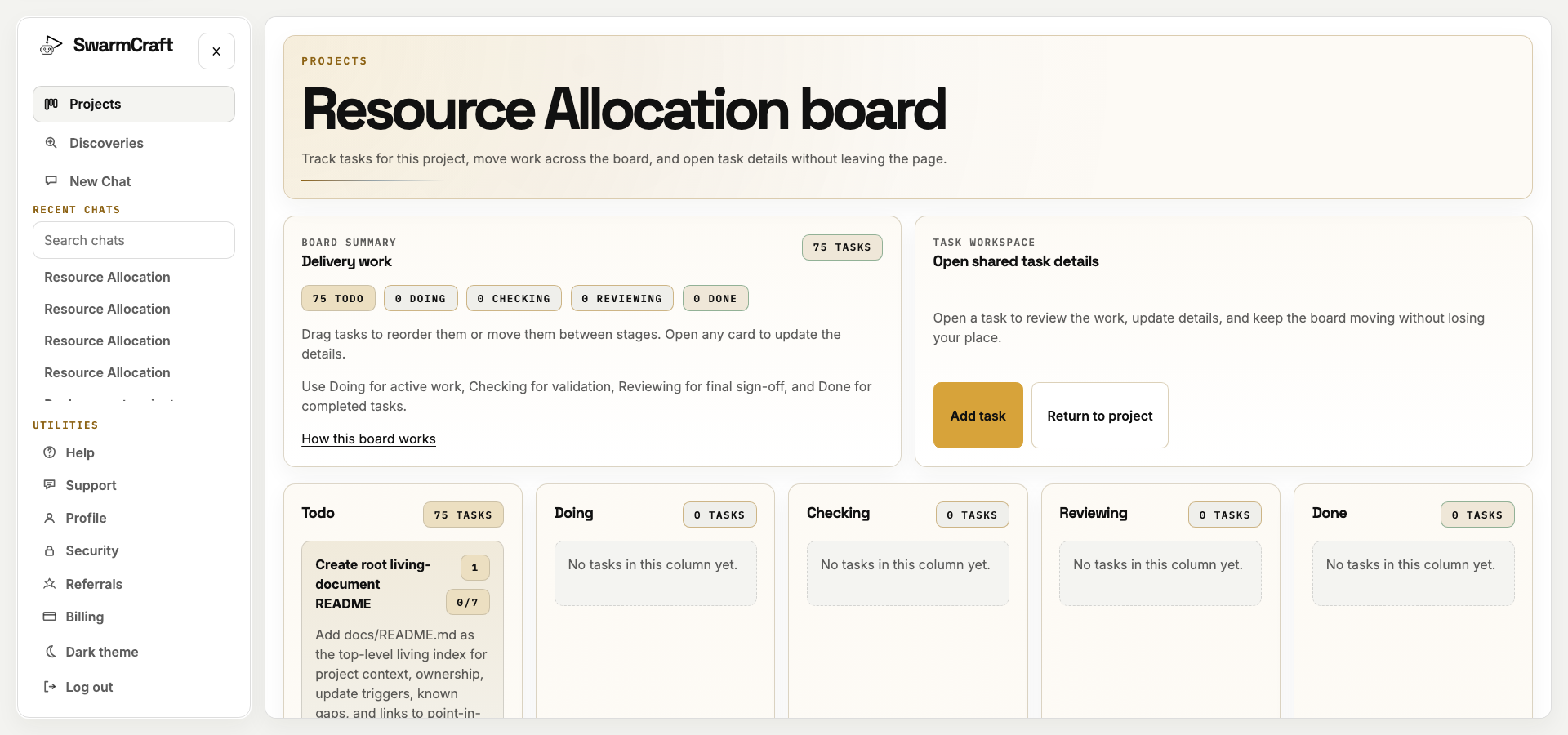
The board screenshot is the initial plan, when all 75 tickets were still Todo. The build manifest is the completion record: every selected ticket reached Done with zero blocked or manual-review outcomes.
The sequence matters. The build did not begin with a calendar and retrofit accountability later. It established record boundaries, permissions, versioning and state transitions before completing the planning surfaces.
AI also appears in two different places:
- a Codex build agent translated the approved operation brief into the 75-ticket implementation;
- the product gives AI a narrower, evidence-bound role inside allocation planning.
The first accelerates construction. The second remains governed by the software it helps operate.
When resource management software is enough
Keep an off-the-shelf resource management product when its planning model, permissions, integration coverage and operating controls already fit the organisation. A mature platform may be the responsible choice when many business units need shared scheduling, portfolio reporting and maintained vendor integrations.
Consider a focused owned operation when the real problem is narrower and more specific:
- demand arrives with organisation-specific evidence and approval rules;
- effective capacity depends on constraints a generic calendar hides;
- tentative, held, approved and committed states must remain distinct;
- AI recommendations need bounded evidence and explicit human disposition;
- the business must explain why a person was proposed, changed or rejected;
- changed evidence must invalidate an earlier answer without erasing it; or
- several retained systems are justified, but the decision workflow between them is not.
The decision is not simply buy versus build. It is which software earns its place, which records should stay authoritative, and whether the allocation control plane is important enough to own. The Resource Guru alternatives page examines that boundary from a switching perspective.
What this says about AI-built allocation software
The implementation clarifies three distinct layers.
Governed source foundation
HR, identity, leave, project, finance and time systems continue to supply authoritative facts. Provider-neutral contracts admit only the fields, versions and freshness evidence required for allocation.
Owned allocation control plane and AI preparation
The organisation owns demand, snapshots, proposals, holds, decisions, commitments, changes and audit evidence. AI works inside that boundary to prepare options and expose trade-offs.
Governed execution
Deterministic software calculates capacity, checks hard constraints, enforces access, applies expiry, validates current evidence, commits allocation versions and records downstream delivery.
None of those layers works safely alone. A resource calendar without governed evidence can make a collision look feasible. AI without a decision boundary can turn a suggestion into implied authority. A custom interface without retained source contracts becomes another stale data copy.
Together, the layers produce a focused allocation system:
Sources supply. AI prepares. People decide. Deterministic software commits and remembers.
What operator-builders should take from week 12
To automate resource allocation, start with the commitment rather than the calendar:
- Define demand, capacity, hold, approval and commitment as separate records.
- Inventory the sources that already govern people, leave, projects, finance and time.
- Derive immutable, effective-dated capacity snapshots from bounded source evidence.
- Make constraints and missing evidence visible before matching.
- Give AI permitted facts and require citations, uncertainty and alternatives.
- Keep accountable people in control of every material edit and approval.
- Put an owner and expiry on every soft hold.
- Recheck the current version transactionally before commitment.
- Project only approved minimum changes through replay-safe delivery.
- Treat replanning as a new version with a retained decision chain.
Week 12 does not prove that a generated application is ready to replace every resource platform. It proves that the allocation operation can be separated from the rented scheduling surface and made concrete, ownable, explainable and testable.
Start with Fast Start
When the existing source systems are known and one bounded resource planning workflow is the problem, Fast Start can shape the owned allocation control plane without forcing an HR, project, finance or time-system migration.
The goal is not another staffing calendar. It is an operation that exposes hidden capacity, lets AI prepare evidence-bound options, keeps people accountable for decisions, and can change safely when reality does.