This is week four of the SwarmCraft workflow replacement case-study series. Each week is dedicated to completing a workflow replacement project end to end, then showing the finished build, implementation evidence, and what the completed software can actually do.
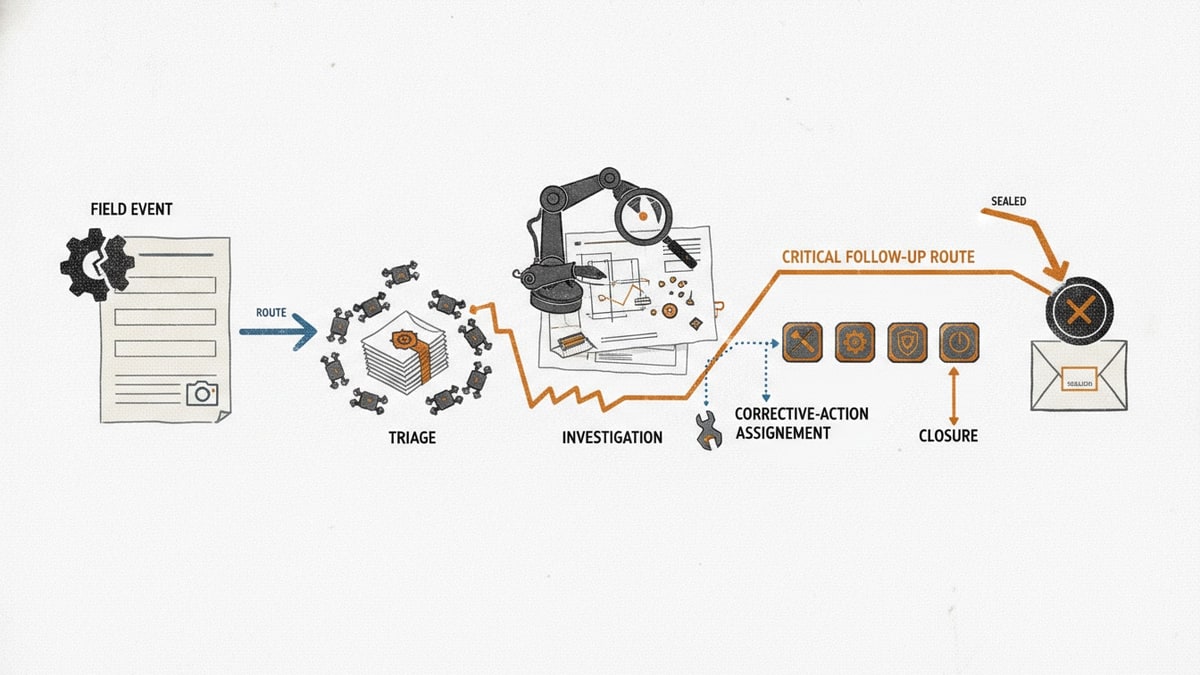
The workflow is safety incident reporting: a field worker captures an incident, attaches photo and video evidence, submits it for triage, and the safety team carries the report through investigation, remediation, and follow-up.
The target is not a full EHS platform. The target is the operational surface where incidents are captured in the field, evidence is preserved, responsibility changes hands, and open corrective work stays visible.
That boundary matters. Safety management software is valuable when a team needs inspections, training, analytics, document control, and a broad compliance system. It becomes too much platform when the real pain is narrower: people are offsite, connectivity is unreliable, evidence is scattered across phones, and follow-up work loses ownership after the first report.
If you want the broader category context first, start with Best safety management software. This article is the implementation-led view: what one incident reporting workflow looks like when it becomes owned software instead of another rented safety surface.
SafetyCulture's platform overview is a useful category reference because it shows how modern safety platforms bundle inspections, issue capture, assets, training, tasks, and analytics. The SwarmCraft question is narrower: what should one focused safety incident workflow own by itself?
Project stats
| Stat | Week 04 result |
|---|---|
| Implemented tickets | 35 |
| Final board state | 35 done / 0 open |
| Agent requests | 35 |
| Build runner | OpenAI Codex CLI |
| Build-lane runtime | 5h 50m |
| Tracked files | 125 |
| Tracked text lines | 26,991 |
| Test and spec files | 17 |
| Browser evidence screenshots | 8 |
The useful part is not that an AI agent generated a mobile form. The useful part is that the agent worked through a 35-ticket incident reporting project with authentication, role enforcement, incident workflow rules, offline retry behavior, photo and video evidence metadata, adapter boundaries, browser system tests, documentation, runbooks, and a final board state.
That is the difference between "AI made a screen" and a repository that can be inspected, run, tested, and improved.
The incident reporting workflow we built
The finished app handles a practical safety incident workflow with four accountable roles.
| Role | Responsibility |
|---|---|
| Field worker | Captures incident details on a phone, attaches photo and video evidence, saves drafts, and submits reports even when connectivity is unreliable. |
| Site supervisor | Receives submitted reports, starts triage, confirms immediate controls, and hands work to the right reviewer. |
| Safety officer | Reviews high-severity incidents, evidence quality, status timelines, and decision history before remediation continues. |
| Investigator | Owns follow-up investigation and helps close the loop between evidence, corrective action, and final verification. |
The incident reporting process follows a focused safety workflow:
- A field worker signs in on a mobile-sized browser screen.
- The app captures incident type, location, summary, severity, witnesses, and immediate controls.
- The worker attaches photo and video evidence metadata without forcing large media transfer to block submission.
- The worker can save a local draft or submit while offline.
- Offline reports move into a queued state and sync when the browser reconnects.
- Submitted incidents route by severity to the right owner.
- Supervisors triage the report, record immediate controls, and assign the next owner.
- Safety officers inspect audit history, evidence status, unavailable media, and restricted evidence.
- Investigation, remediation, and completion remain visible in one status timeline.
That is the difference between digitising an incident form and building incident reporting automation. The form is only the first step. The workflow becomes useful when offline capture, evidence, triage, ownership, and audit history stay connected.
What the custom incident app includes
The Week 04 build produced a working mobile-first browser app and API boundary, not just a static incident report mockup.
| Area | Implemented capability |
|---|---|
| Mobile field capture | Phone-sized incident intake with required fields first, touch-sized actions, SafetyCulture-style internal branding, and no horizontal overflow. |
| Offline drafts | Local draft save, resume state, queued submission labels, sync progress, failed-sync state, and reconnect recovery. |
| Evidence handling | Photo and video evidence metadata, pending upload state, queued media records, SHA-256 integrity metadata, and object-storage adapter boundaries. |
| Incident workflow | Draft, submitted, triage, safety review, investigation, remediation, and completion status handling. |
| Severity routing | High-severity incidents route to safety review with visible priority and owner context. |
| Audit history | Workflow transitions, policy evaluations, triage decisions, handoffs, evidence requests, and actor context stay reviewable. |
| Access control | Seeded roles, session cookies, route authorization, protected API actions, and visible denied-route behavior. |
| Integrations | Email, HR lookup, safety evidence storage, and object storage adapter boundaries with local mock modes and customer-managed configuration rules. |
| Operations | npm workspaces, Docker Compose PostgreSQL, Flyway migrations, production Dockerfiles, CI workflow, environment examples, health checks, deployment, rollback, and troubleshooting runbooks. |
The strongest screen is the safety officer review view. It is dense because the real workflow is dense: status, owners, due dates, audit history, media cards, restricted evidence, unavailable video, and current decision context all matter.
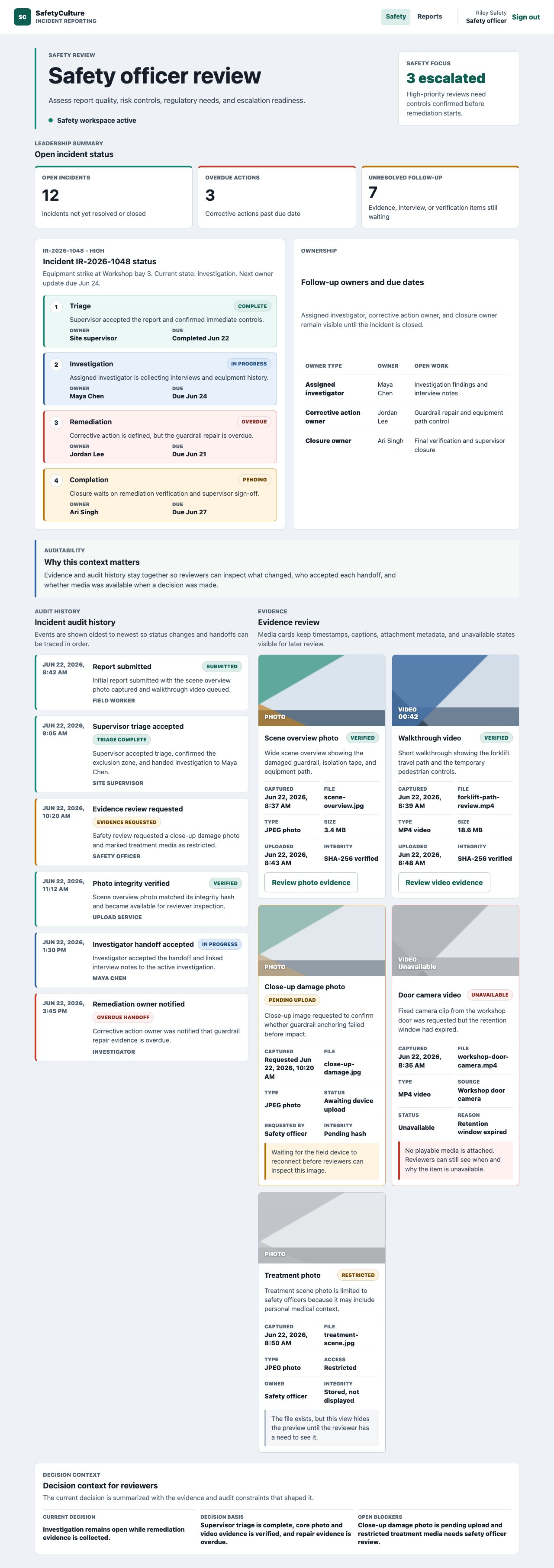
This is the operational value of a focused incident management workflow. A reviewer can see where the incident is, who owns the next step, which evidence is verified, which evidence is pending, and why the current decision is constrained.
Technology implemented
The repository is a small monorepo with production-style boundaries.
| Layer | Technology |
|---|---|
| Web app | React 19, esbuild bundle, static web server, runtime API configuration, Playwright browser tests |
| API | Node.js 20+, native ESM modules, HTTP handlers, session cookies, server-side authorization, structured JSON logs |
| Persistence | Flyway PostgreSQL migrations for incident workflow, media uploads, assignments, audit history, and security audit tables |
| Workflow rules | API-owned state machine, severity routing policy, assignment validation, and safe audit metadata |
| Offline and media | Local draft state, browser online/offline handling, queued media upload records, retry sync endpoint, object-storage adapter boundary |
| Local runtime | npm workspaces, Docker Compose, environment examples, health and readiness endpoints |
| CI and release evidence | GitHub Actions, lint/test/build jobs, Playwright reports, web build artifact upload, production image packaging |
| Documentation | Architecture notes, feature docs, decision records, testing guide, deployment, rollback, troubleshooting, logging, and release runbooks |
The implementation keeps browser UI in apps/web, workflow rules and API enforcement in apps/api, database migrations under infra/db/migrations, and operational documentation under docs. That separation matters later. A future change to severity routing, evidence retention, object storage, HR lookup, or safety review policy has a clear place to go.
What the browser evidence proves
The Playwright system tests are not only regression checks. They create screenshots that let a reviewer inspect the workflow in a real browser.
The committed evidence covers:
- mobile field incident intake
- happy-path report submission with photo and video evidence metadata
- supervisor review workspace after submission
- offline queued submission
- reconnect sync recovery
- high-severity safety review with audit and evidence history
- safety officer login state
- denied access to the supervisor queue
The security evidence matters because incident reporting often carries sensitive operational and personal information. Visibility is useful, but control still has to belong to the right role.
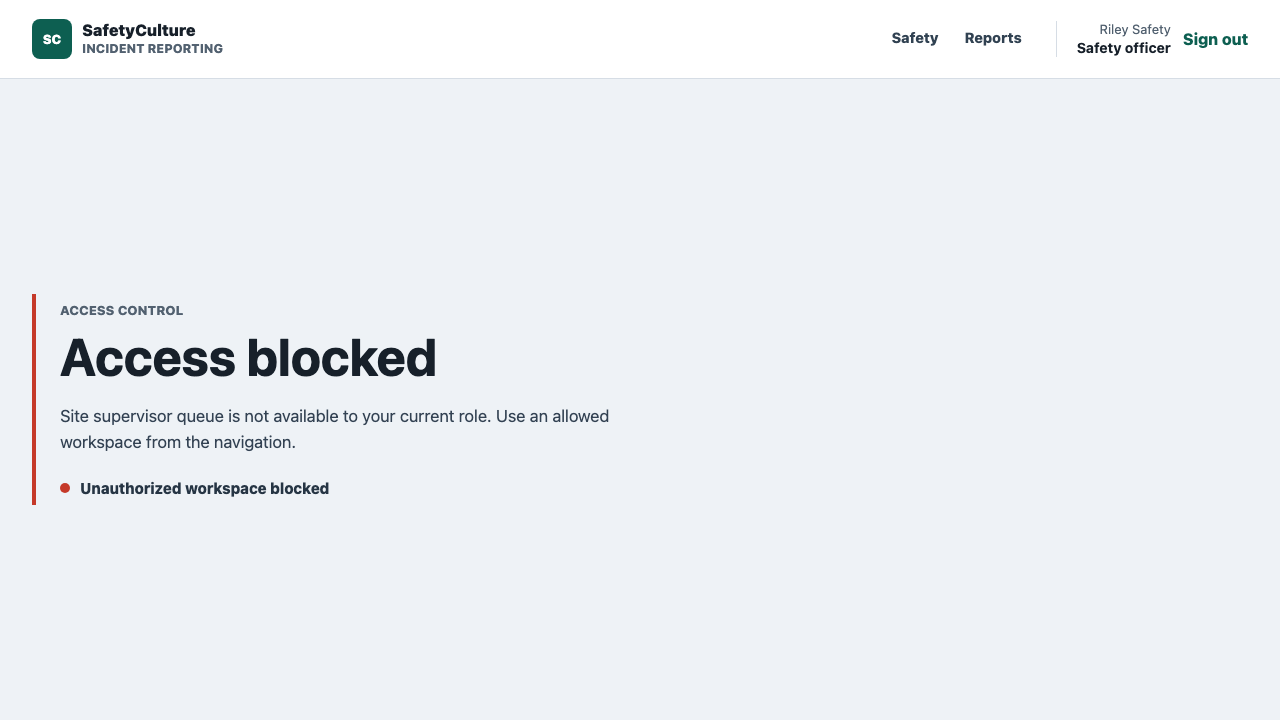
That screen is intentionally plain. A safety officer can use the Safety and Reports workspaces, but the site supervisor queue is blocked. The app shows the denial instead of silently leaking another role's workspace.
Why offline capture changes the workflow
Incident reporting automation is easy to underestimate when everyone imagines a worker at a desk with a stable connection.
That is not the field reality. A report may start in a plant room, loading dock, vehicle yard, remote site, warehouse aisle, construction area, or other place where a phone is the only practical capture device. The worker may have no signal. They may need to photograph the scene before it changes. They may need to attach a short video while still keeping urgent submission fast.
That is why this build treats media upload as workflow state instead of a file-picker detail:
- the incident can be submitted before large media finishes transferring
- photo and video metadata stays attached to the incident
- queued uploads have stable references, byte sizes, and integrity fields
- retry attempts can be audited
- reviewers can distinguish verified, pending, unavailable, and restricted evidence
That is the right shape for a workplace incident reporting workflow, WHS incident reporting workflow, or OHS incident reporting workflow where the record has to be useful later, not just convenient at the moment of capture.
How SwarmCraft structured the build
SwarmCraft started by turning the workflow problem into a project board. For this incident reporting workflow, that meant 35 tickets covering foundation work, auth, role permissions, incident domain schema, workflow state policy, API contracts, offline media sync, integration adapter boundaries, mobile field capture screens, triage and review views, audit and evidence screens, browser system tests, production hardening, CI, observability, and operational runbooks.
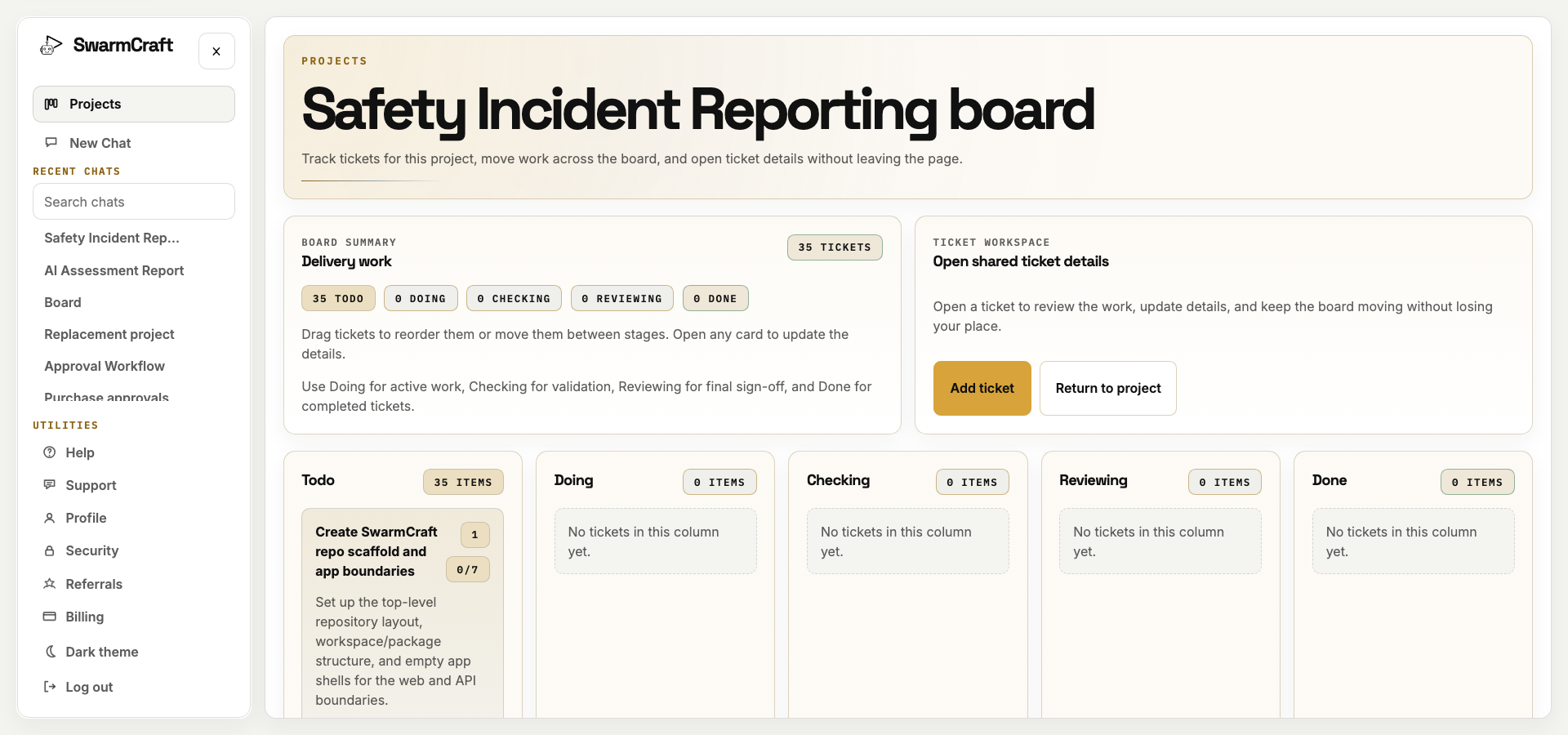
The final run closed all 35 tickets with no open work left on the SwarmCraft board. The build used 35 agent requests against a 60-request cap, and every selected ticket reached Done.
That is the sale for new readers: SwarmCraft is not a generic chat window trying to improvise a product. It is a structured, specialized build system that turns a workflow replacement idea into tickets, implementation packets, validation commands, screenshots, and a repository that can be inspected like ordinary software.
The target repo also matters. It contains app code, tests, migrations, deployment files, documentation, runbooks, decision records, browser evidence, and screenshot refresh commands. That is the difference between "AI generated an incident app concept" and "AI helped produce an owned safety workflow app."
What must be true before you retire the safety workflow
Incident records, evidence, escalation, and corrective actions are too consequential for a speculative cutover. Keep the current safety platform in service while the team discovers which inspections, assets, training, calendars, documents, analytics, and reporting capabilities are genuinely part of the incident operation—and where each should live after the exit.
The owned incident workflow becomes the first safe replacement boundary when the operation is focused and explicit:
- field capture is the bottleneck
- offline reporting is common enough to matter
- photo and video evidence needs consistent metadata
- large media must not block urgent submission
- severity routing follows a clear policy
- triage and corrective action ownership is repeatedly lost
- safety leaders need a simple view of open follow-up work
- the existing safety system is trusted, but the handoffs around incidents are weak
- the business wants to own the field workflow instead of adapting to a vendor's generic model
Before retirement, run field capture, offline recovery, severity routing, evidence handling, triage, and corrective-action handoff in parallel. Reconcile every submitted incident, prove that media and audit evidence survive failure, rehearse rollback, and name the people responsible for security, availability, retention, and regulatory change.
Inspections, training, controlled documents, or specialist compliance services may remain outside the owned incident application without preserving the incumbent as the permanent workflow owner. If the existing record and control boundaries are not yet clear, Deep Discovery is the responsible way to shape the migration before removing the current system.
For readers comparing the broader platform decision, Best safety management software, SafetyCulture alternatives, Donesafe competitors, Intelex replacement, and Safety software sprawl cover the switching question from different angles. This article is the implementation-led view: what one safety incident workflow looks like when it becomes owned software.
What this says about AI-built workflow software
The Week 04 result is commercially interesting because it handles a field workflow with real technical edges.
The agent did not need to invent safety policy. It needed to turn a clear incident workflow into a working app:
- mobile-first incident intake
- offline draft and queued submission states
- photo and video evidence metadata
- reconnect sync recovery
- severity-based routing
- supervisor triage
- safety review
- audit and evidence visibility
- role-based access control
- integration adapter boundaries
That is the kind of work where AI-assisted custom software becomes practical. The business rule is specific. The replacement boundary is controlled. The implementation can be validated through tests and screenshots. The finished app can be reviewed like any other software project.
It is also a good example of why "AI built a CRUD app" is the wrong frame. The useful work is not the form. The useful work is the workflow state around the form: offline capture, media queueing, severity routing, human handoff, audit history, and operational evidence.
What operator-builders should take from week four
Incident reporting automation works best when the trigger, required fields, field-device reality, evidence policy, severity routing, triage owner, corrective action owner, and audit expectations are already clear.
If those pieces are unclear, automation will only move confusion faster. If they are clear, a focused incident reporting workflow can remove a surprising amount of manual chasing without replacing the whole EHS system.
The mobile proof is intentionally placed last because it is long, but it is still useful evidence. Incident reporting often starts away from a desk. A field worker needs to capture the report, see required fields first, attach evidence, understand offline status, and submit without a desktop-only workflow becoming the hidden bottleneck.