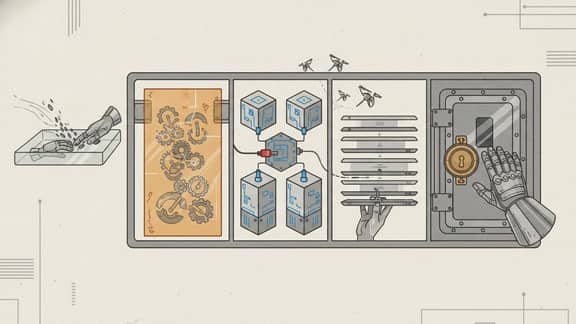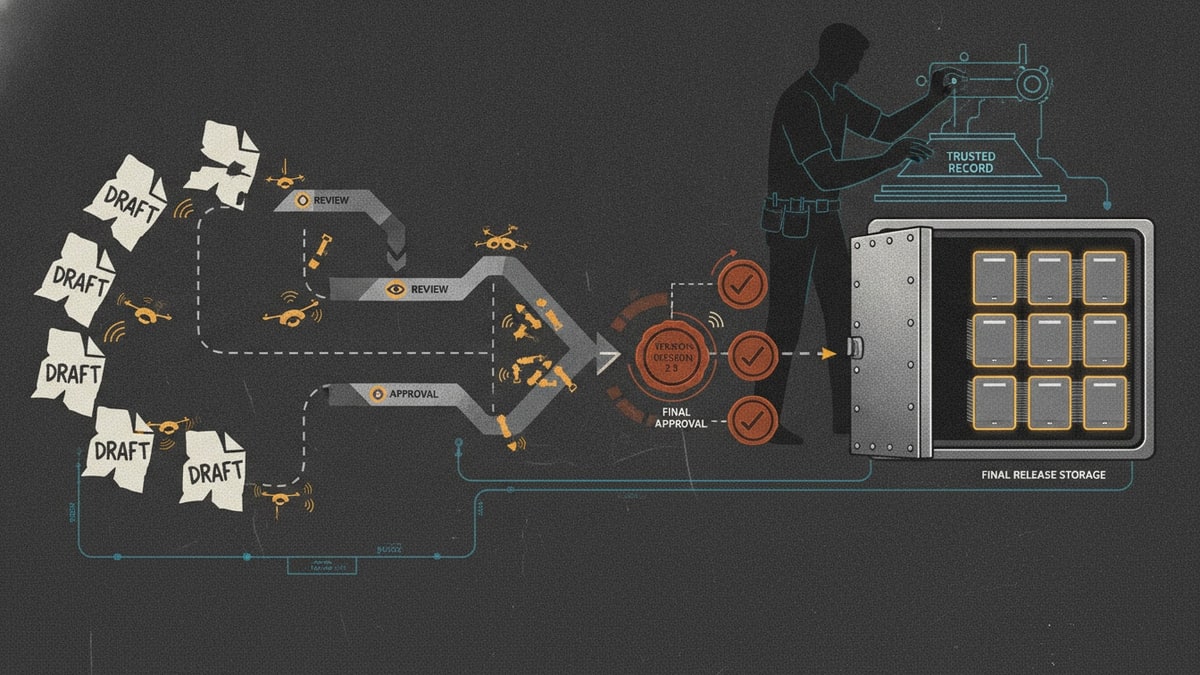
This is week five of the SwarmCraft workflow replacement case-study series. Each week is dedicated to completing one workflow replacement project end to end, then showing the finished build, implementation evidence, and what the completed software can actually do.
The workflow is document approval: a document owner uploads a source file, the system validates and converts it into a controlled review artifact, reviewers and approvers make version-aware decisions, and a document control administrator can trace the approved or rejected record later.
The target is not to clone an entire document management platform. The more interesting move is to take a substantial slice of the document operation and make it owned software: source intake, controlled conversion, review routing, approval authority, conditional signing, version evidence, publication state, and audit history in one inspectable workflow application.
That boundary matters. Document management software is valuable when a team needs a broad repository, records retention, enterprise search, document generation, collaboration, templates, legal hold, and contract lifecycle management. This build takes a serious chunk out of that operating surface without trying to replace every surrounding system. An owner-operator can pick up the repo, keep the approval and signing workflow close to how the business actually works, and continue shaping it around policy, risk, integrations, and document control practices over time.
If you want the broader category context first, start with Best document management software. This article is the implementation-led view: what one document approval workflow looks like when it becomes owned software instead of another rented document portal.
Docusign's CLM overview is useful category context because it frames contract work around creation, workflow, approval or signature, and storage. Docusign's identity verification product and Adobe's Acrobat Sign authentication methods show the same modern expectation from the signing side: signer verification should be risk-based, not one-size-fits-all. The SwarmCraft question is narrower: what should one focused approval workflow own before the organization reaches for a full CLM or signing platform?
Project stats
| Stat | Week 05 result |
|---|---|
| Implemented tickets | 38 |
| Final board state | 38 done / 0 open |
| Agent requests | 38 |
| Build runner | OpenAI Codex CLI |
| Build-lane runtime | 6h 51m |
| Tracked files | 268 |
| Tracked text lines | 33,995 |
| Test and spec files | 26 |
| System-test evidence screenshots | 10 |
| SwarmCraft setup screenshots | 2 |
The useful part is not that an AI agent generated a form with an Approve button. The useful part is that the agent worked through a 38-ticket document approval project with OIDC login, role enforcement, upload intake, malware-scan and conversion boundaries, approval state policy, signature-required workflow states, audit history, PostgreSQL persistence, browser system tests, documentation, runbooks, and a final board state.
That is the difference between "AI made a document screen" and a repository that can be inspected, run, tested, and improved.
The document approval workflow we built
The finished app handles a focused document approval process with clear roles.
| Role | Responsibility |
|---|---|
| Document owner | Starts a workflow request, uploads the source file, chooses approval-only or approval-then-signing policy, and submits the document for review. |
| Reviewer | Reviews assigned documents, recommends approval, or requests changes without having final approval authority. |
| Approver | Records final approval, rejection, or changes-requested decisions for assigned approval steps. |
| Approval coordinator | Adds ordered routing steps and signature requirements when policy requires a signing branch. |
| Internal signer | Represents an internal signing participant after approval, separate from the approver role. |
| External signer | Represents an outside signing participant for documents explicitly sent outside the organization. |
| Document control administrator | Reviews security audit events, workflow history, decisions, publication trace, and version evidence. |
The document approval process follows a focused document control workflow:
- A document owner signs in through the protected portal.
- The owner starts a document intake request with a stable document ID.
- The owner uploads one source file, up to the configured 25 MB limit.
- The browser and API accept PDF, DOCX, XLSX, PPTX, CSV, HTML, PNG, JPEG, and plain text source files.
- Upload intake rejects empty, unsupported, encrypted, password-protected, or unsafe files before workflow entry.
- Accepted source files are scanned and converted into a controlled PDF artifact for review.
- The owner chooses the workflow path: approval only, or approval then signing.
- Approval-only stays the default path. It does not ask for signer fields, recipients, or identity proofing during intake.
- Reviewers and approvers work from separate role permissions and separate decision authority.
- Approval decisions attach to the exact document version reviewed.
- Approval-only workflows can publish after approval when no signature requirement is active.
- Signature-required workflows can move into signature preparation only after approval policy is satisfied.
- Administrators can inspect workflow history, decision timeline, publication trace, and security audit events.
That is the core distinction for this article. A document approval workflow can include a signing branch without making every approval a signature event. Approval is a decision. Signature is an additional obligation when policy requires it.
Intake is more than a file picker
The intake screen is where many document workflows quietly lose control. A generic upload form accepts a file, maybe stores it somewhere, and leaves the hard questions for the next person: which version is this, what format was uploaded, is it safe to render, can it be reviewed consistently, and did this workflow actually require signatures?
The Week 05 build treats intake as the first controlled workflow state.
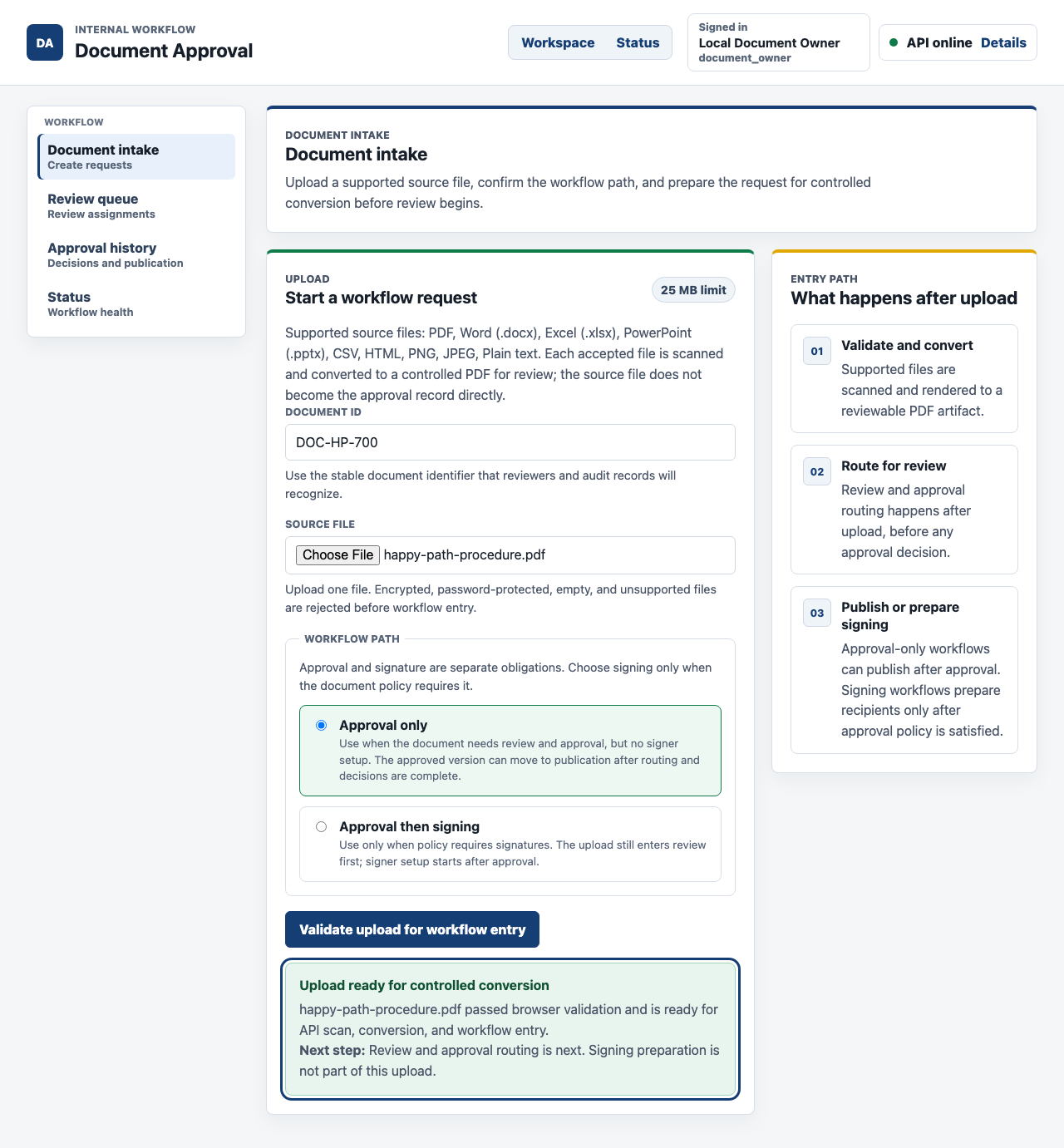
The owner does not just upload a PDF and hope the right person sees it. The intake screen explains supported source types, validates the upload, keeps approval and signature separate, and sends the accepted file toward scan and conversion before review begins.
The app is intentionally not PDF-only. PDF is the canonical review and signing artifact after conversion, but the source intake supports the documents teams already work with: PDF, Word DOCX, Excel XLSX, PowerPoint PPTX, CSV, HTML, PNG, JPEG, and plain text when conversion is available.
The API owns the serious part of that promise. It receives multipart upload, checks authorization, validates the source file, runs the scanning boundary, persists upload intake metadata, creates a conversion job, and stores a rendered PDF storage reference with a SHA-256 hash and conversion evidence reference. The workflow stores the artifact metadata needed for review. It does not turn the browser into the trust boundary.
That is where the value starts. The organization gets a reviewable record, not just another uploaded attachment.
The review queue turns decisions into operating work
Most document approval pain is not caused by a missing button. It is caused by fuzzy responsibility: one person reviews, another approves, somebody else coordinates routing, and the final record has to prove what happened later.
The review workspace makes that responsibility visible.
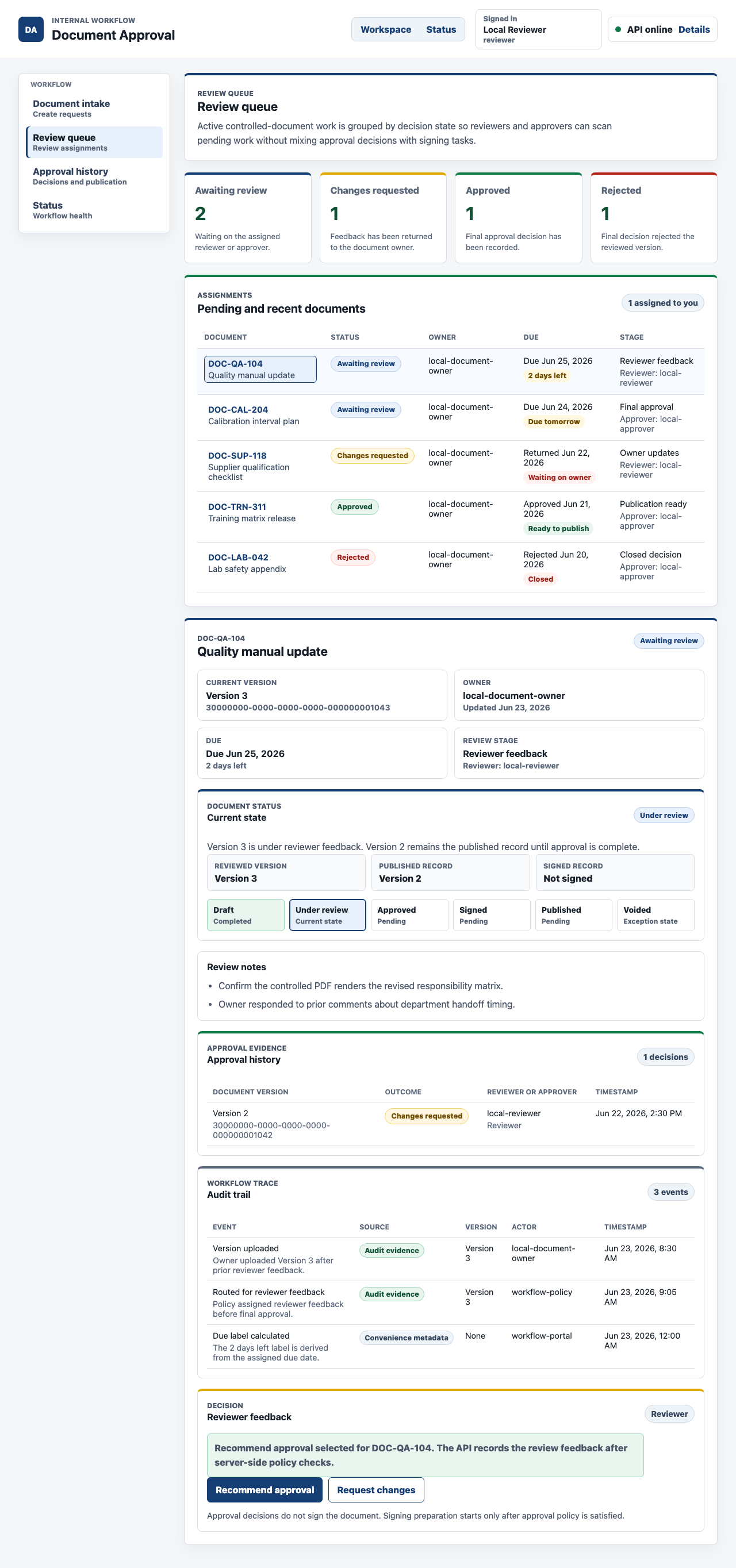
The reviewer can inspect the assigned document, see the current state, read the review notes, and make a recommendation. That recommendation is useful, but it is not final approval authority. The approver role remains separate.
That separation is not bureaucracy. It prevents an app from flattening every participant into the same "approved by" field. In a controlled document workflow, the reviewer, approver, approval coordinator, signer, and administrator often have different responsibilities. A focused workflow app should model those responsibilities directly.
Approval state is version-aware evidence
The strongest screen in the build is the approved document detail. It is dense because the real workflow is dense: current state, reviewed version, published record, signed record, workflow progression, review notes, approval history, audit trail, and a decision boundary all matter.
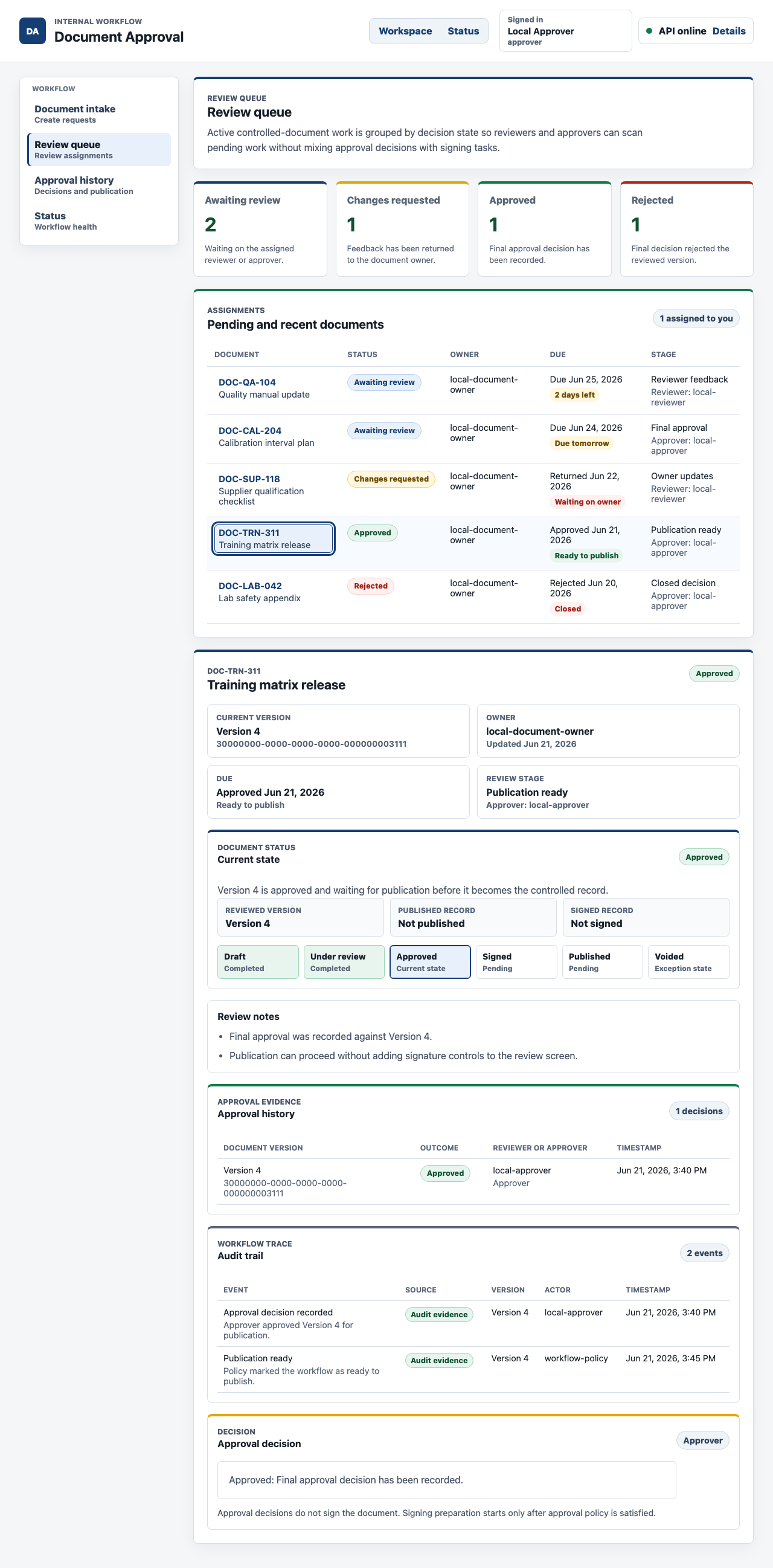
This is the operational value of a focused document review workflow. The approver can see what state the document is in, which version was approved, whether a signed record exists, and why signing preparation is outside the approval decision itself.
That version awareness is the difference between a useful approval system and a polished task list. If a document changes after review, the previous approval should not silently bless the new file. The decision belongs to the exact document version that was reviewed. The workflow history needs enough evidence to show that relationship later.
The app also keeps publication visible. Approval-only workflows can publish after approval when no signature requirement is active. Signature-required workflows move into signing only after approval policy is satisfied. A completed signature does not replace approval, and approval does not pretend to be a signature.
Exceptions are first-class workflow states
The rejection path matters just as much as the happy path. A document control workflow that only looks good when everybody approves is not ready for operational use.
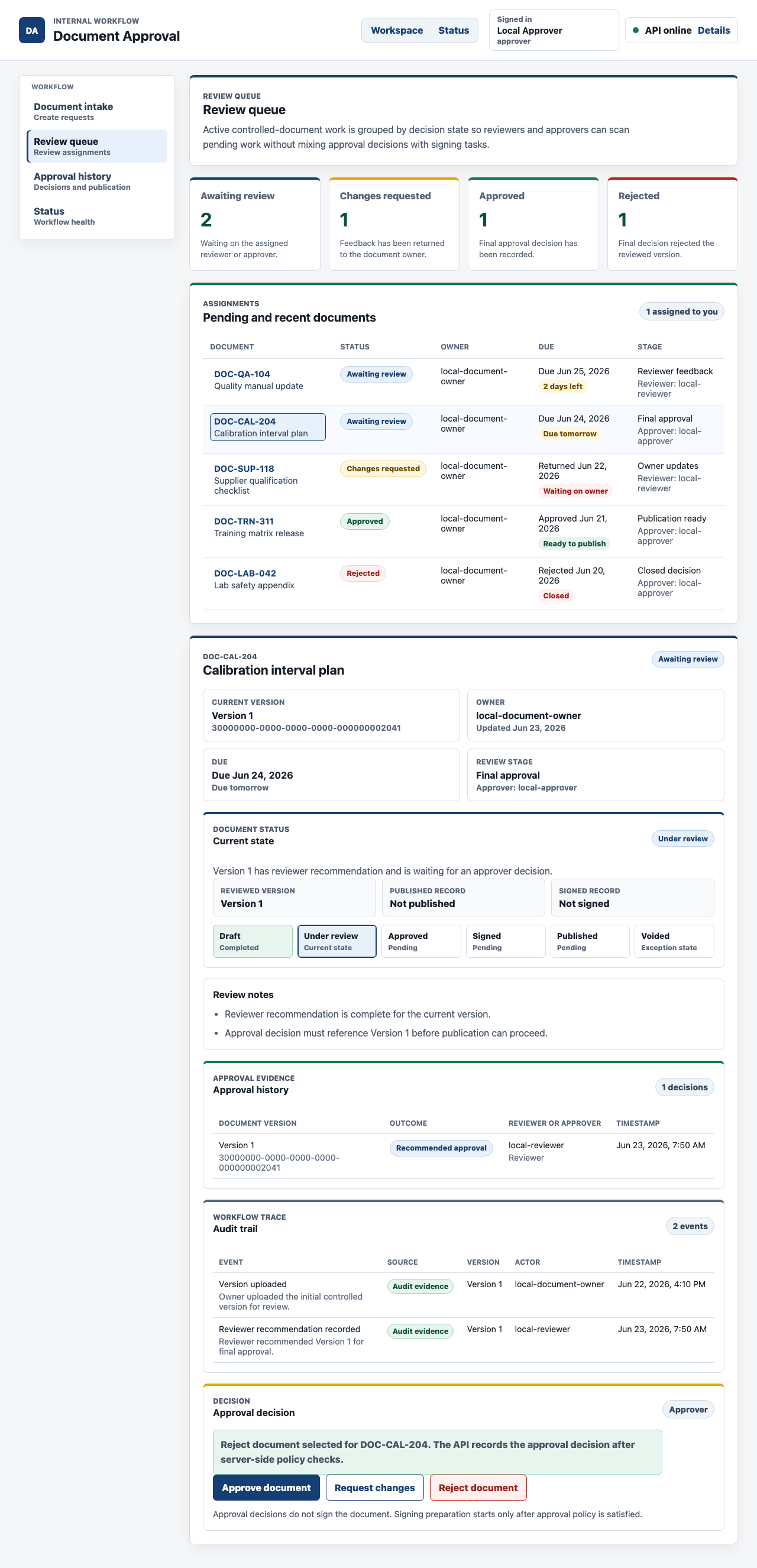
The approver can reject the reviewed version with a recorded decision and reason. That decision closes the workflow into the right terminal state instead of leaving the document in a vague "needs work" limbo.
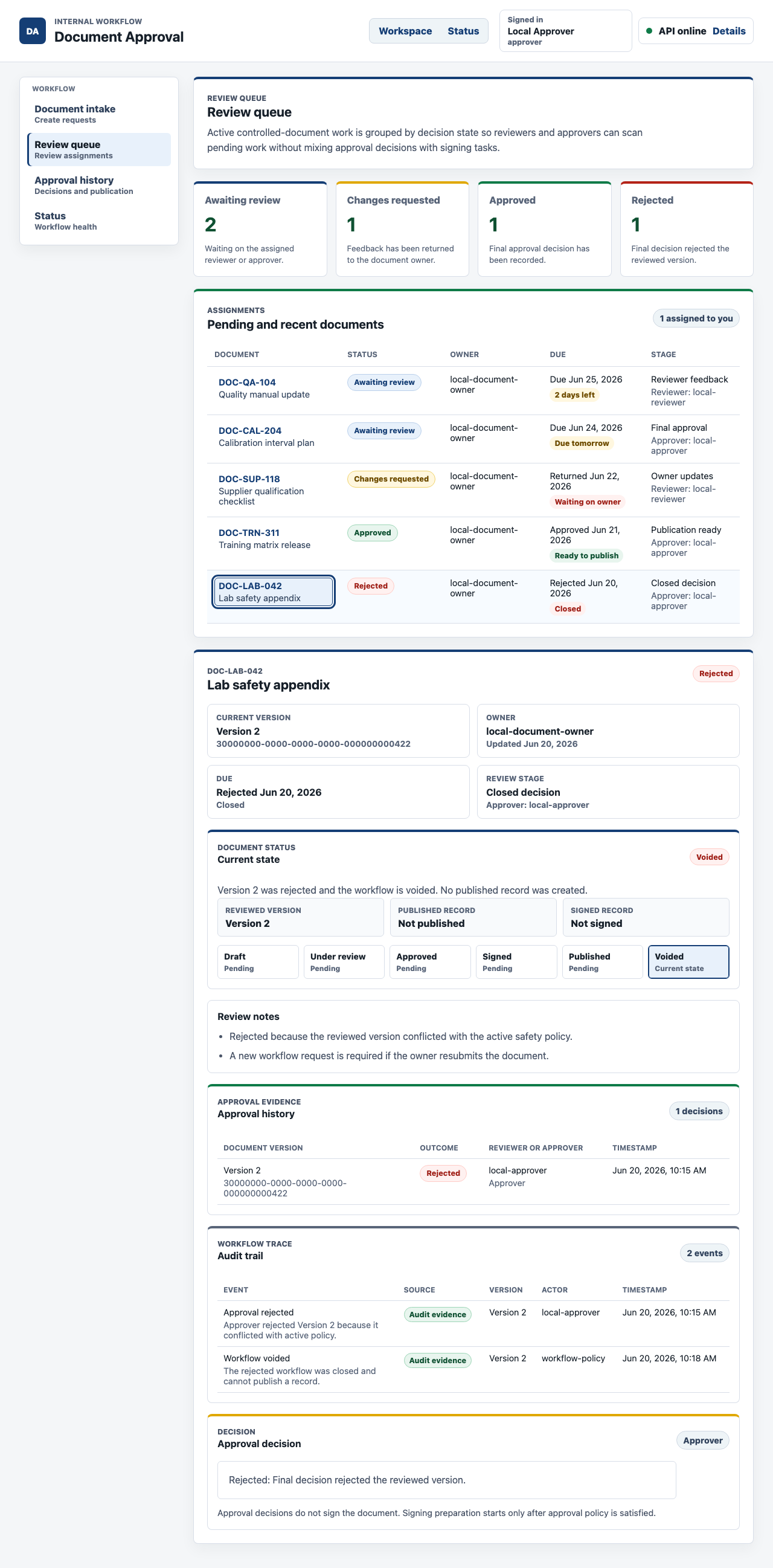
The rejected record does not pretend a failed approval is a minor comment. It shows voided status, no published record, rejection history, and an audit trail explaining why the workflow closed.
That is important commercially. Many document tools make successful approvals easy to show and exception handling hard to trust. A focused owned workflow can make the unhappy path a designed part of the system.
Access control and audit are product features
Document approval often includes policies, contracts, customer material, HR records, quality documents, controlled procedures, financial approvals, or other records that should not leak through convenience screens.
The Week 05 build uses OIDC login, HttpOnly browser session cookies, server-side role checks, and explicit route permissions. UI hiding is not the security boundary. The API owns authorization.
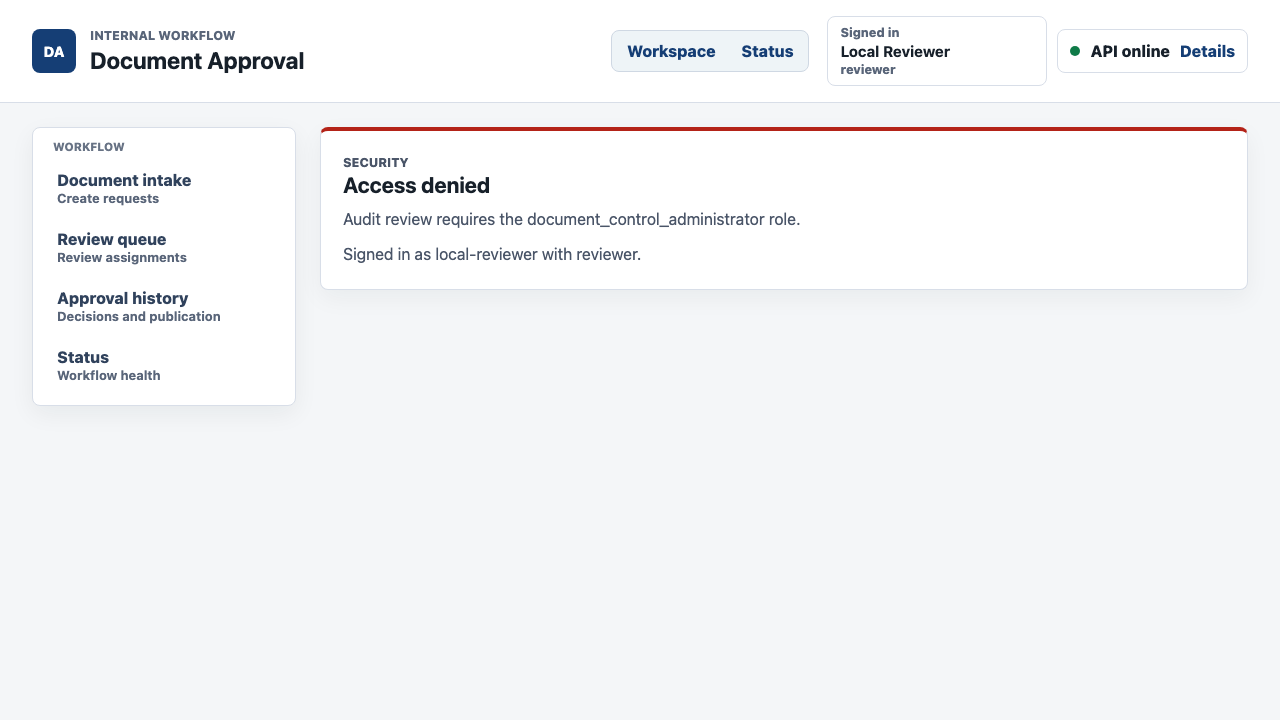
That screen is intentionally plain. A reviewer can use the review workflow, but the audit review route is blocked. The app shows the denial instead of silently leaking administrator evidence.
The administrator audit view is separate from the workflow detail. It shows security audit events in a minimized format: time, actor, action, outcome, policy, route, and request reference.
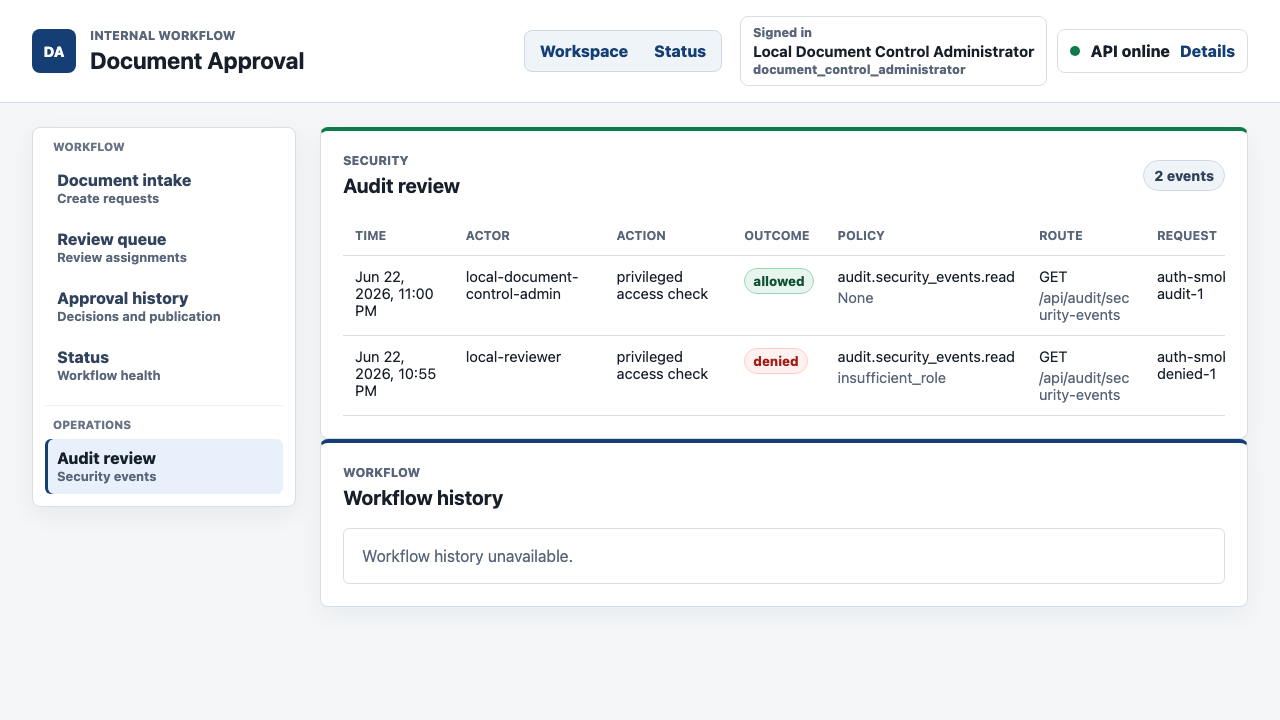
The security audit trail is append-only at the database level. It records useful evidence, but it deliberately excludes document contents, credentials, OAuth or OIDC token material, approval secrets, raw query strings, free-form identity claims, and retained identity payloads.
That is the balance a modern document workflow needs. The system should prove access decisions without turning the audit log into another sensitive data store.
Persistence proof matters
The Playwright system tests are not only regression checks. They create screenshots that let a reviewer inspect the workflow in a real browser.
The committed evidence covers:
- owner intake with approval-only upload validation
- authenticated review queue shell
- reviewer recommendation
- approver approval and approved document evidence
- approver rejection action
- rejected document audit evidence
- workflow history and approval audit status
- denied access for a reviewer trying to open
/audit - administrator security audit review
- full-stack persistence after reload in a fresh administrator session
The persistence screenshot is important because it is generated by the full-stack system test, not a route-stubbed browser fixture. The test creates a workflow request through the API, uploads a document version, routes the approval step, records the approver decision, delays the final approval call, reloads the administrator page while approval is still in flight, then opens a fresh administrator session after approval completes.
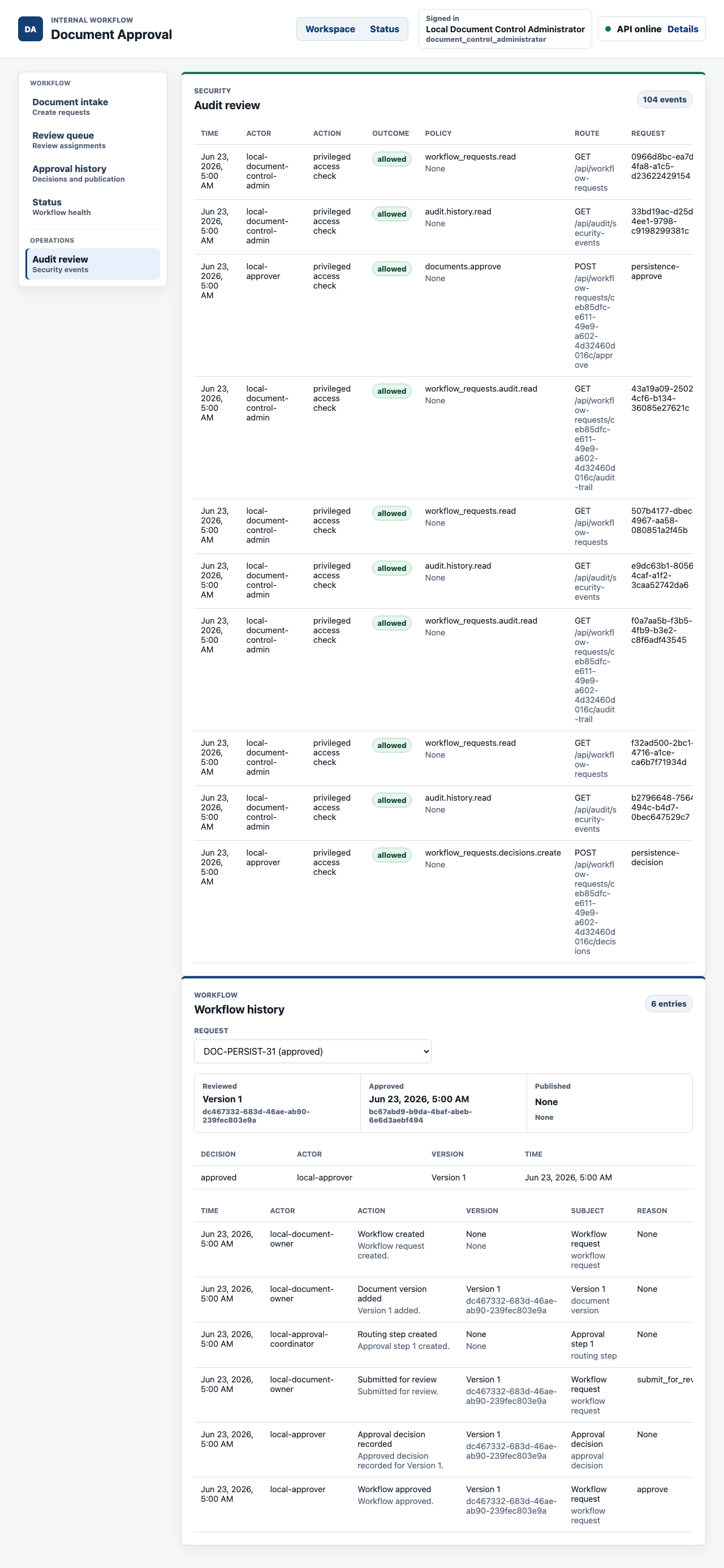
That is what a document version control workflow needs from automation. The status after reload is not just local component state. The approved workflow history is persisted and visible to the administrator later.
What the custom document approval app includes
The Week 05 build produced a working browser app, API boundary, database schema, and test evidence, not just a static document approval mockup.
| Area | Implemented capability |
|---|---|
| Document intake | Document ID, one-file source upload, 25 MB browser limit, supported file list, upload validation, and clear next-step copy. |
| Source formats | PDF, Word DOCX, Excel XLSX, PowerPoint PPTX, CSV, HTML, PNG, JPEG, and plain text accepted locally when conversion is available. |
| Scan and conversion boundary | API-owned upload intake, mock malware scanning, fail-closed scanner behavior, conversion jobs, rendered PDF storage references, output hashes, and conversion evidence references. |
| Source adapters | Stable source-document descriptor contracts for local upload, Google Drive, and Microsoft 365 style integrations without leaking vendor SDKs into the workflow core. |
| Approval versus signature | Approval-only is the default path; signing is a conditional path after approval policy is satisfied. The review screen does not pretend that an approval click signs the document. |
| Review queue | Reviewers and approvers see active controlled-document work grouped by decision state, owner, due cue, and current stage. |
| Role separation | Document owners, reviewers, approvers, approval coordinators, signers, and administrators have separate seeded roles and route permissions. |
| Approval history | Approval decisions store actor, decision, timestamp, reviewed version, and version identifiers. |
| Workflow audit | Domain audit rows show workflow created, document version added, routing created, submitted for review, decision recorded, approved, rejected, and publication-ready events. |
| Security audit | Authentication, authorization, allowed access checks, denied access, route, policy, actor, and request id are persisted for administrator review. |
| Persistence | PostgreSQL and Flyway store workflow requests, document versions, routing steps, decisions, signature requirements, upload intake, conversion jobs, storage artifacts, and audit rows. |
| Signing provider boundaries | API interfaces exist for OIDC login evidence, passkey step-up, external signer proofing, certificate-backed signing, and RFC 3161 timestamping. |
| Operations | Docker Compose PostgreSQL, production Dockerfiles, Kubernetes manifests, CI workflow, local setup, observability, release evidence, health, readiness, and rollback runbooks. |
The important pattern is ownership. The custom app owns the workflow state that matters to the business: who submitted the document, which source file was converted, which version was reviewed, who recommended, who approved, why a record was rejected, whether signing is required, and what evidence an administrator can inspect later.
Why approval and signing stay separate
Most modern document signing systems support more than a typed name on a PDF. A mature document signing workflow usually needs recipient routing, field placement, signer authentication, consent capture, signature intent, timestamped evidence, document hashes, and a completion package.
That does not mean every document approval process should force that ceremony.
The Week 05 scenario deliberately split the obligations:
| Obligation | What the workflow should do |
|---|---|
| Approval | Confirm that an accountable person reviewed a specific document version and made a decision. |
| Signature | Collect a signing act for an already approved version when document policy requires it. |
| Identity verification | Match friction to risk: normal internal approval can rely on the company identity provider, while higher-risk signing may need passkeys, government ID, eID, certificate-backed signing, or a trust-service provider. |
| Field placement | Belong to the signing branch, not the intake form. A signer-specific field map should be tied to the stable converted version so signature, initials, date, and acknowledgement fields cannot drift after a document changes. |
| Evidence package | Preserve enough metadata to prove who acted, on which version, through which method, and at what time, without copying sensitive identity payloads into general workflow records. |
The implemented app follows that split. Approval-only upload is usable today. The backend model and documentation reserve the signature path with signature requirements, signature routing, signer consent, signed artifact references, and signing provider adapters.
The build does not claim to be a full drag-and-drop signing-field editor. That would be a later signing-workflow project. For this document approval workflow, the right move was to make approval complete without forcing signatures, while leaving a realistic technical path for the documents that do need signatures.
Why this is a better first replacement than a full document suite
Buying a broad document platform can make sense. It can also bury a specific workflow problem inside a much larger operating model.
For week five, the sharper replacement boundary was the approval layer:
| Broad platform promise | Focused owned workflow equivalent |
|---|---|
| Repository | Keep the existing document estate, but own the approval request, source metadata, rendered review artifact, and version evidence. |
| Workflow builder | Encode the actual document approval state machine, role policy, routing, rejection, signature-required branch, and publication rules. |
| E-signature | Treat signing as conditional. Reserve provider-backed identity and signature evidence for documents that actually require a signing act. |
| Audit dashboard | Store workflow history and minimized security audit rows that show who acted, through which route, and against which policy. |
| Integrations | Use adapter boundaries for source documents, scanning, conversion, storage, identity, signing, and timestamping instead of making the workflow depend on one vendor's UI. |
| Governance | Keep the source code, migrations, tests, browser evidence, docs, and runbooks in an inspectable repository. |
That is the commercial case for owning the workflow. The business does not need to recreate every feature in a document management suite. It needs to own the part where operational trust is created: source intake, conversion, approval authority, version evidence, signing conditions, and audit history.
Technology implemented
The repository is a small monorepo with production-style boundaries.
| Layer | Technology |
|---|---|
| Web app | React 19, TypeScript, Vite, XState, browser route handling, accessible form states, and Playwright browser tests |
| API | Spring Boot, Java, Spring Security, OIDC login, server-side role checks, workflow controllers, and actuator health checks |
| Persistence | PostgreSQL, Flyway migrations, workflow schema, audit schema, upload intake, conversion jobs, storage artifact metadata, and seeded roles |
| Workflow rules | API-owned approval state machine, routing-step policy, approval decision policy, signature-required policy, and publication policy |
| Upload and conversion | Multipart upload endpoint, source-document adapter boundary, malware-scanning adapter, document-conversion service, rendered PDF metadata, and SHA-256 hashes |
| Identity and signing | OIDC login verification, passkey step-up, external signer verification, signing certificate, timestamping, and provider evidence adapter contracts |
| Local runtime | pnpm workspaces, Docker Compose PostgreSQL, environment examples, health endpoints, and local test commands |
| CI and release evidence | GitHub Actions, lint/test/build jobs, browser setup, container builds, evidence packaging, and artifact upload |
| Documentation | Architecture notes, feature docs, testing guide, security notes, local setup, production containers, observability, release readiness, health, and rollback runbooks |
The implementation keeps browser UI in apps/web, server-side auth and workflow enforcement in apps/api, database migrations in the API resources, and operational assets under infra and docs. That separation matters later. A future change to signature provider policy, source-document import, scan failure handling, retention, or publication rules has a clear place to go.
How SwarmCraft structured the build
SwarmCraft started by turning the document operations scenario into a project board. For this document approval workflow, that meant 38 tickets covering foundation work, OIDC login, seeded roles, server-side authorization, audit logging, workflow persistence, upload intake, document conversion, storage artifact metadata, approval history, review queue UI, signing-provider adapter boundaries, browser system tests, production hardening, CI, observability, and release runbooks.
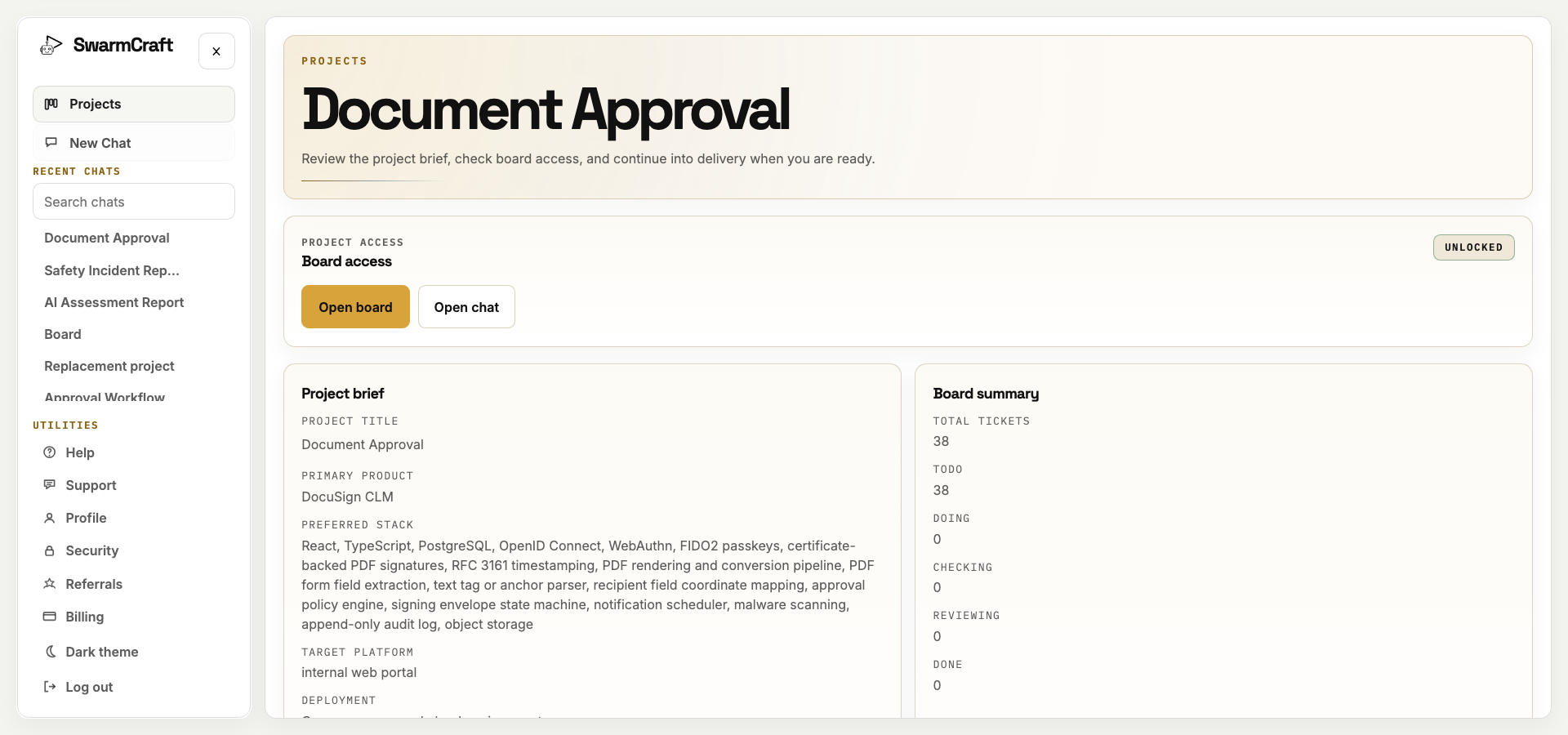
The setup matters because the prompt was not "make a document approval app." The build started from a scoped scenario, target platform, source-product reference point, actor model, acceptance expectations, and evidence requirements.
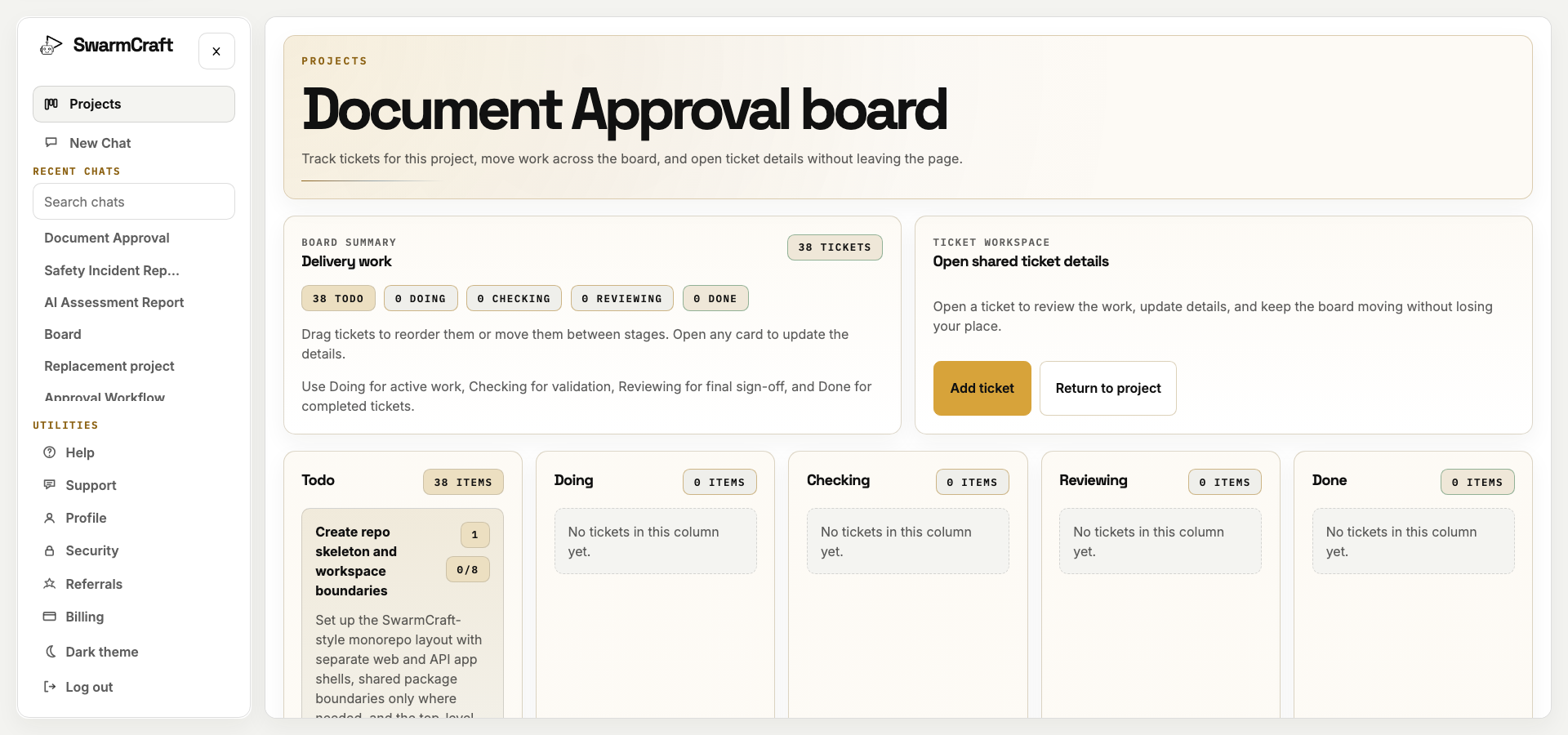
The final build closed all 38 selected tickets with no open work left on the SwarmCraft board. The build used 38 agent requests against a 60-request cap. Cost telemetry was unavailable in the run manifest, so this article reports request count rather than spend.
That is the sale for new readers: SwarmCraft is not a generic chat window trying to improvise a product. It is a structured, specialized build system that turns a workflow replacement idea into tickets, implementation packets, validation commands, screenshots, and a repository that can be inspected like ordinary software.
The target repo also matters. It contains app code, tests, migrations, production assets, documentation, runbooks, browser evidence, and screenshot refresh commands. That is the difference between "AI generated a document approval app concept" and "AI helped produce an owned document approval workflow app."
What must be true before you retire the document workflow
Do not treat repository search, retention, document generation, collaboration, records management, e-signature, legal hold, template governance, and approval as one indivisible product. Keep the current platform during discovery while the team identifies which capabilities belong in the owned operation, which should remain with specialist storage or signing providers, and which are unused bundle breadth.
The approval surface becomes a practical first exit when the workflow is focused and stable:
- document approval is the bottleneck
- review routing is predictable
- approvals are stuck across email, chat, and shared drives
- teams need version clarity more than another repository
- approval-only documents are slowed down by signature setup
- some documents need signatures, but many do not
- the business already trusts a document store but not the handoff around approval
- audit history must show who approved which version and when
- source files need conversion and provenance without turning the approval app into a full document suite
- the organization wants to own the approval workflow rather than adapt to a vendor's generic approval surface
Before cutover, migrate or reference the required versions, run representative approvals in parallel, reconcile decisions, prove conversion and evidence recovery, and confirm that retention or legal-hold duties still have an accountable home. A controlled document repository or signing provider may remain without continuing to own the approval workflow.
Once the owned application can preserve provenance, enforce version-aware decisions, recover safely, and hand approved documents to their proper destination, remove the incumbent approval surface. If the repository and workflow boundaries are still tangled, Deep Discovery can design the minimal migration and change-management path before the team commits to a wider replacement.
For readers comparing the broader platform decision, Best document management software, Document workflow sprawl, Docusign CLM competitors, and Similar to Adobe Acrobat Sign cover the category and switching question from different angles. This article is the implementation-led view: what one document approval workflow looks like when it becomes owned software.
What this says about AI-built workflow software
The Week 05 result is commercially interesting because it handles a workflow that is easy to underspecify.
Document approval sounds like a button. In practice, the useful work is around the button:
- file type support
- upload validation
- source-to-PDF conversion
- malware scanning boundary
- version traceability
- review routing
- approval decision policy
- rejection handling
- role-based access
- audit history
- persistence after reload
- conditional signing boundaries
- identity and signing provider adapter contracts
The agent did not need to replace Docusign CLM. It needed to turn a clear document approval workflow into a working app that can coexist with a broader document estate.
That is the kind of work where AI-assisted custom software becomes practical. The business rule is specific. The replacement boundary is controlled. The implementation can be validated through tests and screenshots. The finished app can be reviewed like any other software project.
It is also a good example of why "AI built a CRUD app" is the wrong frame. The useful work is not the upload form. The useful work is the workflow state around the form: source metadata, conversion evidence, approval authority, version-aware decisions, audit history, and the explicit choice not to turn every approval into a signature ceremony.
What operator-builders should take from week five
Document approval automation works best when the trigger, source file policy, approval authority, routing order, version rules, signature policy, identity expectation, and publication state are already clear.
If those pieces are unclear, automation will only move confusion faster. If they are clear, a focused document approval workflow can remove a surprising amount of manual chasing without replacing the whole document management system.
The most important design choice in week five was keeping the story centered on approvals. Signing is valuable, and modern signing systems need serious identity and evidence controls. But signatures are conditional. A signature should appear when policy requires a signing act, not because the approval workflow had nowhere else to put trust.
That is the practical lesson: automate document approvals around version clarity, role authority, and audit evidence first. Add signing only where the document policy actually calls for it.