This is week nine of the SwarmCraft workflow replacement case-study series, and this build goes beyond automating one support ticket escalation workflow.
Small companies are often told to keep Zendesk, Freshdesk, or another help desk as the customer-service system of record and automate only the awkward edges around it. That advice assumes the breadth accumulated inside a long-lived SaaS product is the benchmark for a credible support system.
It is the wrong benchmark.
The useful benchmark is the support operation the company actually runs. For a small software company, that may be a website, email, a knowledge base, a handful of agents, and an occasional engineering handoff:
What if a few focused workflows are the entire support operation you actually need?
Week nine tested that question by building an owned support operation. It contains several connected workflows: customer intake, email threading, triage, agent resolution, queue management, sensitive escalation, and engineering handoff. The application owns the durable ticket and conversation record that holds those workflows together.
Customers can submit a structured request through a website. Agents get customer context, status, service-level state, source-grounded AI assistance, private notes, and explicit customer-visible actions. Leads get queue health and a Kanban board. Sensitive decisions pause for human review. Engineering receives a bounded evidence packet while the support ticket remains the customer communication record.
This application does not reproduce every Zendesk feature, because that is not the goal. It is the smallest coherent support operation this company needs: a source-controlled foundation an owner-operator can deploy, connect to real providers, and continue moulding as genuine requirements emerge.
If you want the category comparison first, start with Best help desk software. If your current problem is tool duplication rather than ownership, read Why support stacks sprawl when escalation paths are unclear. If Zendesk is already under review, continue with Zendesk alternatives.
The licence bill creates a budget for ownership
Zendesk's current customer-service pricing starts its Suite plans at $55 USD per agent per month when paid annually. Suite Professional is $115 per agent per month, and the agent-facing Copilot add-on is another $50 per agent per month.
For a ten-agent support team, that creates three useful reference points:
| Annual subscription example | Ten agents | Twenty agents |
|---|---|---|
| Suite Team at $55 per agent/month | $6,600 | $13,200 |
| Suite Professional at $115 per agent/month | $13,800 | $27,600 |
| Suite Professional plus $50 Copilot | $19,800 | $39,600 |
At the last level, three subscription years are $59,400 for ten agents or $118,800 for twenty agents, before outcome-priced AI usage, implementation help, other add-ons, internal administration, or future price changes.
Owning the application does not eliminate operating costs. It changes what the company pays for. Hosting, email delivery, identity, monitoring, backups, security work, provider usage, maintenance, and incident response replace a recurring per-agent licence for a broad product roadmap controlled by somebody else.
The avoided licence growth creates an economic envelope for ownership.
A ten-person software company using email, a support form, straightforward routing, a small knowledge base, and occasional engineering escalation may be paying rent on a much larger operating model. Omnichannel operations, quality management, workforce management, telephony, advanced analytics, multiple brands, and a large integration ecosystem have value only when the company actually needs them.
The ownership calculation is therefore practical: use a few years of avoided licence growth to fund a focused system, then spend ongoing money on the infrastructure and improvements the operation really uses.
The boundary we chose
The build owns the support ticket and its message thread. That is a genuine system-of-record decision, unlike previous weeks where an upstream HRIS, LMS, CRM, repository, or compliance platform remained authoritative.
The first release is deliberately bounded around the website-and-email support operation:
- website help, structured intake, and authenticated customer history
- email ingestion, threading, outbound delivery state, and retry-safe identifiers
- ticket state, priority, queue, assignee, service-level state, and audit events
- retrieval-grounded AI contracts for classification, summaries, missing information, and drafted replies
- human review before an AI-assisted customer commitment
- private notes and customer-visible messages as separate concepts
- queue health, ageing work, workload, and a lead Kanban board
- structured engineering escalation through a GitHub adapter
- attachment quarantine, scanning, and clean-file retrieval boundaries
- role and queue-scoped authorisation
It does not attempt to become a CRM, billing platform, contact centre, workforce scheduler, social-media inbox, marketing suite, or broad IT service-management product.
Those omissions are not a backlog inherited from Zendesk. They are products and workflows outside the operation this application owns. If the company later needs another channel or control, the owner can add it to the source-controlled foundation in response to real work rather than buying every possible future edge case in advance.
That boundary is the point: own the website-and-email support operation the team actually runs, including its records, without reproducing the suite assembled for everybody else.
Project stats
| Stat | Week 09 result |
|---|---|
| Planned implementation tickets | 40 |
| Final board state | 40 done / 0 open |
| Build runner | OpenAI Codex CLI |
| Agent executions | 40 |
| End-to-end driver runtime | 3h 19m |
| Active agent-stage runtime | 3h 04m |
| Tracked files after evidence capture | 205 |
| Tracked text lines | 26,341 |
| Test and spec files | 40 |
| PostgreSQL migrations | 8 |
| Article browser checks | 19 passing |
| Unit and script checks | 72 passing |
| Reviewed target-system screenshots | 11 |
| SwarmCraft planning screenshots | 2 |
The run survived a workstation crash and resumed without rerunning completed tickets. The final driver state records all 40 tickets as done, with no open, blocked, checking, reviewing, or manual-review outcomes.
The statistics prove that an AI build agent can create a substantial production-shaped support foundation quickly. The next evidence should come from operating it: connect the chosen providers, deploy it, restore-test it, carry a real queue, observe failures, and shape the application around what the team learns. It does not need to reproduce years of other companies' help-desk edge cases before that work can begin.
The support workflows inside the operation
The owned operation has five accountable actors.
| Role | Responsibility |
|---|---|
| Customer | Describes the problem, supplies safe evidence, follows the conversation, and confirms whether the outcome works. |
| Support agent | Triages the request, reviews AI assistance, asks for missing information, communicates with the customer, and owns resolution. |
| Support lead | Monitors queue pressure, service levels, assignments, blocked work, and escalation decisions. |
| Product or engineering specialist | Investigates a bounded technical packet without taking over the customer conversation. |
| Support administrator | Manages privileged access and reviews safe security-audit evidence. |
Together, its intake, triage, resolution, escalation, and management workflows form this operating sequence:
- A customer opens the help site or sends ordinary email.
- The system creates or locates a durable ticket and appends the original message without losing its channel identity.
- Structured intake records product area, environment, impact, urgency, attempted fixes, and attachment metadata.
- Attachments remain quarantined until the scanning boundary reports a clean result.
- AI can classify the request, summarise the thread, identify missing information, retrieve approved sources, and draft a cited response.
- The draft remains a proposal. Confidence, sources, missing information, and the human-review requirement stay visible.
- An authorised agent claims or receives the ticket, adds private context separately, and sends only an explicitly reviewed customer message.
- Service-level state and queue ownership remain explicit as work moves between new, active, waiting, escalated, resolved, closed, or reopened conditions.
- A complex product defect becomes a structured engineering packet containing impact, environment, reproduction context, attempted fixes, and a stable support reference.
- The GitHub issue can change independently while the support ticket remains the record of customer communication.
- Resolution records the final customer-visible reply, state change, actor, time, and audit event.
- A returning customer can read the same conversation and outcome without seeing private notes, AI context, queue data, or internal audit evidence.
The purpose of support workflow automation is not to remove people from the conversation. It is to remove the repeated reconstruction work around the conversation.
Customer intake is simple because the complexity sits behind it
The public form asks for the minimum structured context needed to start useful work. Privacy and attachment guidance sit beside the fields rather than appearing after a customer has already sent unsafe material.
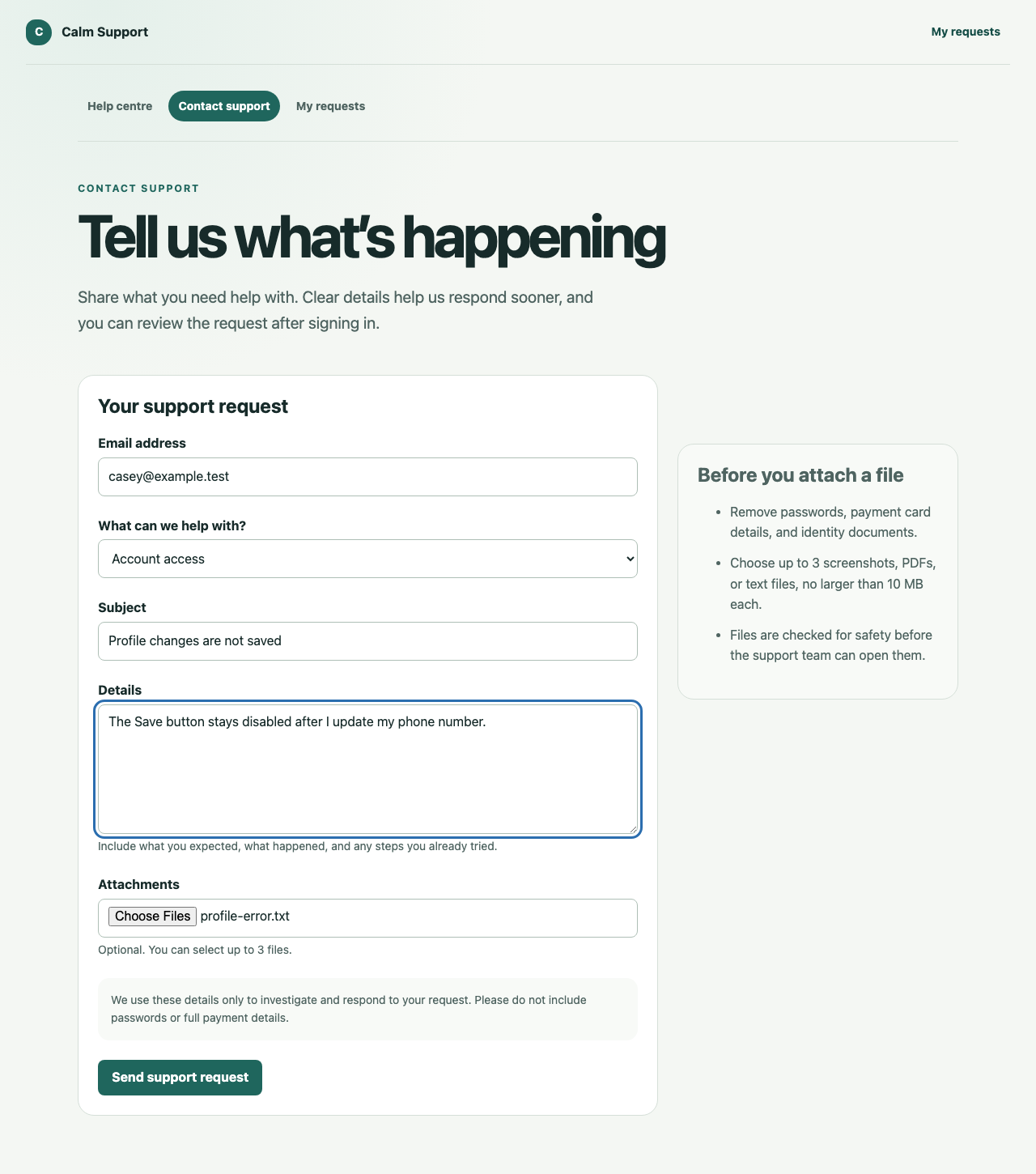
The received state appears only after the deterministic API accepts the request and returns a stable reference.
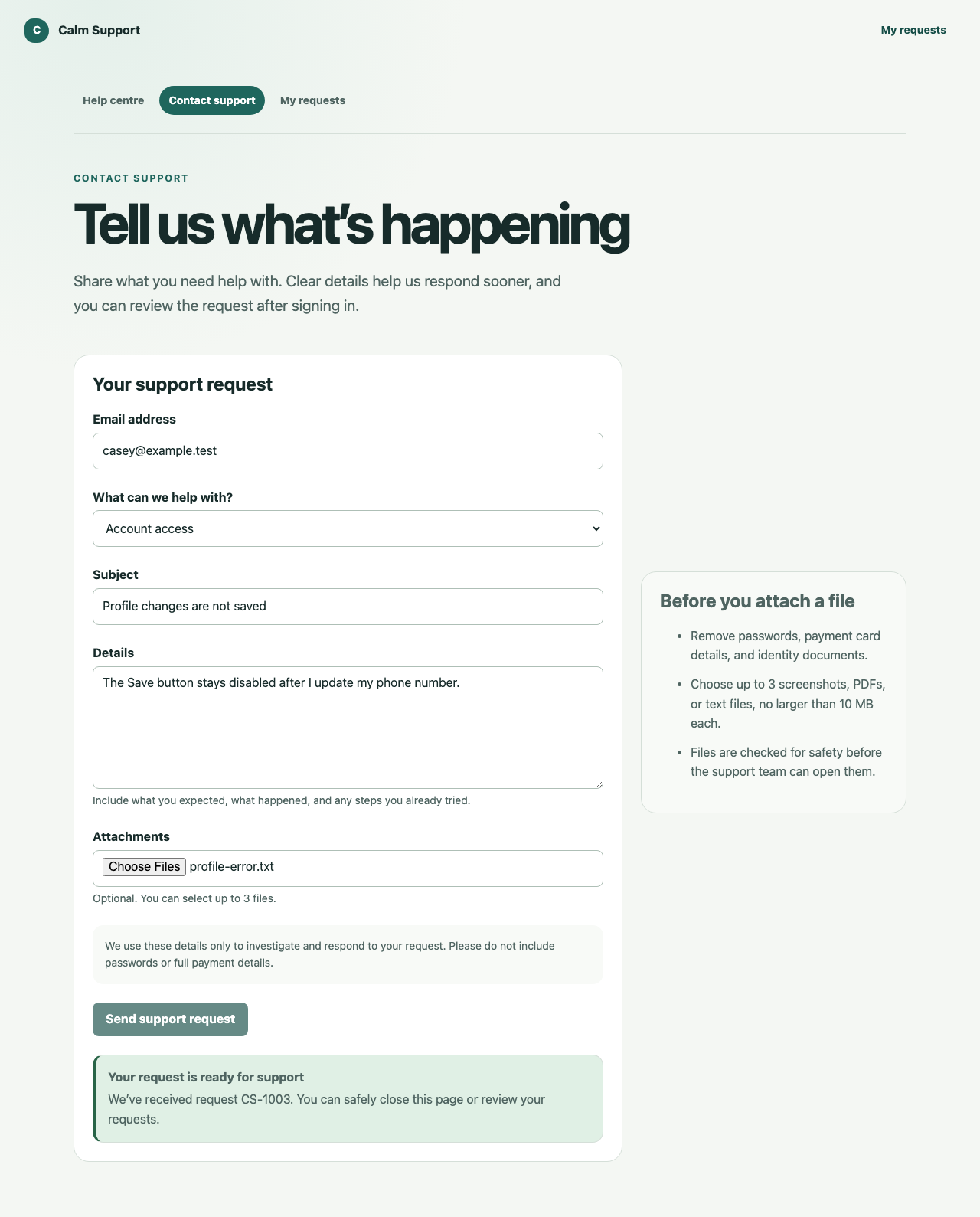
The production email adapter is not bundled with a provider credential, but the implemented email workflow is more than an interface placeholder. It persists tickets, messages, provider identifiers, thread mappings, outbound attempts, safe failures, and idempotency keys. Duplicate inbound webhooks cannot silently create duplicate conversations, and outbound retries reuse the same message identity.
AI assistance is evidence, not authority
The agent workspace brings the conversation, customer context, service-level state, cited suggestion, missing information, confidence, next actions, and recent audit events into one view.
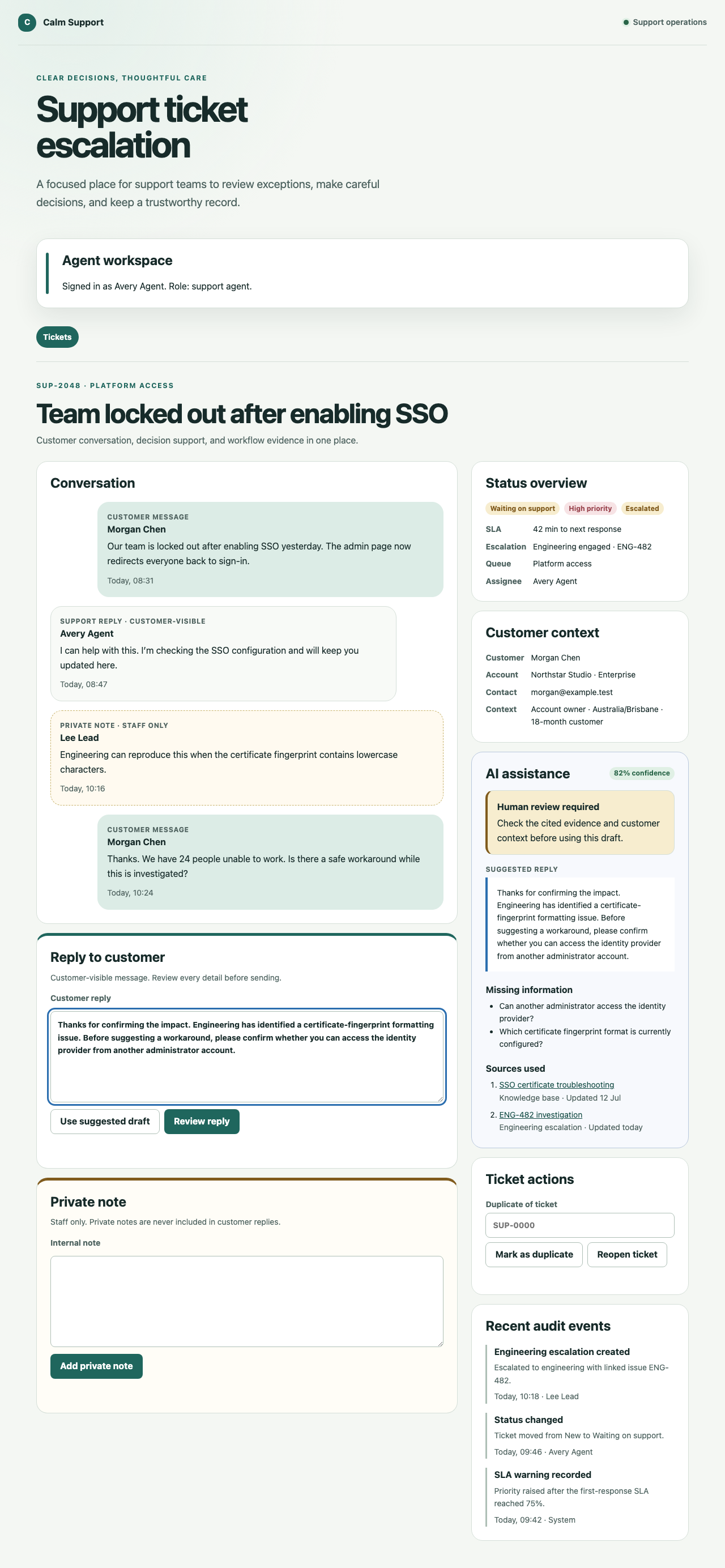
The AI gateway implements contracts for classification, summarisation, missing-information detection, and response drafting. Every request receives only the permitted ticket fields and retrieved sources. Retrieved content is labelled untrusted, unknown source citations are rejected, and every draft must return requiresHumanReview: true.
That does not mean the screenshot proves a live OpenAI request. The browser evidence uses deterministic local fixtures, and the AI gateway's focused integration suite uses a mock adapter so tests are repeatable and independent of model drift. The production boundary, validation, structured-output contract, configuration, logging exclusions, and failure states exist; connecting and evaluating the chosen live model remains production work.
This is the correct order. First build the policy and evidence boundary. Then introduce a model into a system that already knows what the model is allowed to see and what it is never allowed to decide.
Resolution updates both sides of the conversation
The connected system test submits a real request through the customer form, opens it in the staff workspace, sends a customer-visible resolution, and verifies the resulting state and audit evidence.
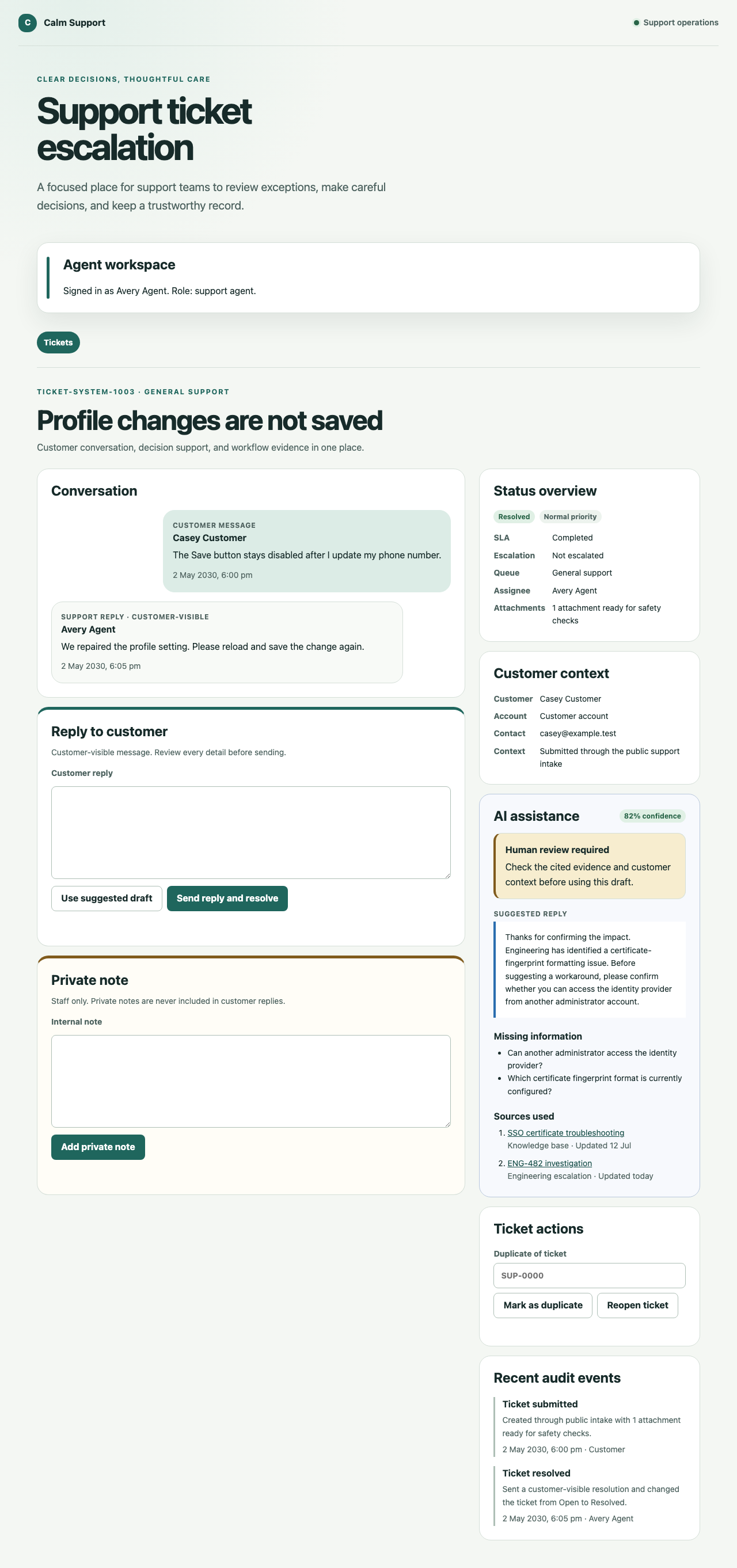
The customer then signs in and sees the same resolved conversation in a deliberately smaller information boundary.
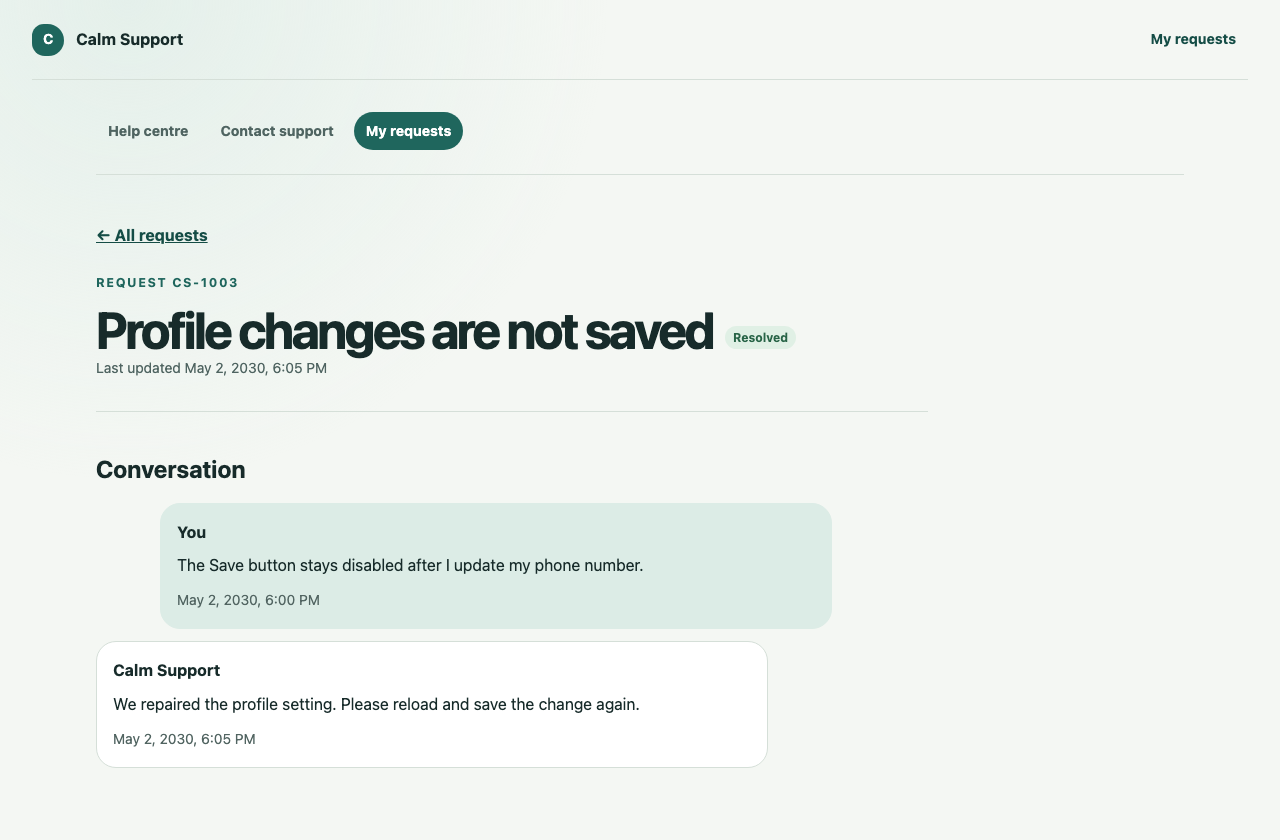
The private support context is absent. There is no AI confidence, internal investigation, assignee, queue, audit actor, or private note in the customer view. That separation is part of the workflow model, not a polite browser convention.
Queue health turns escalation into operations
Escalation becomes expensive when the lead cannot see it until someone complains. The lead workspace combines open work, unassigned tickets, ageing work, near-SLA risk, workload, ticket progression, blocked work, and an attention queue.
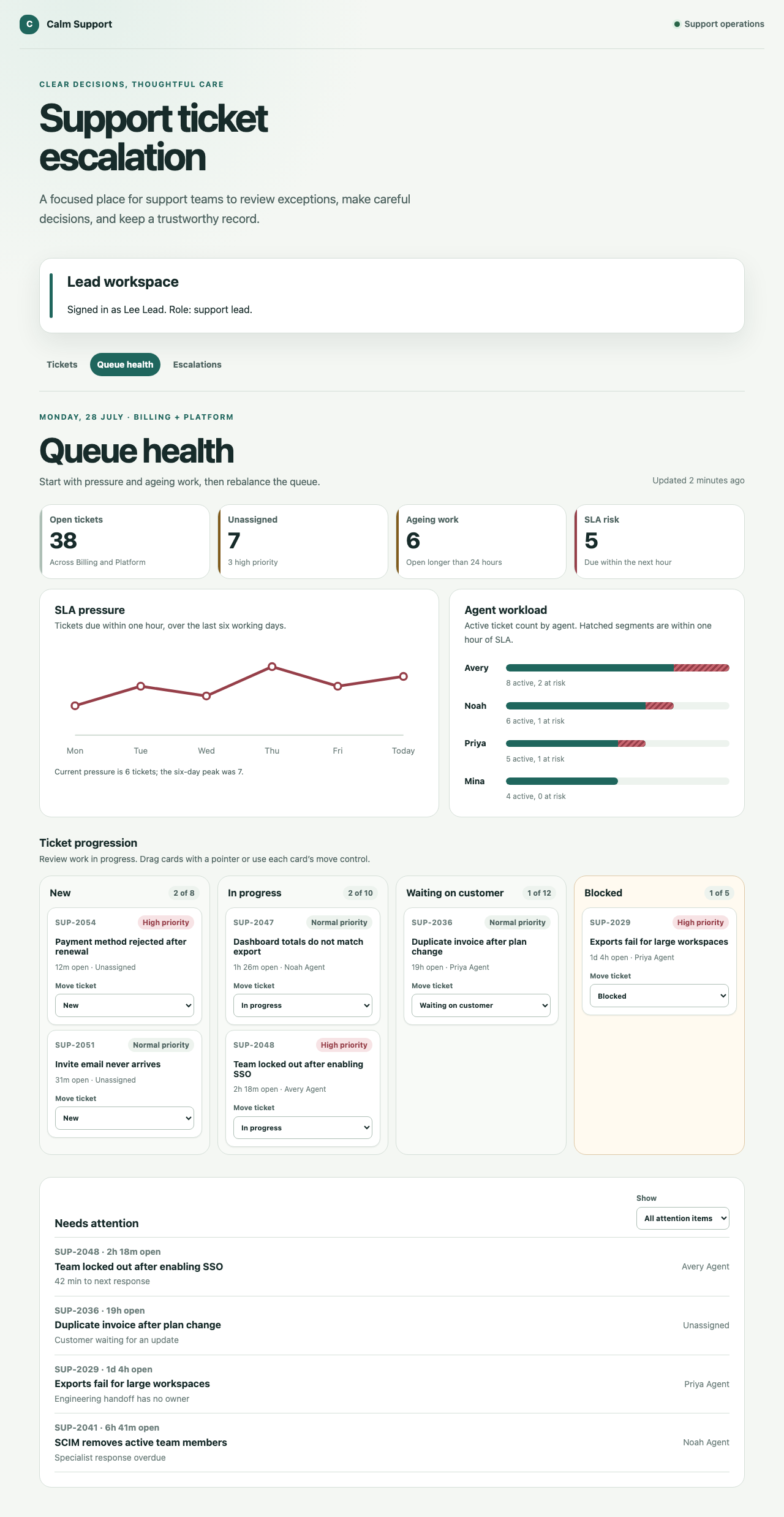
The Kanban board makes state and capacity visible. Every move has a keyboard-accessible control as well as a pointer interaction.
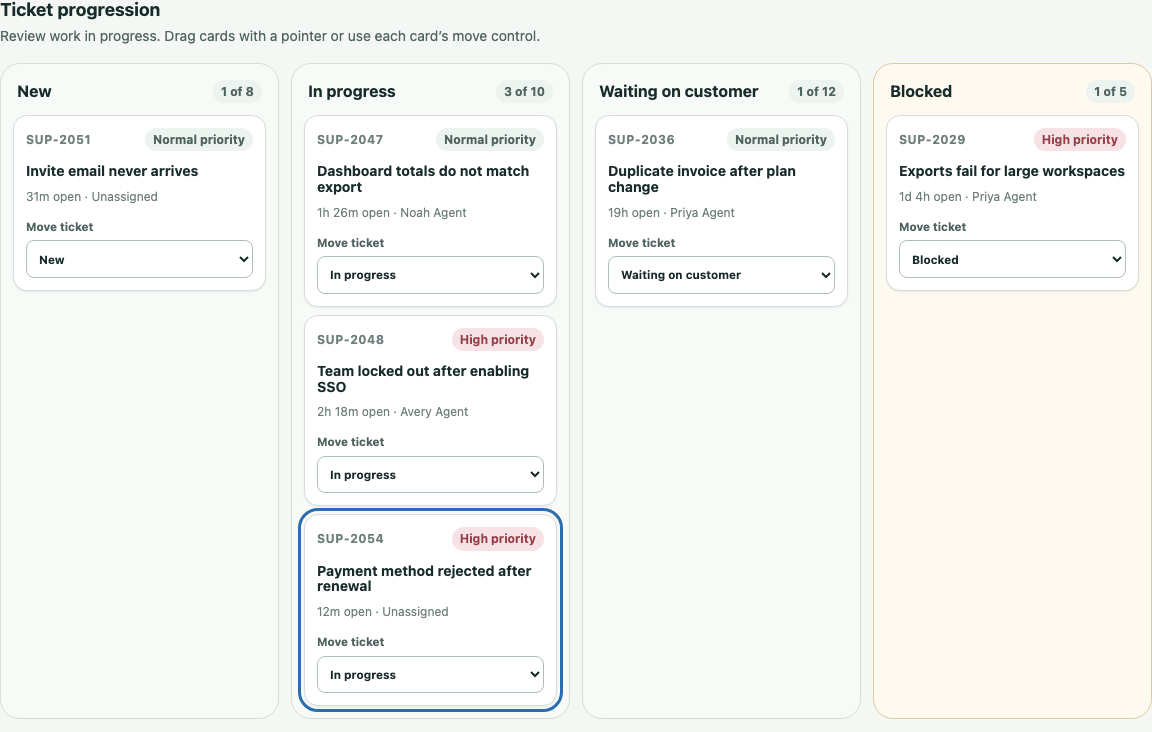
There is an important implementation boundary here. The lead dashboard currently uses deterministic local queue fixtures, and its board moves are browser-preview state rather than persisted server mutations. The screenshot proves the operating model, responsive interaction, accessibility, and information design. Production work still needs to connect that surface to the server-authoritative ticket state machine and service-level calculations.
This distinction is why browser evidence is useful only when paired with source inspection. A convincing screen is not automatically a completed backend capability.
Human review protects sensitive escalations
The specialist workflow shows the state, accountable reviewer, decision controls, and append-only submission evidence for a pending escalation.
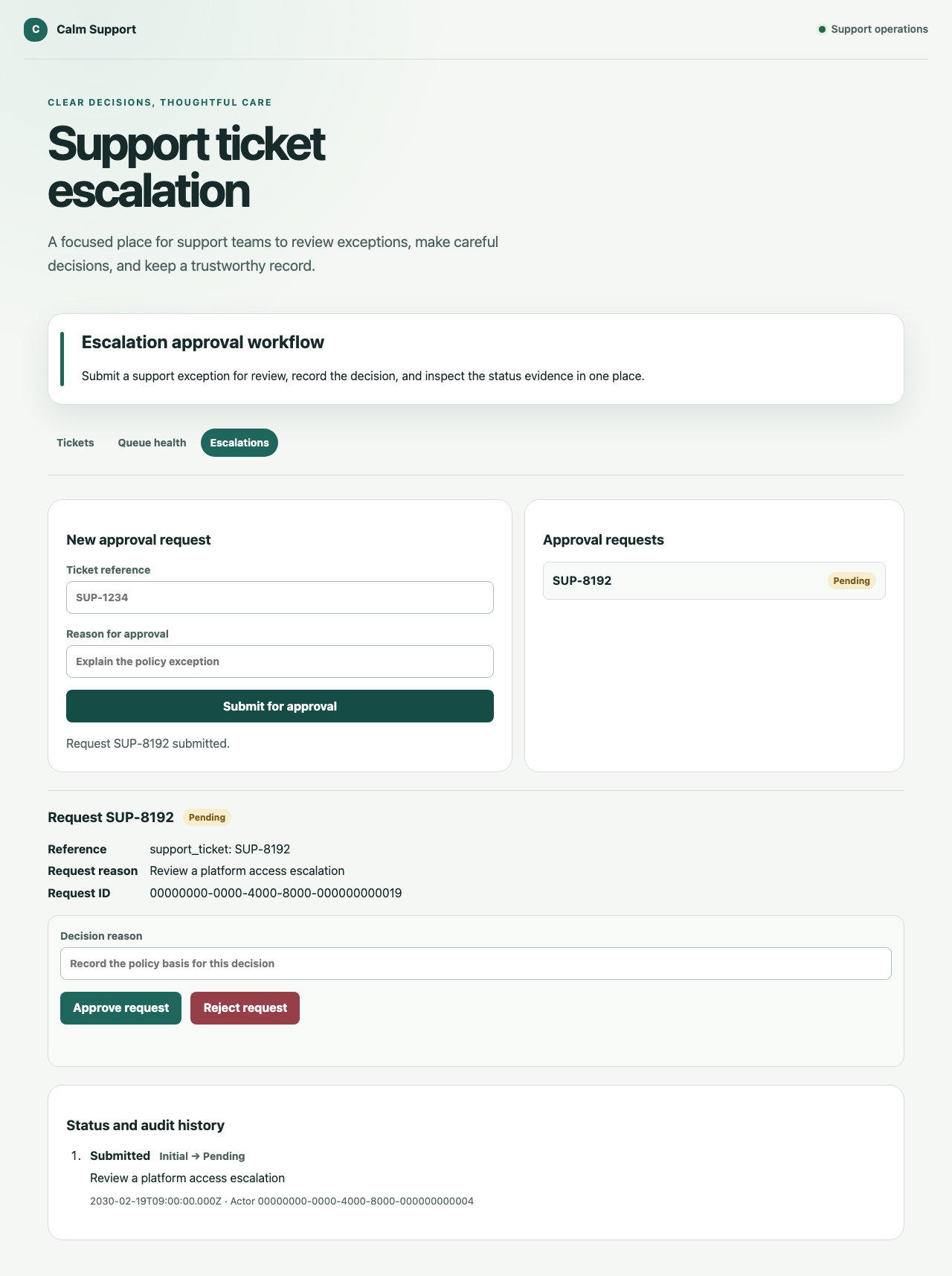
The persisted approval workflow validates transitions on the server and separates request, assignment, decision, and history. An assigned request cannot be decided by a different reviewer, and a terminal decision cannot be quietly overwritten by a later browser action.
This gives the customer support escalation workflow a deliberate pause point for security-sensitive advice, privacy issues, billing commitments, high severity, weak grounding, or low confidence. AI may assemble the packet. A person owns the commitment.
Governance is visible without exposing customer content
The administrator audit surface records safe identifiers, action, target type, outcome, time, request ID, and bounded permission context.
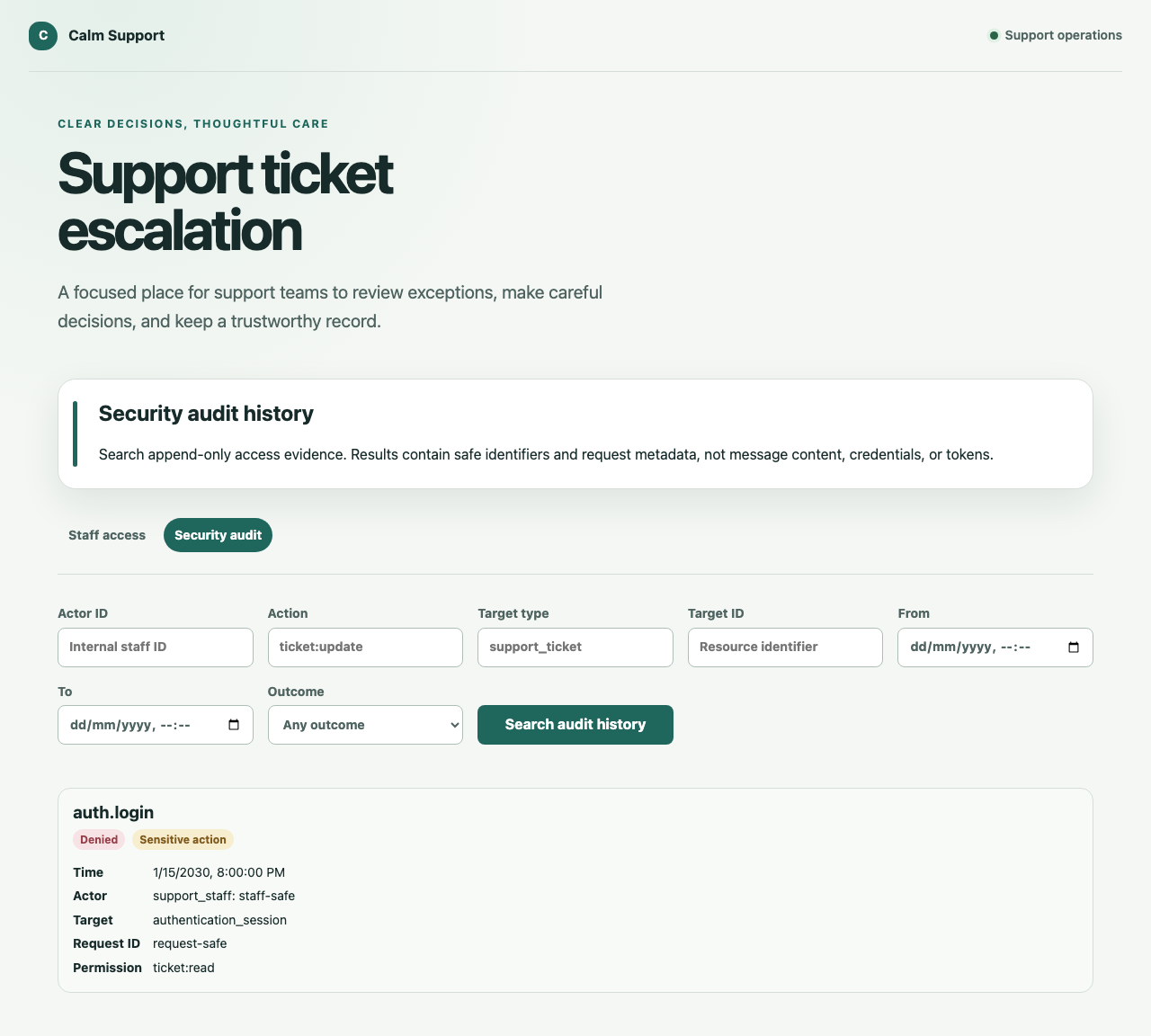
Security audit rows are append-only in PostgreSQL. Updates, deletes, and truncation are rejected. The records intentionally exclude message bodies, passwords, tokens, cookies, provider payloads, raw errors, and arbitrary request context.
Authorisation is enforced by the API as well as the navigation. An authenticated support agent who attempts to open an administrator surface receives a clear denial and no privileged data.
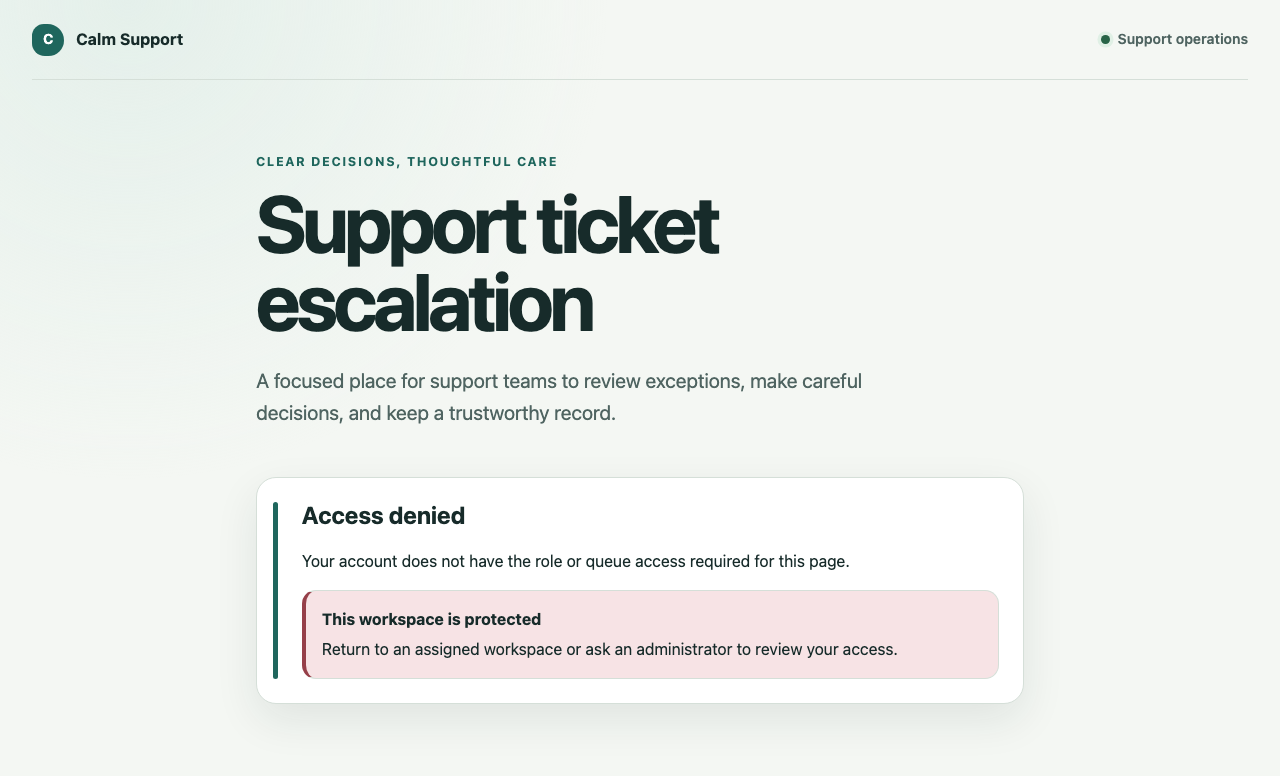
That is a more meaningful help desk workflow automation test than hiding an admin link. Direct requests still need to fail safely.
What the owned support operation includes
| Capability | What was implemented | Next work for live operation |
|---|---|---|
| Customer website | Help route, structured intake, privacy guidance, attachments, authenticated history, safe empty/error states | Production customer identity, live knowledge search, and provider hardening |
| Ticket and conversation | Durable website resolution vertical plus persisted email ticket/message/thread model | Unify every browser action with the complete persisted state machine |
| Inbound normalisation, thread matching, deduplication, outbound attempt state, and retry-safe identifiers | Connect a production email provider and delivery webhooks; add HTML and attachment handling | |
| AI assistance | Validated gateway for classification, summary, missing information, and cited drafts; mandatory human-review output | Connect, evaluate, monitor, and govern the selected live model and retrieval index |
| Attachments | Quarantine, checksum, scanning, clean-file retrieval, blocked infected/unavailable states | Production object store, malware scanner, retention, and deletion policy |
| Agent workspace | Conversation, separate reply/private-note surfaces, status, context, AI evidence, actions, and audit timeline | Persist private-note, duplicate, and reopen preview actions |
| Lead operations | Queue metrics, SLA pressure, workload, Kanban, attention filters, and accessible movement | Server-authoritative queue mutations, business-hours timers, and live workload data |
| Engineering handoff | Persisted evidence packet, GitHub adapter, stable external reference, retry and conflict protection | Production token, repository policy, reconciliation jobs, and operational ownership |
| Approval workflow | Persisted request, decision, assignment, validation, and audit history | Extend policies for every sensitive support commitment |
| Security | OIDC session foundation, role/capability checks, queue scopes, denials, and append-only audit | Threat modelling, penetration testing, retention, and production identity assurance |
| Delivery | Containers, Kubernetes configuration, CI evidence, observability, rollback, recovery, and secret runbooks | Deploy, load test, restore-test, monitor, and operate it under real service objectives |
The final column is not a list of missing Zendesk features. It is the concrete work an owner-operator would do next to connect and run this foundation in their environment. After that, the application should grow from observed support needs rather than an incumbent comparison grid.
Technology implemented
| Layer | Week 09 implementation |
|---|---|
| Browser application | Responsive JavaScript application with customer, agent, lead, specialist, and administrator surfaces |
| API | Node.js HTTP services for sessions, authorisation, ticket operations, workflow decisions, integrations, and audit |
| Persistence | PostgreSQL with eight versioned Flyway migrations |
| Identity | OIDC login, opaque database-backed sessions, provisioned staff roles, capabilities, and queue scopes |
| Provider-neutral inbound/outbound adapter with durable threading and delivery attempts | |
| AI | Provider-neutral structured gateway with source allow-listing, citation validation, human-review enforcement, and deterministic mocks |
| Attachments | Object-storage and malware-scanning boundaries with quarantine and integrity checks |
| Engineering | GitHub issue adapter with a stable hidden reference and idempotent retry strategy |
| Assurance | Append-only workflow history and security audit events with safe logging |
| Delivery | Docker, Kubernetes manifests, health/readiness contracts, CI release evidence, observability, rollback, and recovery runbooks |
| Verification | Unit, integration, accessibility, security-smoke, responsive, and Playwright system coverage |
What the browser evidence proves
The article evidence command runs 19 Chromium checks on dedicated ports so it cannot attach to another local application. It starts an isolated web server and deterministic API, exercises the customer-to-agent-to-customer resolution path, checks role-specific and denied routes, verifies keyboard and responsive behaviour, runs automated accessibility scans, and compares the page with reviewed screenshot baselines.
The broader unit and script suite passed 72 checks, and the production-style build completed successfully.
The evidence proves:
- the website can accept a structured request and show a stable reference
- a connected staff view can read and resolve that request
- resolution creates customer-visible conversation and audit evidence
- the customer can sign in and read the resolved conversation
- AI assistance is presented with sources, confidence, missing information, and a human-review warning
- lead queue and Kanban concepts remain usable and understandable
- approval and audit history are visible
- privileged routes deny an unauthorised agent
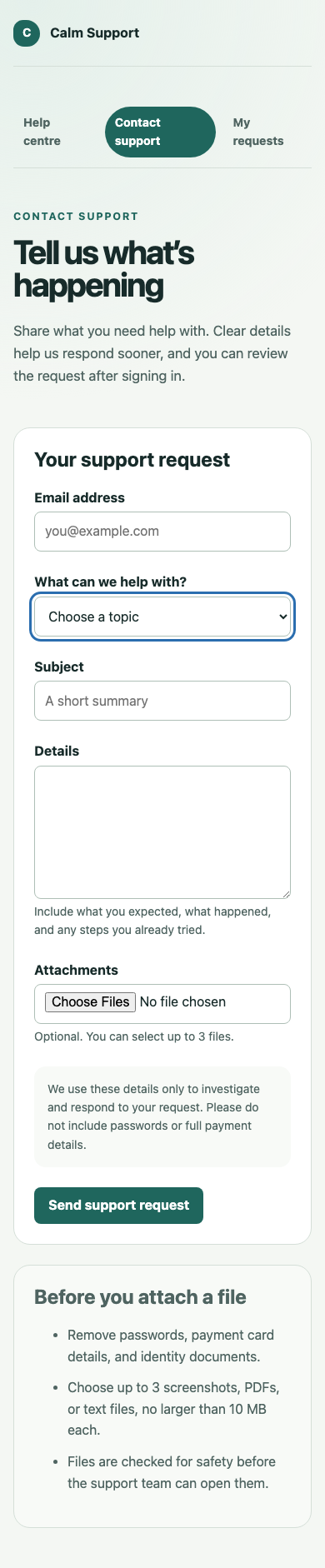
- the customer intake remains coherent at a 390-pixel mobile width
It does not prove real email deliverability, model quality, provider availability, production identity, malware-scanner effectiveness, persistent lead-board movement, data restoration, or live operational cost. Those need provider-specific and production assurance.
How SwarmCraft structured the build
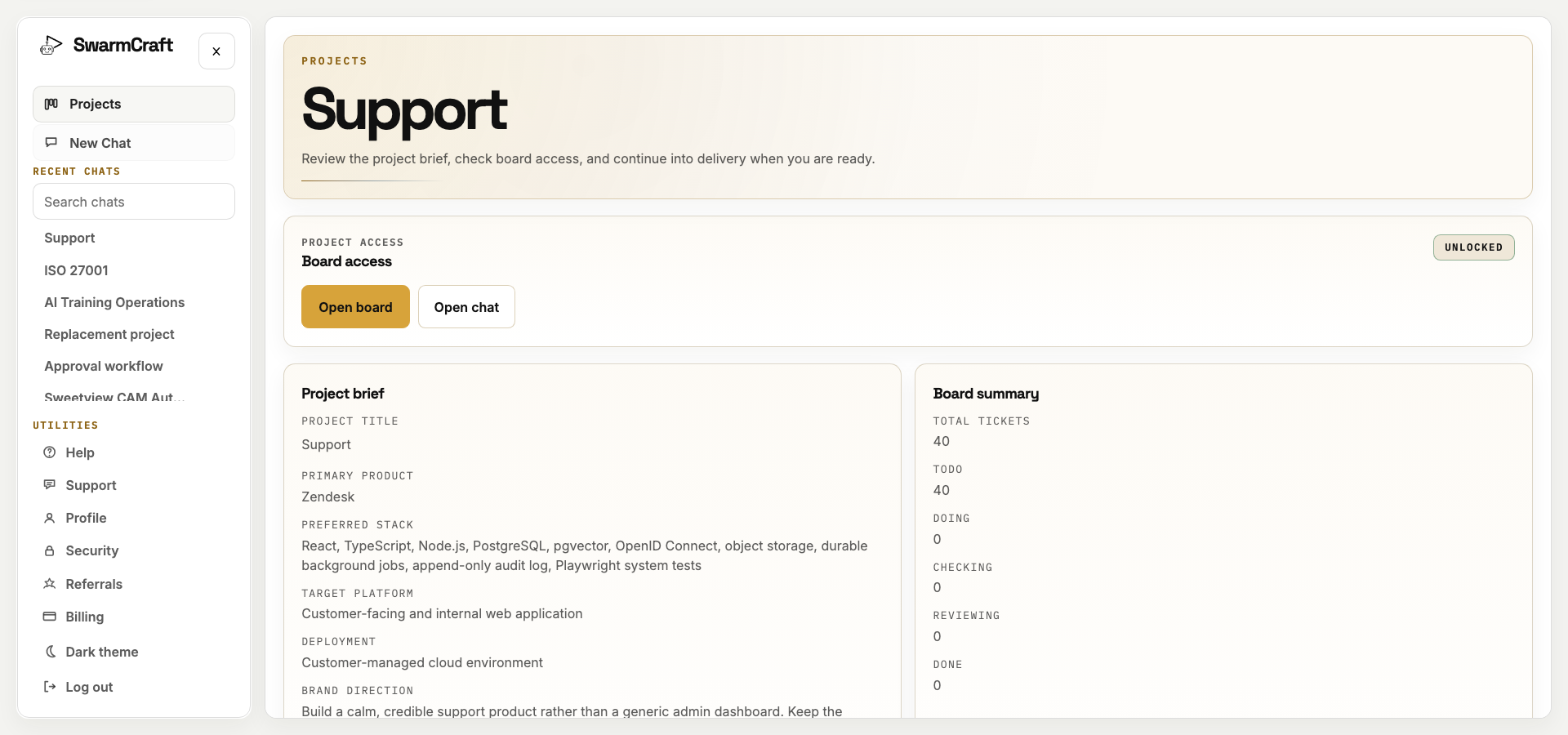
SwarmCraft created a 40-ticket project covering repository foundations, database migrations, health contracts, test scaffolding, environment configuration, identity, roles, audit, approval policy, email, AI, attachment safety, GitHub handoff, customer and staff surfaces, production deployment, observability, recovery, and final browser evidence.
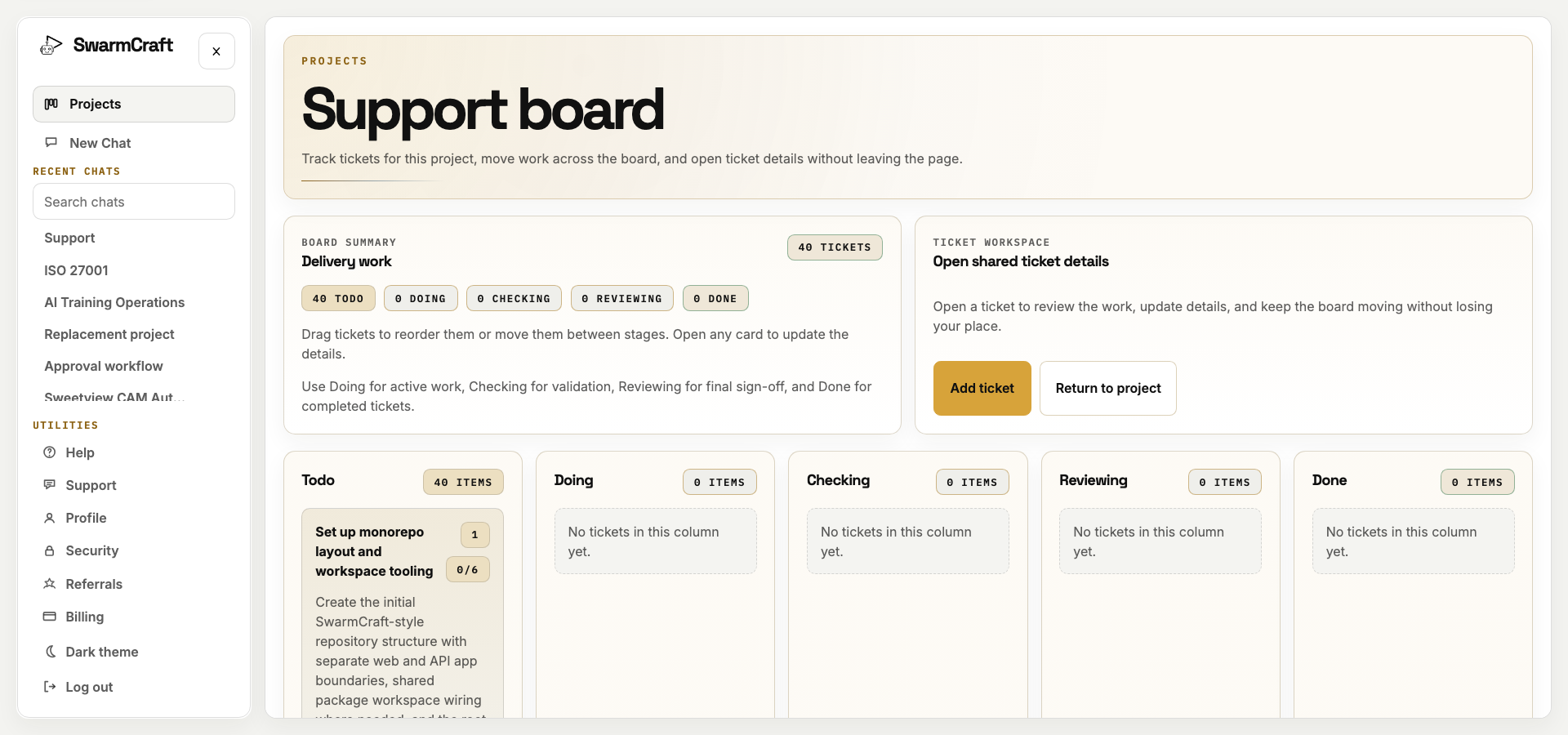
The board image is the initial plan. The build events and final manifest are the completion evidence: all 40 tickets finished.
Forty was not a magic target. The planning system initially produced forty independently testable pieces because this scenario genuinely crossed public UI, staff UI, data, integration, security, operations, and delivery boundaries. The project should have exceeded forty if complete decomposition required it. The useful rule is not “six tickets per phase” or “stop near forty.” It is: make each ticket independently reviewable, then let the real scope determine the count.
Feature parity is the wrong target
An owner-operator should not begin with a list of everything Zendesk, Freshdesk, Intercom, Help Scout, or Front can do. Begin with the support operation:
- Which channels do customers actually use?
- Which information must intake capture?
- Who owns triage, resolution, sensitive review, and engineering handoff?
- Which ticket, conversation, service-level, and audit records must remain durable?
- Which provider connections are necessary now?
- Which reports change a real operating decision?
- What would let the team reduce or cancel the existing subscription?
That enquiry may reveal a genuine current need for telephony, social messaging, workforce forecasting, multiple brands, contractual vendor support, or a maintained integration marketplace. If those capabilities earn their place, include their cost and operational value in the decision.
But do not turn possible future needs into mandatory scope. A feature created for another company's channels, scale, or edge cases is not a requirement for this one. The help desk software comparison and Zendesk alternatives are useful ways to see what the market offers; they are not specifications for the application an operator must own.
The target is completeness for the bounded support operation. Once the application owns that job reliably, the team can cancel the rent and extend its own software when real work justifies the change.
What this says about AI-built support software
The AI contribution is bigger than drafting replies.
During the build, AI decomposed the operating model, implemented forty reviewable tickets, maintained the repository across a crash-safe resume, and produced the web, API, data, integration, testing, security, and operations spine in just over three hours.
Inside the product, AI has a narrower role:
- classify the request
- summarise a growing conversation
- identify missing information
- retrieve approved product knowledge
- cite the sources used
- draft a possible response
- prepare an escalation packet
- suggest reusable knowledge after resolution
People still own severity, sensitive advice, promises, exceptions, escalation, resolution, publication, access, and operational risk.
That split is the real opportunity. AI makes focused owned operations economically plausible, but only when the surrounding software makes authority, evidence, failure, and review explicit.
What operator-builders should take from week nine
“Help desk” is no longer one indivisible buying decision, and Zendesk's feature catalogue is not the definition of customer support.
A team can define the support operation it truly needs—website and email intake, durable conversations, source-grounded assistance, queue ownership, service-level visibility, engineering handoff, customer resolution, and audit—then own that operation without carrying the broad suite assembled around it.
Week nine produced the foundation for exactly that. It is not yet deployed against live identity, email, AI, storage, and scanning providers, and some browser surfaces still need server-authoritative persistence. Those are concrete continuation tasks for the owner, not evidence that the company needs to retreat to a rented platform.
The practical path is:
- Start from the support workflows the team actually performs.
- Own the tickets, conversations, decisions, and controls that make those workflows coherent.
- Connect and assure the providers the live operation requires.
- Use the application with real customers.
- Add capability when observed work demands it—not because an incumbent has accumulated it.
That is how “stop paying for SaaS you barely use” becomes an operating decision rather than a slogan. The owner is not accepting a permanently smaller help desk. They are taking control of the support system and giving it room to become exactly what their business needs.
The mobile evidence closes on the same principle as the desktop build: customer support starts with making it easy for a person to ask for help.
Choose a discovery route
If interviews, source material, record ownership, controls, or migration need structured review, explore Deep Discovery. It can investigate whether to keep, integrate, migrate, or own records without presuming replacement is safe. Deep Discovery is currently available through a limited account-enabled rollout.