The project board is where discovery turns into durable delivery work. It is SwarmCraft's Kanban-style view of the tasks required to create, check, review, and complete your project.
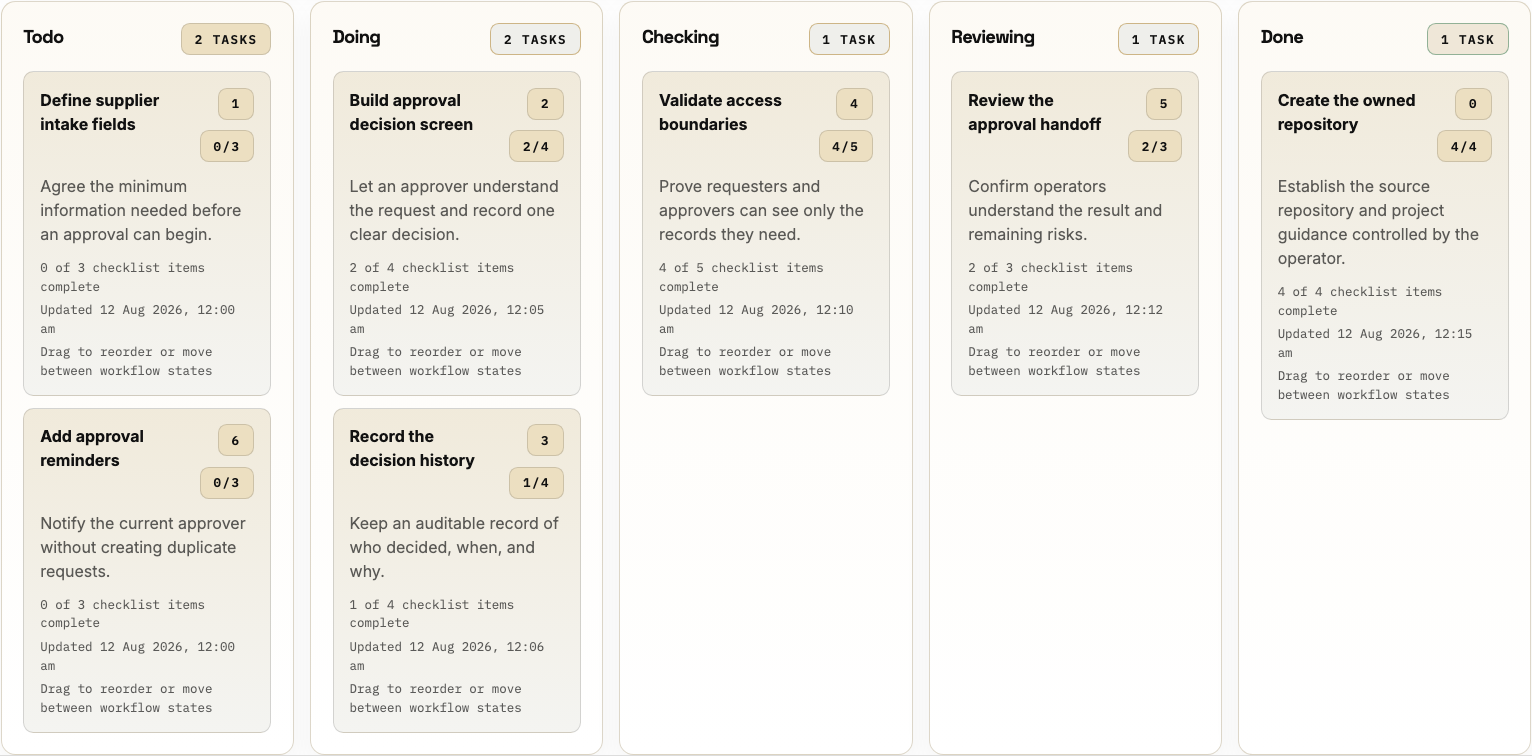
Read the board from left to right. Each task moves through implementation, technical checking, and human review before it is complete.
Read a task card
Each card is one task: a meaningful unit of project delivery work. A card shows:
- the task title and a short summary of the intended result
- its recommended order in the project
- completed checklist items compared with the total checklist
- when the task was last updated
- the option to open the task or drag it to another position or lane
Open a card to read or update its full details. The browser asks you to confirm before moving a task between lanes because the board should record a real change in the work, not just a visual rearrangement.
Workflow states
The normal board flow is:
- Todo means the task is defined and ready, but work has not started.
- Doing means implementation is actively changing the owned source code or other project output.
- Checking means the implementation is being technically validated and evidence is being recorded.
- Reviewing means a person is understanding the result, asking questions, and deciding whether to approve it.
- Done means the result has been reviewed, approved, and completed.
Each lane should represent a real change in delivery state, not just a cosmetic move.
Move work forward and back
The usual path is Todo → Doing → Checking → Reviewing → Done. Work can move back when it is not ready: a failed technical check returns to Doing, while review feedback can return the task to the earlier lane where the required change belongs. Record the reason in the task or working packet so the next pass starts with useful context.
SwarmCraft prefers lane changes from the VS Code extension because it keeps the board, working packet, and repository together. The extension moves linked tasks one adjacent lane at a time. Browser dragging is useful for an intentional correction, but confirm each move and keep it consistent with the repository work.
The final move to Done is a human action. When the VS Code auto-commit preference is enabled and the repository is in a safe state, the extension creates a local Git commit before completing the move. Moving a card in the browser does not provide the same packet-backed completion and commit assurance, so use the extension for linked implementation work.
Task, checklist, and working packet
A task is the unit that moves across the board. Checklist items are smaller expectations inside that task, grouped around implementation, checking, or review. Completing a checklist item records progress; it does not create another board task.
A working packet is the repository file linked to a task when you work through the VS Code extension or CLI. It carries the task goal, checklist, notes, agent update, and current lane alongside the source code. It supports the task; it is not a second name for it.
Packet-backed execution
For interactive task-by-task delivery, follow Use SwarmCraft in VS Code. It explains the commands for Doing, Checking, and Reviewing, and how the extension syncs supported packet changes to the board.
For a setup session where SwarmCraft should prepare packets and run the board from the terminal, use Run one-shot with the CLI. The CLI still uses the board as the source of truth.
Keep movement honest
Keep tasks small enough that one person can understand the goal, complete the checklist, and prove the result without needing a second planning cycle. Move them when the work actually changes state. SwarmCraft is more useful when the board reflects reality instead of optimism.
When you want to place the board inside the wider path from discovery to deployment and continued source ownership, return to How SwarmCraft works.