
A merge request brings completed work and its evidence to a human reviewer before it enters the target branch. The developer explains the outcome, the reviewer records a decision, and any requested changes stay traceable until accepted.
SwarmCraft records this process in your repository under .reviews/. A hosted pull request can accompany it, but is optional. Task review decides whether an individual task is done; merge review considers the combined change against the branch it will join. Neither decision authorises deployment.
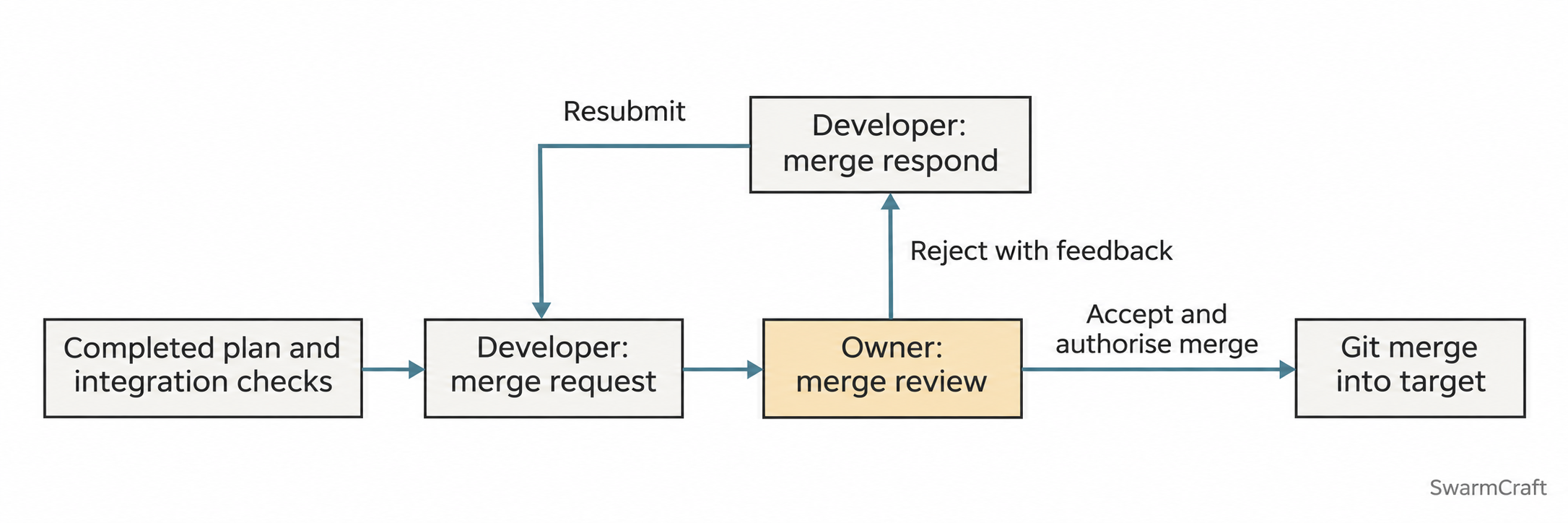

The owner is the accountable reviewer. Arrange technical or specialist support appropriate to the developer's experience and the system's risk.
Prepare the branch and evidence
In your repository and AI chat:
- Use
swarmcraft-planto record a Delivery section: responsible developer, source branch and merge target. For example,approval-routing-plantargetsmain. Repository naming conventions take precedence. A direct task records the same information in its packet notes without needing an initiative plan. - When authorising implementation, have the assistant create or reuse the agreed working branch before preparation commits. Planning alone does not switch branches. If another effort occupies the checkout, use a separate worktree and explicitly arrange the transfer of the relevant plan and packet files.
- Complete the agreed scope and its verification. Keep packet evidence and actual one-shot policies intact. Explicitly skipped checking or reviewing is not human approval; disclose it to the merge reviewer.
- Agree who reviews the work and what needs specialist assessment. Prepare reproducible checks, a short demonstration, known limitations and any migration or recovery steps. Commit the intended implementation under your normal authorisation before submission.
These skills require project guidance template set 15 or later. Install a CLI or extension release containing that bundle, then upgrade repository guidance. Updating the installed tool alone does not update the repository. Preview with swarmcraft upgrade --workspace . --check, inspect the changes and conflicts, then apply without --check. Preserve owner-edited guidance and reload the assistant when needed.
Submit the completed work
In the developer's AI chat, invoke the skill using your provider's syntax. For example, in Codex:
Use $swarmcraft-merge-request to submit docs/plans/approval-routing-plan.md.
The source is approval-routing-plan, the target is main, and the reviewer is Morgan.
The skill checks the actual branches and evidence and writes .reviews/approval-routing-plan/submission.md. It records the exact implementation, target baseline and merge-base commits, plus practical review instructions. For a bounded phase submission, it names what is included and what remains.
A normal submission request authorises the submission-record commit and a non-force push of the source branch to the resolved remote. It does not authorise a target push or create a hosted pull request. Say draft-only for records without commits or pushes, or local-only for a committed submission without a push. Missing or ambiguous reviewer/remote details must be resolved first.
The result includes a copy-ready reviewer message. Send it yourself through your agreed channel after checking the submission is accessible. A failed push or local-only submission is not ready for remote review.
Assess and decide
In the reviewer's checkout and AI chat:
- Open the shared submission and use
swarmcraft-merge-reviewto assess it without recording a decision yet. Inspect the actual diff, target-side changes, checks and demonstration. The assistant can recommend a decision but cannot supply yours. - Record required findings separately from suggestions. Findings receive stable IDs such as
R1-F1, with evidence, impact and the requested change. A changed implementation or target baseline requires a refreshed submission and assessment. - Explicitly accept or reject the specified round and revisions. For example: “Reject round 1; the permission failure path needs a test.” The decision is recorded in
review.mdand committed. Acceptance alone does not merge or push. - If you reviewed in a separate clone, explicitly authorise sharing the decision on the source branch or use another agreed mechanism. Confirm the developer can access the decision commit before handing the work back.
The same person may fill developer and reviewer roles where appropriate, but that is not independent review. If your agreed supervision requires a separate reviewer, retain that arrangement. Seek qualified help for decisions beyond your expertise.
Address feedback and resubmit
Back in the developer's AI chat:
Use $swarmcraft-merge-respond to address the required findings in
.reviews/approval-routing-plan/review.md, then resubmit.
The skill recommends a direct fix, a new focused packet, or a new plan according to the scope. It follows any approach already authorised and records changes and actual verification in response.md. Work on another branch needs an explicit integration route back to the submission branch.
“Respond and resubmit” authorises the necessary scoped fix/response commits and the next submission round with its source-branch push. A response-only request does not imply commits, push or resubmission. Completed packet history remains intact; new packet work follows its selected execution policy.
The developer can report a finding as addressed or propose deferral. Only the reviewer resolves, defers or withdraws a required finding. Keep its original ID across rounds, retain prior decisions, and identify unresolved work honestly. If the first review has no findings, no response round is needed.
Authorise and verify the merge
In the reviewer's AI chat, when the exact submitted change and current target are acceptable:
Use $swarmcraft-merge-review to accept and merge round 2 of
.reviews/approval-routing-plan/submission.md into its recorded target.
The skill rechecks source history, target baseline, decisions and required checks. It uses a clean target worktree and normally preserves the delivery commits with a merge commit. Conflicts return to the developer for resolution, verification and resubmission. It does not silently repair implementation under an earlier approval.
Success means the intended revision is merged locally, the review history is retained, and checks on the merged result pass. A failed check is an integrated failure to investigate, not permission to deploy or automatically revert. Target pushes, branch deletion and deployment require their own instructions.
When integration is verified, follow Deploy and operate to prepare the separate release decision.